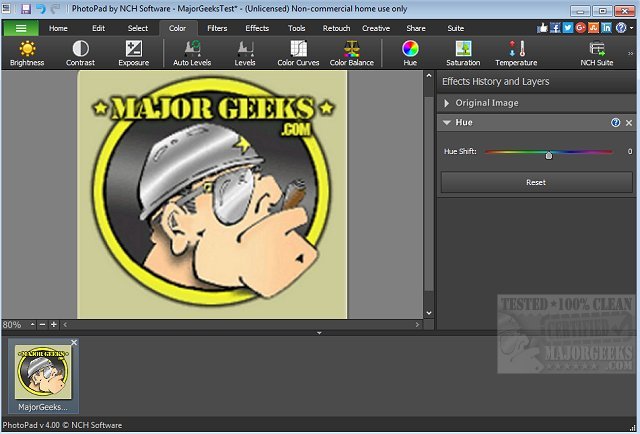
PhotoPad 15.13 Beta has been released, showcasing its capabilities as a user-friendly photo editing software that allows you to modify various aspects of your images effortlessly. The program is designed for immediate use, eliminating lengthy setup processes and enabling users to dive right into editing their photos. It supports a wide range of image formats and features drag-and-drop functionality, making it convenient for quick projects, especially for those on tight deadlines.
Key features of PhotoPad include tools for touching up images, applying diverse photo effects such as oil paint and sepia, and enhancing photo quality through sharpening and noise reduction. Users can also adjust color settings, create collages, and even convert photos into cross-stitch patterns or paint-by-number designs. The software supports photo stitching for panoramic images and allows for the addition of text, clipart, frames, and borders to enhance photographs further. Its non-destructive editing feature permits easy modifications without losing the original image quality.
Additionally, PhotoPad allows users to upload their edited pictures directly to social media platforms like Facebook and Flickr, facilitating seamless sharing of creative works.
In summary, PhotoPad 15.13 Beta stands out with its comprehensive editing tools and user-friendly interface, making it a suitable choice for both beginners and advanced users looking to enhance their photo editing experience. As digital photography continues to evolve, software like PhotoPad plays a crucial role in helping users express their creativity and produce visually appealing images with ease. Future updates may further expand its capabilities, possibly incorporating more advanced features such as AI-driven enhancements and improved collaboration tools for sharing projects with others
Key features of PhotoPad include tools for touching up images, applying diverse photo effects such as oil paint and sepia, and enhancing photo quality through sharpening and noise reduction. Users can also adjust color settings, create collages, and even convert photos into cross-stitch patterns or paint-by-number designs. The software supports photo stitching for panoramic images and allows for the addition of text, clipart, frames, and borders to enhance photographs further. Its non-destructive editing feature permits easy modifications without losing the original image quality.
Additionally, PhotoPad allows users to upload their edited pictures directly to social media platforms like Facebook and Flickr, facilitating seamless sharing of creative works.
In summary, PhotoPad 15.13 Beta stands out with its comprehensive editing tools and user-friendly interface, making it a suitable choice for both beginners and advanced users looking to enhance their photo editing experience. As digital photography continues to evolve, software like PhotoPad plays a crucial role in helping users express their creativity and produce visually appealing images with ease. Future updates may further expand its capabilities, possibly incorporating more advanced features such as AI-driven enhancements and improved collaboration tools for sharing projects with others
PhotoPad 15.13 Beta released
PhotoPad is a slick photo editor that permits you to manipulate most aspects of your photo images.