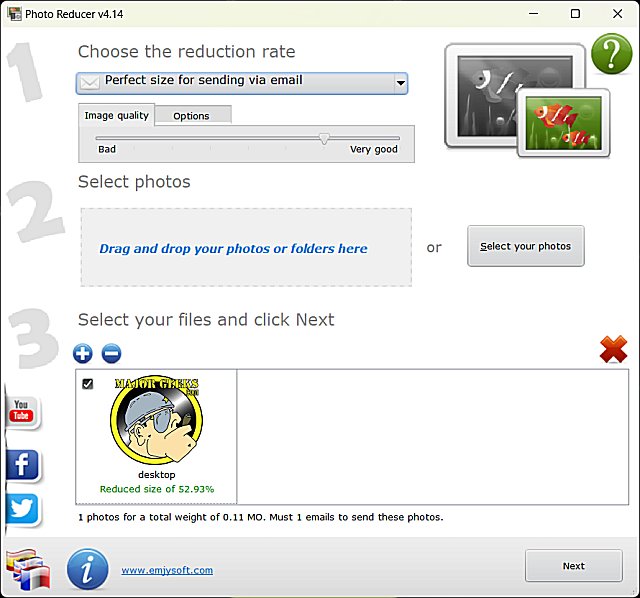
Photo Reducer 6.3 has been released, offering a user-friendly and efficient solution for reducing photo sizes. This freeware application features an intuitive interface that allows users to easily add multiple photos or entire folders using drag-and-drop functionality.
Upon adding images, users have the option to choose from several presets tailored for specific uses such as emailing, printing, or displaying on various devices like digital frames and TVs. The presets include options for Email, 10x15, HD TV, 4K TV, and Web, along with a Custom size feature for personalized adjustments. Additionally, users can control image quality through a simple slider that ranges from Bad to Very Good, making it easy to find the right balance between size and clarity.
After selecting the desired options, users can proceed by clicking Next, where they can choose to email the resized file, save it as a compressed (zip) file, or copy it to a local folder, all while ensuring the original image remains unchanged.
Photo Reducer excels at its primary function—resizing photos—making it a practical tool for anyone looking to optimize their images with minimal effort. Its thoughtful design and ease of use set it apart as a reliable choice for photo management.
In addition to its core functionality, users might also find interest in related topics such as restoring Windows Photo Viewer on Windows 10 & 11, rotating images in these operating systems, and understanding the differences between JPG and JPEG formats. These resources can enhance users' overall experience with photo handling and management
Upon adding images, users have the option to choose from several presets tailored for specific uses such as emailing, printing, or displaying on various devices like digital frames and TVs. The presets include options for Email, 10x15, HD TV, 4K TV, and Web, along with a Custom size feature for personalized adjustments. Additionally, users can control image quality through a simple slider that ranges from Bad to Very Good, making it easy to find the right balance between size and clarity.
After selecting the desired options, users can proceed by clicking Next, where they can choose to email the resized file, save it as a compressed (zip) file, or copy it to a local folder, all while ensuring the original image remains unchanged.
Photo Reducer excels at its primary function—resizing photos—making it a practical tool for anyone looking to optimize their images with minimal effort. Its thoughtful design and ease of use set it apart as a reliable choice for photo management.
In addition to its core functionality, users might also find interest in related topics such as restoring Windows Photo Viewer on Windows 10 & 11, rotating images in these operating systems, and understanding the differences between JPG and JPEG formats. These resources can enhance users' overall experience with photo handling and management
Photo Reducer 6.3 released
Photo Reducer is a freeware, easy-to-use app designed to reduce the size of your photos as simply as possible.