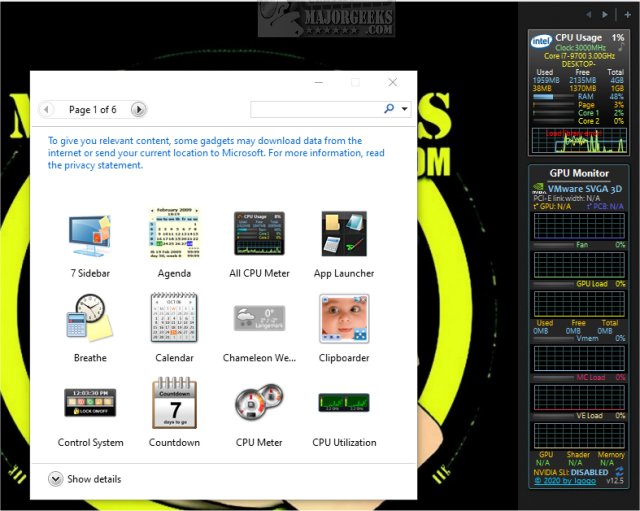
GPU Monitor version 14.5 has been released, offering a dedicated Windows gadget designed to monitor the performance of NVIDIA and Radeon graphics cards. Before diving into its features, it's important to note that Windows previously removed gadgets due to security concerns. To utilize GPU Monitor, users must install either 8GadgetPack or Desktop Gadgets Revived, which provide a selection of safe and tested gadgets. Although the risks associated with third-party gadgets have diminished, caution is advised when adding any not included in these packs. GPU Monitor is recognized as a reliable and safe option.
Once installed, GPU Monitor provides comprehensive monitoring capabilities, displaying a variety of metrics such as GPU temperature, fan speed, GPU load, virtual memory, memory controller (MC) load, video engine (VE) load, and SLI status. For those who have enabled the gadget functionality, installation is as simple as double-clicking the GPUMonitor.gadget file. However, most users will need to rely on the aforementioned third-party tools to enable gadgets on their systems.
In terms of system resource usage, GPU Monitor is efficient, consuming around 5% of CPU power and just 50MB of memory, which should not significantly impact overall computer performance.
For users interested in optimizing their graphics card performance, there are also related resources available, such as guides on downloading the latest drivers for Windows, understanding Windows DCH drivers, and managing NVIDIA Control Panel settings.
In conclusion, GPU Monitor 14.5 serves as a useful tool for gamers and professionals who rely on their graphics cards, providing essential performance metrics while being mindful of system resource consumption. As the landscape of desktop customization continues to evolve, tools like GPU Monitor remain relevant for those seeking detailed insights into their hardware performance
Once installed, GPU Monitor provides comprehensive monitoring capabilities, displaying a variety of metrics such as GPU temperature, fan speed, GPU load, virtual memory, memory controller (MC) load, video engine (VE) load, and SLI status. For those who have enabled the gadget functionality, installation is as simple as double-clicking the GPUMonitor.gadget file. However, most users will need to rely on the aforementioned third-party tools to enable gadgets on their systems.
In terms of system resource usage, GPU Monitor is efficient, consuming around 5% of CPU power and just 50MB of memory, which should not significantly impact overall computer performance.
For users interested in optimizing their graphics card performance, there are also related resources available, such as guides on downloading the latest drivers for Windows, understanding Windows DCH drivers, and managing NVIDIA Control Panel settings.
In conclusion, GPU Monitor 14.5 serves as a useful tool for gamers and professionals who rely on their graphics cards, providing essential performance metrics while being mindful of system resource consumption. As the landscape of desktop customization continues to evolve, tools like GPU Monitor remain relevant for those seeking detailed insights into their hardware performance
GPU Monitor 14.5 released
GPU Monitor is a Windows gadget that monitors your NVIDIA or Radeon graphics cards.