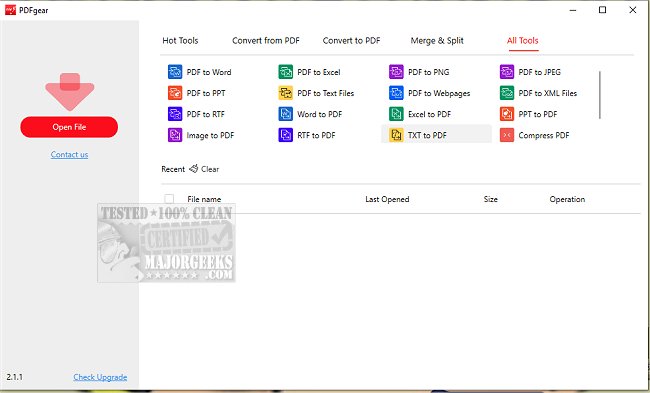
PDFgear has released version 2.1.18, enhancing its robust desktop PDF editor that offers a wide array of features for managing PDF files. Users can convert, edit, merge, split, organize, sign, and annotate PDF documents without any associated costs or sign-up requirements.
One standout feature of PDFgear is its user-friendly text editing capability, allowing users to modify PDF text easily, similar to editing in Microsoft Word. This includes changing text, replacing images, and deleting paragraphs without compromising the document's formatting. Furthermore, PDFgear supports the conversion of over 60 file formats, including Word, Excel, PowerPoint, and various image and e-book types, with a convenient batch conversion feature that enhances productivity.
The introduction of PDFgear Copilot allows users to interact with the software using natural language, facilitating a more intuitive workflow as they can send messages and receive responses seamlessly. The integration of GPT-3.5 makes PDFgear an AI-powered tool that has gained popularity for its ability to summarize extensive research files and extract key information efficiently. Users can also proofread, revise, and rewrite content directly within their PDFs and have interactive conversations with their documents.
Additionally, PDFgear features a powerful OCR (Optical Character Recognition) PDF converter, which enables the editing of scanned PDF documents, converting them into editable Microsoft Word files, and extracting information from scanned documents.
The most appealing aspect of PDFgear is that it is entirely free to use, making it an accessible option for anyone needing a comprehensive PDF management solution.
In summary, PDFgear 2.1.18 is an advanced, user-friendly PDF editor that integrates AI capabilities and offers a wide range of features, including powerful text editing, format conversion, and OCR functionality, all at no cost. This makes it an excellent choice for individuals and professionals looking to efficiently manage their PDF documents.
As PDF technology continues to evolve, tools like PDFgear will likely incorporate even more advanced features, such as enhanced collaboration options, improved security measures for sensitive documents, and deeper integration with cloud services for seamless access and sharing
One standout feature of PDFgear is its user-friendly text editing capability, allowing users to modify PDF text easily, similar to editing in Microsoft Word. This includes changing text, replacing images, and deleting paragraphs without compromising the document's formatting. Furthermore, PDFgear supports the conversion of over 60 file formats, including Word, Excel, PowerPoint, and various image and e-book types, with a convenient batch conversion feature that enhances productivity.
The introduction of PDFgear Copilot allows users to interact with the software using natural language, facilitating a more intuitive workflow as they can send messages and receive responses seamlessly. The integration of GPT-3.5 makes PDFgear an AI-powered tool that has gained popularity for its ability to summarize extensive research files and extract key information efficiently. Users can also proofread, revise, and rewrite content directly within their PDFs and have interactive conversations with their documents.
Additionally, PDFgear features a powerful OCR (Optical Character Recognition) PDF converter, which enables the editing of scanned PDF documents, converting them into editable Microsoft Word files, and extracting information from scanned documents.
The most appealing aspect of PDFgear is that it is entirely free to use, making it an accessible option for anyone needing a comprehensive PDF management solution.
In summary, PDFgear 2.1.18 is an advanced, user-friendly PDF editor that integrates AI capabilities and offers a wide range of features, including powerful text editing, format conversion, and OCR functionality, all at no cost. This makes it an excellent choice for individuals and professionals looking to efficiently manage their PDF documents.
As PDF technology continues to evolve, tools like PDFgear will likely incorporate even more advanced features, such as enhanced collaboration options, improved security measures for sensitive documents, and deeper integration with cloud services for seamless access and sharing
PDFgear 2.1.18 released
PDFgear provides a comprehensive desktop PDF editor that allows you to convert, edit, merge, split, organize, sign, annotate, and more.