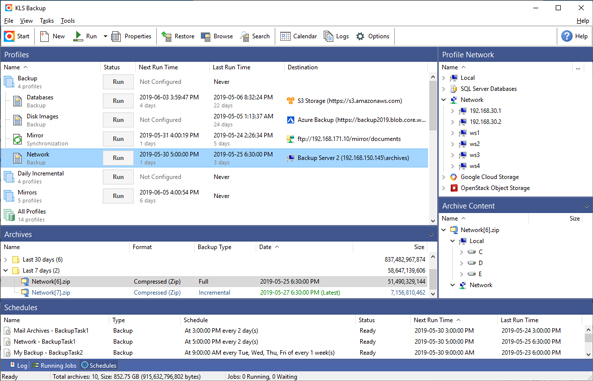
KLS Backup 2025 Professional, version 14.0.5.0, has been released as a robust solution for data backup and synchronization. This software provides users with the ability to save or sync their files across a diverse range of storage options, including local drives, network drives, and popular cloud platforms such as Microsoft Azure, Amazon S3, Google Cloud, Google Drive, OneDrive, and Dropbox. It also supports optical media and various file transfer protocols like SFTP, FTP, and WebDAV, making it a versatile tool for data management.
Key features of KLS Backup 2025 Professional include the capability to perform backups with encryption options, allowing users to choose between compressed or uncompressed file formats using standard ZIP or 7z encryption. It supports backups from various sources, including local drives, network locations, cloud services, and databases such as MySQL and SQL Server. Users benefit from advanced version management, enabling quick recovery of specific backup versions.
Designed for ease of use, KLS Backup 2025 Professional includes wizards to help users navigate its features and functionality. It also features a synchronization function to maintain updated content between folders and an integrated scheduler for automated backups, running smoothly as a Windows service. Users can customize multiple aspects of the application, including backup types, storage settings, and security options, and can set pre- and post-action tasks while generating logs for monitoring.
In summary, KLS Backup 2025 Professional is an excellent choice for individuals and businesses looking to enhance their data security and management processes. It provides a reliable and comprehensive solution for preserving valuable data and ensuring it remains accessible and secure across various storage solutions.
Extensions:
- In addition to its current capabilities, future updates to KLS Backup could focus on enhancing user experience with even more cloud integration options and improved AI-driven backup recommendations based on user behavior.
- A mobile application could be developed to allow users to manage their backups remotely, providing notifications and status updates on their backup processes.
- Incorporating machine learning algorithms could help optimize storage usage by suggesting which files to back up or archive based on access frequency and importance.
- Offering a more extensive community support platform or forums could enhance user engagement, allowing users to share tips and best practices related to data management and backup strategies
Key features of KLS Backup 2025 Professional include the capability to perform backups with encryption options, allowing users to choose between compressed or uncompressed file formats using standard ZIP or 7z encryption. It supports backups from various sources, including local drives, network locations, cloud services, and databases such as MySQL and SQL Server. Users benefit from advanced version management, enabling quick recovery of specific backup versions.
Designed for ease of use, KLS Backup 2025 Professional includes wizards to help users navigate its features and functionality. It also features a synchronization function to maintain updated content between folders and an integrated scheduler for automated backups, running smoothly as a Windows service. Users can customize multiple aspects of the application, including backup types, storage settings, and security options, and can set pre- and post-action tasks while generating logs for monitoring.
In summary, KLS Backup 2025 Professional is an excellent choice for individuals and businesses looking to enhance their data security and management processes. It provides a reliable and comprehensive solution for preserving valuable data and ensuring it remains accessible and secure across various storage solutions.
Extensions:
- In addition to its current capabilities, future updates to KLS Backup could focus on enhancing user experience with even more cloud integration options and improved AI-driven backup recommendations based on user behavior.
- A mobile application could be developed to allow users to manage their backups remotely, providing notifications and status updates on their backup processes.
- Incorporating machine learning algorithms could help optimize storage usage by suggesting which files to back up or archive based on access frequency and importance.
- Offering a more extensive community support platform or forums could enhance user engagement, allowing users to share tips and best practices related to data management and backup strategies
KLS Backup 2025 Professional 14.0.5.0 released
KLS Backup 2025 Professional is a powerful program for backing up and syncing your data. You have the option to save or sync your files across various storage solutions, including local drives, network drives, and more.