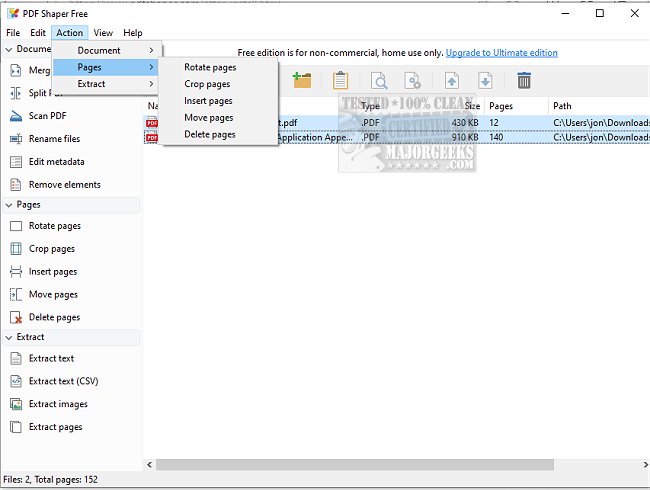
PDF Shaper is a user-friendly PDF converter and extractor that has recently updated to version 15.6. It features a sleek interface, customizable themes, and a robust processing algorithm that is among the fastest and most stable in the industry. The program is designed for efficiency, allowing users to manage multiple files simultaneously.
Comprehensive PDF Management Tools
PDF Shaper stands out as a versatile tool for PDF document management. Key functionalities include:
- Splitting and Merging: Users can split large PDF files into smaller segments or combine multiple PDFs into a single document.
- Watermarking and Signing: The software provides options to apply watermarks for intellectual property protection and electronically sign documents for legal purposes.
- Optimization and Conversion: Users can optimize PDF files for quicker loading times and convert PDFs to various formats such as Word, Excel, and HTML.
- Security Features: PDF Shaper allows for the encryption and decryption of files with password protection, ensuring document security.
- Page Management: The program enables users to insert, move, rotate, crop, or delete PDF pages with ease, along with extracting text and images.
Resource-Efficient Performance
PDF Shaper is designed to be light on system resources, ensuring smooth operation without taxing the computer's CPU. Its batch processing capability allows users to handle multiple PDF documents at once, significantly enhancing productivity.
Conclusion
In summary, PDF Shaper 15.6 is a powerful and reliable tool for anyone needing to manage PDF documents effectively. With its extensive range of features, it caters to both casual users and professionals, making PDF management tasks simple and efficient.
Additional Resources
For users looking to further enhance their PDF experience, consider the following resources:
- Guides on creating PDFs in Windows.
- Instructions for enabling two-page view in Google Chrome for PDFs.
- Tips on preventing Microsoft Edge from automatically opening PDF and HTML files.
- Steps to add or remove the XPS Viewer app in Windows 10 and 11.
PDF Shaper continues to offer innovative solutions that streamline PDF document handling, making it an essential tool for anyone who frequently works with PDF files
Comprehensive PDF Management Tools
PDF Shaper stands out as a versatile tool for PDF document management. Key functionalities include:
- Splitting and Merging: Users can split large PDF files into smaller segments or combine multiple PDFs into a single document.
- Watermarking and Signing: The software provides options to apply watermarks for intellectual property protection and electronically sign documents for legal purposes.
- Optimization and Conversion: Users can optimize PDF files for quicker loading times and convert PDFs to various formats such as Word, Excel, and HTML.
- Security Features: PDF Shaper allows for the encryption and decryption of files with password protection, ensuring document security.
- Page Management: The program enables users to insert, move, rotate, crop, or delete PDF pages with ease, along with extracting text and images.
Resource-Efficient Performance
PDF Shaper is designed to be light on system resources, ensuring smooth operation without taxing the computer's CPU. Its batch processing capability allows users to handle multiple PDF documents at once, significantly enhancing productivity.
Conclusion
In summary, PDF Shaper 15.6 is a powerful and reliable tool for anyone needing to manage PDF documents effectively. With its extensive range of features, it caters to both casual users and professionals, making PDF management tasks simple and efficient.
Additional Resources
For users looking to further enhance their PDF experience, consider the following resources:
- Guides on creating PDFs in Windows.
- Instructions for enabling two-page view in Google Chrome for PDFs.
- Tips on preventing Microsoft Edge from automatically opening PDF and HTML files.
- Steps to add or remove the XPS Viewer app in Windows 10 and 11.
PDF Shaper continues to offer innovative solutions that streamline PDF document handling, making it an essential tool for anyone who frequently works with PDF files
PDF Shaper 15.6 released
PDF Shaper is an easy-to-use PDF converter and extractor with a user-friendly interface and many useful features.