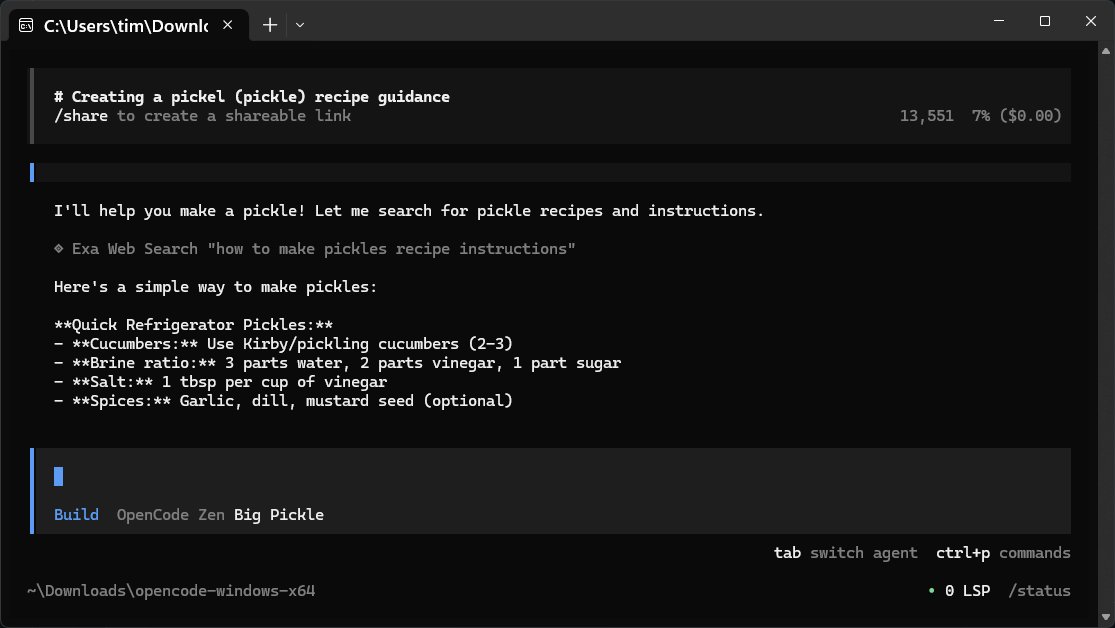
OpenCode version 1.17.7 has been released, offering a free, open-source AI coding assistant designed to enhance productivity for developers. This versatile tool operates directly on your computer, allowing users to write code, debug, and gain insights into their projects without needing cloud-based services or complex setups.
Overview of OpenCode
OpenCode acts as a command-line companion that interprets natural language inputs, making it easy to interact with your codebase. It supports a wide array of programming languages, ensuring that developers can use it in their preferred environment. Notably, it operates locally, which enhances security and privacy, as no sensitive data is shared externally. Furthermore, OpenCode is lightweight, prioritizing speed and efficiency over a graphical user interface (GUI), which may deter users accustomed to more visual development tools.
Key Features and Benefits
- User-Friendly: OpenCode is straightforward to install—just download, unzip, and run the executable file.
- Open Source: Being open-source, it allows users to customize and contribute to its development.
- Flexible Models: Users can choose from over 75 different language models (LLMs) like OpenAI and Anthropic, enabling tailored responses based on project needs.
- Local Operation: It connects to files stored on your machine without the need for external data sharing.
How OpenCode Works
OpenCode does not come with a built-in language model; instead, it connects to an online repository or compatible LLMs. Users must have an internet connection to utilize its features, and users are encouraged to familiarize themselves with the manual for optimal use. The interaction is simple: users input a question, and OpenCode retrieves an answer from the chosen model, displaying it in the terminal or editor.
Integration with Various LLMs
Setting up OpenCode with different LLMs is easy, allowing for flexibility based on user preference. Users can configure multiple models for various tasks—quick queries versus complex coding challenges—by following a straightforward authentication process.
Tips for Effective Use
1. Secure your API keys as you would sensitive personal information.
2. Utilize multiple providers for different tasks to optimize efficiency.
3. Export sessions to retain information as OpenCode does not save them automatically.
4. Use the built-in export function for quick content grabs, as traditional copy-and-paste may be unreliable.
Local Model Compatibility
OpenCode supports local models like LM Studio and Ollama, allowing users to keep operations entirely offline if preferred. This flexibility is beneficial for those who want to control their coding environment.
Final Thoughts
OpenCode emerges as a powerful tool for developers who appreciate speed, flexibility, and privacy in coding assistance. While it may not cater to users seeking a rich GUI experience, it excels in providing a robust, efficient platform for coding tasks. For any troubleshooting or community support, users can turn to forums like MajorGeeks for assistance.
Future Enhancements
Looking ahead, potential improvements could include an optional GUI for those who prefer a visual interface, enhanced offline capabilities, and an expanded library of built-in resources to assist users in coding and research without relying solely on internet connectivity. Such features could broaden OpenCode's appeal while maintaining its core values of efficiency and privacy
Overview of OpenCode
OpenCode acts as a command-line companion that interprets natural language inputs, making it easy to interact with your codebase. It supports a wide array of programming languages, ensuring that developers can use it in their preferred environment. Notably, it operates locally, which enhances security and privacy, as no sensitive data is shared externally. Furthermore, OpenCode is lightweight, prioritizing speed and efficiency over a graphical user interface (GUI), which may deter users accustomed to more visual development tools.
Key Features and Benefits
- User-Friendly: OpenCode is straightforward to install—just download, unzip, and run the executable file.
- Open Source: Being open-source, it allows users to customize and contribute to its development.
- Flexible Models: Users can choose from over 75 different language models (LLMs) like OpenAI and Anthropic, enabling tailored responses based on project needs.
- Local Operation: It connects to files stored on your machine without the need for external data sharing.
How OpenCode Works
OpenCode does not come with a built-in language model; instead, it connects to an online repository or compatible LLMs. Users must have an internet connection to utilize its features, and users are encouraged to familiarize themselves with the manual for optimal use. The interaction is simple: users input a question, and OpenCode retrieves an answer from the chosen model, displaying it in the terminal or editor.
Integration with Various LLMs
Setting up OpenCode with different LLMs is easy, allowing for flexibility based on user preference. Users can configure multiple models for various tasks—quick queries versus complex coding challenges—by following a straightforward authentication process.
Tips for Effective Use
1. Secure your API keys as you would sensitive personal information.
2. Utilize multiple providers for different tasks to optimize efficiency.
3. Export sessions to retain information as OpenCode does not save them automatically.
4. Use the built-in export function for quick content grabs, as traditional copy-and-paste may be unreliable.
Local Model Compatibility
OpenCode supports local models like LM Studio and Ollama, allowing users to keep operations entirely offline if preferred. This flexibility is beneficial for those who want to control their coding environment.
Final Thoughts
OpenCode emerges as a powerful tool for developers who appreciate speed, flexibility, and privacy in coding assistance. While it may not cater to users seeking a rich GUI experience, it excels in providing a robust, efficient platform for coding tasks. For any troubleshooting or community support, users can turn to forums like MajorGeeks for assistance.
Future Enhancements
Looking ahead, potential improvements could include an optional GUI for those who prefer a visual interface, enhanced offline capabilities, and an expanded library of built-in resources to assist users in coding and research without relying solely on internet connectivity. Such features could broaden OpenCode's appeal while maintaining its core values of efficiency and privacy
OpenCode 1.17.7 released
OpenCode is a free, Open Source AI assistant that runs on your computer and helps you write code, fix bugs, and understand what your files are doing.