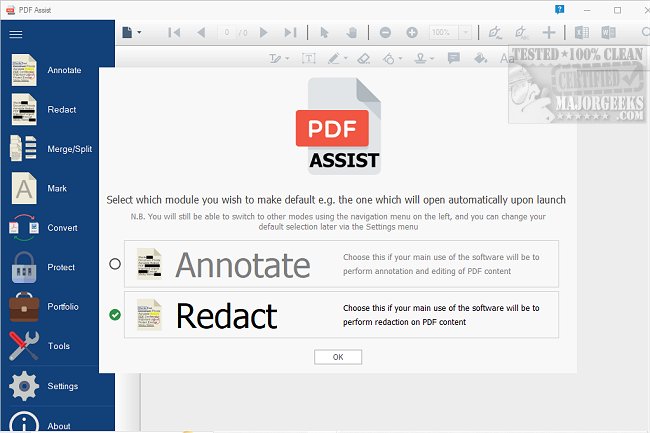
PDF Assist 3.1.6 has been released as a versatile PDF management tool that allows users to perform a wide variety of tasks with their PDF files. Notably, it provides robust redaction capabilities, automatically identifying and removing sensitive information such as National Insurance numbers, tax references, phone numbers, and dates. Unlike many other software options, PDF Assist completely removes the selected content rather than simply masking it.
The user interface is designed for ease of use, with features organized on a left-side menu. During testing, the application demonstrated smooth operation and fast performance. Key features include:
1. Annotation Tools: Users can highlight, underline, strikethrough text, and add various markup types. Additionally, freehand drawing and the insertion of shapes, callouts, stamps, sticky notes, and both text and ink signatures are available.
2. Merge and Split Functions: PDF Assist simplifies the process of managing PDF documents by allowing users to easily merge multiple files into a single document or split a lengthy PDF into separate pages. This functionality is designed to save time and enhance document organization.
3. Form Filling: Users have the option to manage software updates effectively, with the capability to install updates without administrative privileges or disable them on specific machines, aligning with company policies.
4. PDF Protection: The software provides options for encrypting and password-protecting PDF files, ensuring that only authorized users can access, print, modify, or extract content. Users can also remove protection from existing secure PDFs for easier accessibility.
5. Watermarking: To enhance professionalism, users can add custom or pre-existing watermarks to PDF documents, offering both visual identification and an additional layer of security.
Overall, PDF Assist 3.1.6 presents a comprehensive solution for PDF management, making it an invaluable tool for individuals and businesses that frequently handle PDF documents. Although it is not free, the perpetual license is deemed a worthwhile investment for users who manage a significant volume of PDF files.
In addition, users might find it helpful to explore related resources such as guides on preventing Microsoft Edge from opening PDF files, creating PDFs on Windows, or enabling two-page view in Google Chrome for a better PDF experience
The user interface is designed for ease of use, with features organized on a left-side menu. During testing, the application demonstrated smooth operation and fast performance. Key features include:
1. Annotation Tools: Users can highlight, underline, strikethrough text, and add various markup types. Additionally, freehand drawing and the insertion of shapes, callouts, stamps, sticky notes, and both text and ink signatures are available.
2. Merge and Split Functions: PDF Assist simplifies the process of managing PDF documents by allowing users to easily merge multiple files into a single document or split a lengthy PDF into separate pages. This functionality is designed to save time and enhance document organization.
3. Form Filling: Users have the option to manage software updates effectively, with the capability to install updates without administrative privileges or disable them on specific machines, aligning with company policies.
4. PDF Protection: The software provides options for encrypting and password-protecting PDF files, ensuring that only authorized users can access, print, modify, or extract content. Users can also remove protection from existing secure PDFs for easier accessibility.
5. Watermarking: To enhance professionalism, users can add custom or pre-existing watermarks to PDF documents, offering both visual identification and an additional layer of security.
Overall, PDF Assist 3.1.6 presents a comprehensive solution for PDF management, making it an invaluable tool for individuals and businesses that frequently handle PDF documents. Although it is not free, the perpetual license is deemed a worthwhile investment for users who manage a significant volume of PDF files.
In addition, users might find it helpful to explore related resources such as guides on preventing Microsoft Edge from opening PDF files, creating PDFs on Windows, or enabling two-page view in Google Chrome for a better PDF experience
PDF Assist 3.1.6 released
PDF Assist is a comprehensive PDF tool that enables you to perform various tasks on your PDF files.