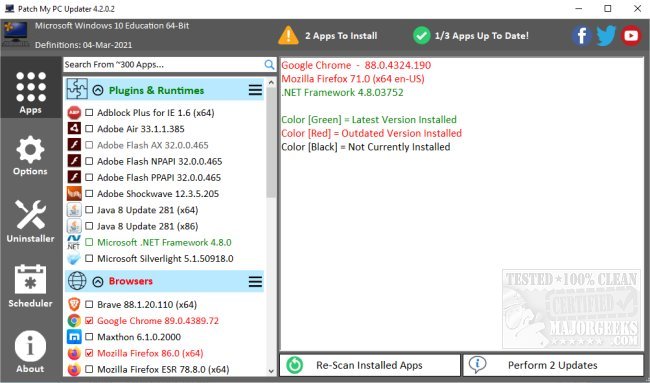
Patch My PC has released version 5.4.5.0 of its portable application, designed to simplify the process of keeping software up to date on your system. This tool checks your system against the latest versions of over 300 applications, providing a clear visual status indicator: green for up-to-date software, red for outdated, and black for uninstalled.
The user interface is intuitive, categorizing apps into 17 groups for easy navigation. It includes a summary of app statuses on the right side of the screen, along with options for installing, uninstalling, and scheduling updates. Notably, Patch My PC can seamlessly install outdated software without the interruption of traditional installation wizards. It intelligently defaults to installing 64-bit applications on 64-bit systems, while also allowing users to opt for 32-bit installations if desired. Furthermore, the app can terminate running programs before updates and offers batch uninstallation for efficiency.
In addition to individual updates, Patch My PC can create a baseline of applications for new PCs, making it a time-saving tool for system administrators during deployment. The application is continuously updated with new features and improvements, ensuring users of all skill levels can maintain their systems efficiently.
The release includes a video tutorial to guide users through its functionalities, and a FAQ section is available on the official website for additional support. Overall, Patch My PC stands out as an essential utility for anyone looking to streamline software management and enhance PC performance.
For those interested in optimizing their Windows experience, related topics include speeding up the Windows 10 start menu, modifying it to resemble earlier versions, managing pending updates, and controlling major update installations
The user interface is intuitive, categorizing apps into 17 groups for easy navigation. It includes a summary of app statuses on the right side of the screen, along with options for installing, uninstalling, and scheduling updates. Notably, Patch My PC can seamlessly install outdated software without the interruption of traditional installation wizards. It intelligently defaults to installing 64-bit applications on 64-bit systems, while also allowing users to opt for 32-bit installations if desired. Furthermore, the app can terminate running programs before updates and offers batch uninstallation for efficiency.
In addition to individual updates, Patch My PC can create a baseline of applications for new PCs, making it a time-saving tool for system administrators during deployment. The application is continuously updated with new features and improvements, ensuring users of all skill levels can maintain their systems efficiently.
The release includes a video tutorial to guide users through its functionalities, and a FAQ section is available on the official website for additional support. Overall, Patch My PC stands out as an essential utility for anyone looking to streamline software management and enhance PC performance.
For those interested in optimizing their Windows experience, related topics include speeding up the Windows 10 start menu, modifying it to resemble earlier versions, managing pending updates, and controlling major update installations
Patch My PC 5.4.5.0 released
Patch My PC is a portable app designed to check your system against the current version of over 300 apps and allow for streamlined updating. Video tutorial available.