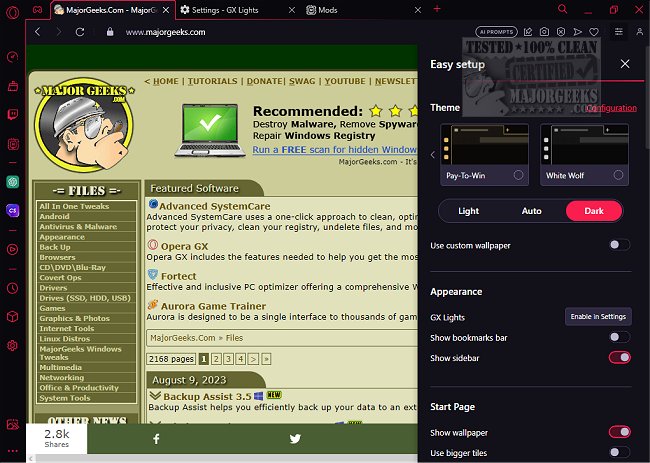
Opera GX 135.0.5973.57 has been released, further enhancing its reputation as a specialized browser tailored for gamers and multitaskers. This gaming-centric browser, built on the Chromium engine—similar to Google Chrome—offers unique features that allow users to optimize their gaming and browsing experience. Notably, it is available for free on Windows, macOS, and Chromebooks, with Linux support through workarounds.
Key features of Opera GX include CPU and RAM usage limiters, a network bandwidth cap, a built-in ad blocker, and a VPN, alongside the GX Cleaner for removing browser clutter. The GX Corner serves as a hub for game deals, release calendars, and gaming news, all presented in a striking, customizable interface designed to fit seamlessly into gaming setups.
Safety and privacy are also core components of Opera GX, as it is developed by Opera Software, a company with a solid track record in browser development. The browser incorporates a free built-in VPN, tracker blocking, and does not engage in Google telemetry, making it a good choice for users concerned about privacy. The intuitive setup process avoids bundling unwanted software and even provides a portable version for those wanting to test it without installation.
What distinguishes Opera GX from conventional browsers like Chrome or Edge is its focus on resource management and integration with popular gaming platforms, such as Twitch and Discord, allowing for streamlined multitasking. Additional features include the GX Control Panel for managing browser resources, a Hot Tabs Killer for identifying and closing resource-heavy tabs, and the ability to customize through GX Mods, although some may feel these mods are purely aesthetic.
Opera GX also supports extensions from the Chrome Web Store, ensuring users can retain their favorite tools without sacrificing functionality.
Pros of using Opera GX include its built-in resource management tools, free privacy features, and compatibility across various operating systems, while its cons involve slightly heavier resource consumption compared to minimal browsers and the absence of a native Linux version.
In summary, Opera GX is more than just a visually appealing browser; it offers practical tools for gamers and multitaskers to enhance performance and streamline their online experience. For those frustrated with performance issues in traditional browsers, Opera GX presents a compelling alternative that combines functionality with an engaging user experience.
Additionally, for users looking to diversify their browsing experience, they might also explore Opera Air, another innovative offering from Opera Software
Key features of Opera GX include CPU and RAM usage limiters, a network bandwidth cap, a built-in ad blocker, and a VPN, alongside the GX Cleaner for removing browser clutter. The GX Corner serves as a hub for game deals, release calendars, and gaming news, all presented in a striking, customizable interface designed to fit seamlessly into gaming setups.
Safety and privacy are also core components of Opera GX, as it is developed by Opera Software, a company with a solid track record in browser development. The browser incorporates a free built-in VPN, tracker blocking, and does not engage in Google telemetry, making it a good choice for users concerned about privacy. The intuitive setup process avoids bundling unwanted software and even provides a portable version for those wanting to test it without installation.
What distinguishes Opera GX from conventional browsers like Chrome or Edge is its focus on resource management and integration with popular gaming platforms, such as Twitch and Discord, allowing for streamlined multitasking. Additional features include the GX Control Panel for managing browser resources, a Hot Tabs Killer for identifying and closing resource-heavy tabs, and the ability to customize through GX Mods, although some may feel these mods are purely aesthetic.
Opera GX also supports extensions from the Chrome Web Store, ensuring users can retain their favorite tools without sacrificing functionality.
Pros of using Opera GX include its built-in resource management tools, free privacy features, and compatibility across various operating systems, while its cons involve slightly heavier resource consumption compared to minimal browsers and the absence of a native Linux version.
In summary, Opera GX is more than just a visually appealing browser; it offers practical tools for gamers and multitaskers to enhance performance and streamline their online experience. For those frustrated with performance issues in traditional browsers, Opera GX presents a compelling alternative that combines functionality with an engaging user experience.
Additionally, for users looking to diversify their browsing experience, they might also explore Opera Air, another innovative offering from Opera Software
Opera GX 135.0.5973.57 released
Opera GX includes the features needed to help you get the most out of gaming and browsing.