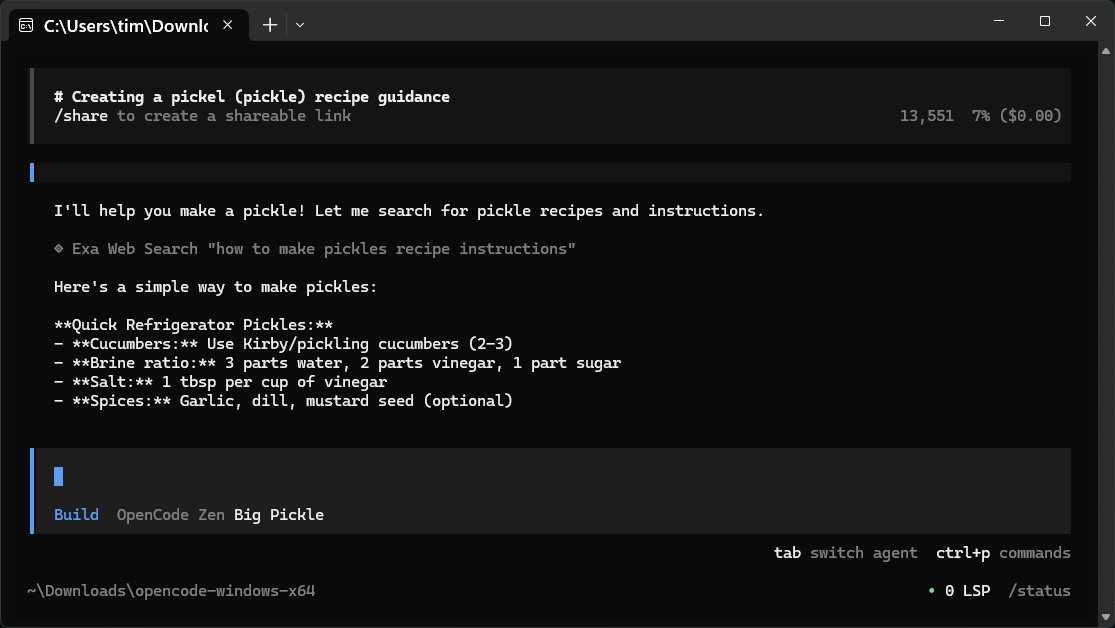
OpenCode is a free and open-source AI coding assistant designed to run directly on your computer. It facilitates the coding process by helping users write code, fix bugs, and comprehend project files, functioning as a command-line companion that interprets natural language commands and executes technical tasks. Key features include compatibility with various programming languages, the ability to read existing files, and a lightweight design that prioritizes speed over graphical user interface (GUI) complexity.
Key Features:
- Efficiency: Designed for developers, OpenCode is streamlined without unnecessary GUI elements, allowing it to load and operate quickly.
- Open Source: Being open-source means users have control over their coding environment without the constraints of proprietary tools.
- Local Operations: It works entirely on local files, ensuring user privacy without sharing data with external servers.
- Flexibility with LLMs: Users can connect OpenCode to over 75 different language models, allowing for customization based on project needs.
Functionality and Usability:
OpenCode does not come with an integrated large language model (LLM) or built-in knowledge database. Instead, it relies on an online repository for obtaining answers, meaning an internet connection is necessary for functionality. Users need to familiarize themselves with the manual for optimal use. The interaction process is straightforward: users input their questions, and OpenCode retrieves answers from the selected model, displaying them efficiently.
Integration with Various Models:
OpenCode supports integration with multiple LLMs like OpenAI, Anthropic, and Gemini. Users can set these up through an authentication process or by manually editing the configuration file, allowing for flexibility based on the specific requirements of different tasks.
Pro Tips for Effective Use:
1. Secure your API keys and treat them like sensitive information.
2. Set up multiple providers to switch between models for different tasks.
3. Export sessions to text files if you need to retain information.
4. Use the built-in Ctrl-Y export function for reliable content transfer.
Local Model Compatibility:
OpenCode can also interface with local models running on personal machines, providing an option for users who prefer not to rely on internet connectivity.
Conclusion:
OpenCode 1.18.10 stands out as a practical and efficient coding assistant, particularly for developers who favor command-line tools and seek an open-source solution. While it may lack some advanced UI features and requires an internet connection for certain functionalities, it empowers users by providing a customizable and private coding environment. For those comfortable with command-line interfaces and looking for simplicity and efficiency, OpenCode is a compelling choice.
Future Considerations:
As development continues, enhancements could include optional GUI features for users who prefer visual interfaces, as well as improved offline capabilities. Community forums, like MajorGeeks, will remain vital for user support and feedback, fostering an active ecosystem around OpenCode
Key Features:
- Efficiency: Designed for developers, OpenCode is streamlined without unnecessary GUI elements, allowing it to load and operate quickly.
- Open Source: Being open-source means users have control over their coding environment without the constraints of proprietary tools.
- Local Operations: It works entirely on local files, ensuring user privacy without sharing data with external servers.
- Flexibility with LLMs: Users can connect OpenCode to over 75 different language models, allowing for customization based on project needs.
Functionality and Usability:
OpenCode does not come with an integrated large language model (LLM) or built-in knowledge database. Instead, it relies on an online repository for obtaining answers, meaning an internet connection is necessary for functionality. Users need to familiarize themselves with the manual for optimal use. The interaction process is straightforward: users input their questions, and OpenCode retrieves answers from the selected model, displaying them efficiently.
Integration with Various Models:
OpenCode supports integration with multiple LLMs like OpenAI, Anthropic, and Gemini. Users can set these up through an authentication process or by manually editing the configuration file, allowing for flexibility based on the specific requirements of different tasks.
Pro Tips for Effective Use:
1. Secure your API keys and treat them like sensitive information.
2. Set up multiple providers to switch between models for different tasks.
3. Export sessions to text files if you need to retain information.
4. Use the built-in Ctrl-Y export function for reliable content transfer.
Local Model Compatibility:
OpenCode can also interface with local models running on personal machines, providing an option for users who prefer not to rely on internet connectivity.
Conclusion:
OpenCode 1.18.10 stands out as a practical and efficient coding assistant, particularly for developers who favor command-line tools and seek an open-source solution. While it may lack some advanced UI features and requires an internet connection for certain functionalities, it empowers users by providing a customizable and private coding environment. For those comfortable with command-line interfaces and looking for simplicity and efficiency, OpenCode is a compelling choice.
Future Considerations:
As development continues, enhancements could include optional GUI features for users who prefer visual interfaces, as well as improved offline capabilities. Community forums, like MajorGeeks, will remain vital for user support and feedback, fostering an active ecosystem around OpenCode
OpenCode 1.18.10 released
OpenCode is a free, Open Source AI assistant that runs on your computer and helps you write code, fix bugs, and understand what your files are doing.