The Oobabooga Text Generation Web UI is a customizable, locally-hosted interface tailored for interacting with large language models (LLMs). This tool allows users to operate a ChatGPT-style setup without the need to send data to the cloud, ensuring privacy and control over their projects. Built using Gradio, a Python library for creating web-based interfaces for machine learning models, it offers a user-friendly environment for chat and text generation.
Key Features of Oobabooga:
- Local Operation: Users can run LLMs without needing an internet connection or access to the OpenAI API, making it suitable for situations where data privacy is paramount.
- Model Flexibility: The interface supports various backends, including Hugging Face Transformers and NVIDIA's TensorRT-LLM via Docker. Users can easily switch between models and fine-tune them with LoRA support.
- Customization Options: With built-in extension support, users can enhance functionalities, such as streaming capabilities and multimodal features. The interface allows tweaking of advanced generation settings to fit specific project needs.
- User-Friendly Installation: While the initial setup requires managing files and understanding Python dependencies, the installation process is straightforward, with detailed instructions provided for different operating systems.
Installation Steps:
1. Ensure sufficient disk space, as the initial download is 28MB but can expand to about 2GB with all dependencies.
2. Download the zip file and extract it to the desired folder.
3. Select the appropriate startup script based on your operating system (Windows, macOS, or Linux).
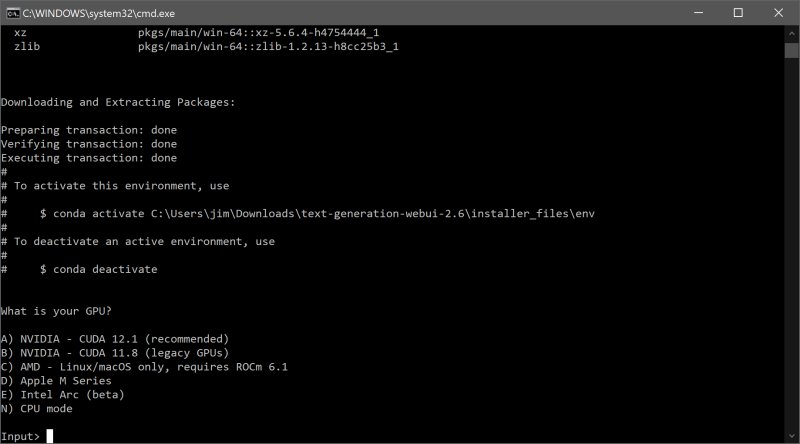
4. Choose your GPU vendor or opt for CPU if unsure.
5. Access the UI via a web browser at `http://localhost:7860`.
Model Integration:
To utilize a model, users can download models from platforms like Hugging Face, either manually or through a built-in script. Models should be placed in the designated models folder, with some requiring their own subfolders for organization.
Recommended Models:
- Mistral 7B: For users with ample resources and high computing power.
- Tiny Llama: A more lightweight option for those with lower hardware specifications.
Pros and Cons:
Pros:
- Fully local and private environment for AI experimentation.
- Support for multiple backends and extensions.
- Easy integration with OpenAI-compatible APIs.
- Flexibility to switch models without restarting the system.
Cons:
- Can be resource-intensive based on the selected model.
- The installation process may have a learning curve for some users.
- Certain extensions may require additional installations.
Conclusion:
The Oobabooga Text Generation Web UI is an excellent tool for AI enthusiasts, researchers, and developers who wish to explore and experiment with LLMs in a private, controlled setting. It provides an extensive range of functionalities and customization options, making it a valuable addition to anyone's AI toolkit. With the ability to run models locally and the ease of integration, Oobabooga stands out as a powerful and versatile platform for text generation and chatbot development. If you're passionate about AI and have the necessary hardware, it's definitely worth setting up and exploring the possibilities this tool has to offer
Key Features of Oobabooga:
- Local Operation: Users can run LLMs without needing an internet connection or access to the OpenAI API, making it suitable for situations where data privacy is paramount.
- Model Flexibility: The interface supports various backends, including Hugging Face Transformers and NVIDIA's TensorRT-LLM via Docker. Users can easily switch between models and fine-tune them with LoRA support.
- Customization Options: With built-in extension support, users can enhance functionalities, such as streaming capabilities and multimodal features. The interface allows tweaking of advanced generation settings to fit specific project needs.
- User-Friendly Installation: While the initial setup requires managing files and understanding Python dependencies, the installation process is straightforward, with detailed instructions provided for different operating systems.
Installation Steps:
1. Ensure sufficient disk space, as the initial download is 28MB but can expand to about 2GB with all dependencies.
2. Download the zip file and extract it to the desired folder.
3. Select the appropriate startup script based on your operating system (Windows, macOS, or Linux).
4. Choose your GPU vendor or opt for CPU if unsure.
5. Access the UI via a web browser at `http://localhost:7860`.
Model Integration:
To utilize a model, users can download models from platforms like Hugging Face, either manually or through a built-in script. Models should be placed in the designated models folder, with some requiring their own subfolders for organization.
Recommended Models:
- Mistral 7B: For users with ample resources and high computing power.
- Tiny Llama: A more lightweight option for those with lower hardware specifications.
Pros and Cons:
Pros:
- Fully local and private environment for AI experimentation.
- Support for multiple backends and extensions.
- Easy integration with OpenAI-compatible APIs.
- Flexibility to switch models without restarting the system.
Cons:
- Can be resource-intensive based on the selected model.
- The installation process may have a learning curve for some users.
- Certain extensions may require additional installations.
Conclusion:
The Oobabooga Text Generation Web UI is an excellent tool for AI enthusiasts, researchers, and developers who wish to explore and experiment with LLMs in a private, controlled setting. It provides an extensive range of functionalities and customization options, making it a valuable addition to anyone's AI toolkit. With the ability to run models locally and the ease of integration, Oobabooga stands out as a powerful and versatile platform for text generation and chatbot development. If you're passionate about AI and have the necessary hardware, it's definitely worth setting up and exploring the possibilities this tool has to offer
Oobabooga Text Generation Web UI 4.5 released
Oobabooga Text Generation Web UI is a locally hosted, customizable interface designed for working with large language models (LLMs).