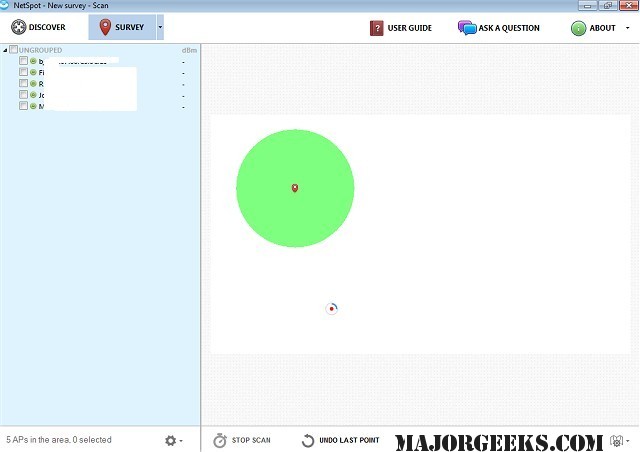
NetSpot has released version 6.0.0.780, a powerful software tool designed to enhance the quality and speed of Wi-Fi networks in homes and offices. This application helps users identify weak coverage areas, signal leaks, and other issues that may impair network performance. With just a few clicks, users can conduct a wireless network site survey, starting by pinpointing their location on a map, after which NetSpot begins mapping out the coverage area.
The software generates real-life signal propagation heat maps, enabling users to visualize Wi-Fi issues easily. It assists in troubleshooting slow Wi-Fi speeds and provides actionable data to improve signal quality and speed, moving beyond mere guesswork. Compatible with various Wi-Fi adapters, NetSpot can be used on laptops to survey and visualize 802.11 Wi-Fi networks.
Key features include a Wi-Fi Discover mode, configurable passive Wi-Fi surveys, intelligent access point detection, signal level visualization, and the ability to visualize unlimited data points per heatmap and multiple SSIDs. However, hidden networks are currently not supported, though users can expect more features to be added in future updates.
To further enhance user experience, NetSpot encourages users to explore related topics, such as improving wireless network performance, viewing wireless signal strength in Windows 10 and 11, understanding Windows Auto-Tuning, and checking Wi-Fi security settings.
In summary, NetSpot 6.0.0.780 is an essential tool for anyone looking to optimize their Wi-Fi network performance, with a user-friendly interface and comprehensive features that facilitate detailed network analysis and troubleshooting. As the software evolves, users can anticipate additional functionalities that will further enhance its capabilities
The software generates real-life signal propagation heat maps, enabling users to visualize Wi-Fi issues easily. It assists in troubleshooting slow Wi-Fi speeds and provides actionable data to improve signal quality and speed, moving beyond mere guesswork. Compatible with various Wi-Fi adapters, NetSpot can be used on laptops to survey and visualize 802.11 Wi-Fi networks.
Key features include a Wi-Fi Discover mode, configurable passive Wi-Fi surveys, intelligent access point detection, signal level visualization, and the ability to visualize unlimited data points per heatmap and multiple SSIDs. However, hidden networks are currently not supported, though users can expect more features to be added in future updates.
To further enhance user experience, NetSpot encourages users to explore related topics, such as improving wireless network performance, viewing wireless signal strength in Windows 10 and 11, understanding Windows Auto-Tuning, and checking Wi-Fi security settings.
In summary, NetSpot 6.0.0.780 is an essential tool for anyone looking to optimize their Wi-Fi network performance, with a user-friendly interface and comprehensive features that facilitate detailed network analysis and troubleshooting. As the software evolves, users can anticipate additional functionalities that will further enhance its capabilities
NetSpot 6.0.0.780 released
NetSpot allows you to boost your home or office Wi-Fi network's quality and speed by helping to identify weak coverage areas, signal leaks, and more.