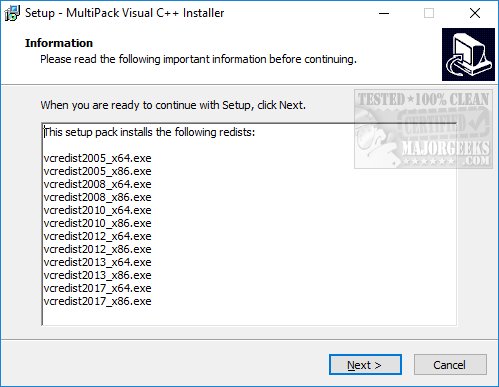
The MultiPack Visual C++ Installer 4.1 has been released as a solution for users needing to install Microsoft Visual C++ end-user runtimes. This tool was developed to simplify the often confusing process of finding and installing the various Visual C++ runtime packages, which can lead to issues with certain applications or games failing to run due to missing components.
By bundling all necessary runtimes into a single, user-friendly installer, the MultiPack Visual C++ Installer eliminates the hassle of searching for individual packs. Users simply need to run the executable, and the installer takes care of adding all the required Visual C++ runtimes automatically. It's important to note that this installer has been tested exclusively on Windows 10 and 11 operating systems.
For those frustrated with the complexity of choosing the correct Visual C++ package, the MultiPack Visual C++ Installer offers a straightforward solution that can have users up and running in mere minutes.
To extend upon this, the MultiPack Visual C++ Installer could potentially incorporate a feature for checking installed runtimes and identifying missing versions. Additionally, future versions could benefit from a user interface that provides more information about each runtime being installed, allowing users to understand what each component does. This could enhance user experience and help users make informed decisions regarding the software they are installing. Furthermore, including support for older operating systems such as Windows 8 and earlier could broaden the installer’s user base and usability
By bundling all necessary runtimes into a single, user-friendly installer, the MultiPack Visual C++ Installer eliminates the hassle of searching for individual packs. Users simply need to run the executable, and the installer takes care of adding all the required Visual C++ runtimes automatically. It's important to note that this installer has been tested exclusively on Windows 10 and 11 operating systems.
For those frustrated with the complexity of choosing the correct Visual C++ package, the MultiPack Visual C++ Installer offers a straightforward solution that can have users up and running in mere minutes.
To extend upon this, the MultiPack Visual C++ Installer could potentially incorporate a feature for checking installed runtimes and identifying missing versions. Additionally, future versions could benefit from a user interface that provides more information about each runtime being installed, allowing users to understand what each component does. This could enhance user experience and help users make informed decisions regarding the software they are installing. Furthermore, including support for older operating systems such as Windows 8 and earlier could broaden the installer’s user base and usability
MultiPack Visual C++ Installer 4.1 released
MultiPack Visual C++ Installer is designed to install all of the Microsoft Visual C++ end-user runtimes.