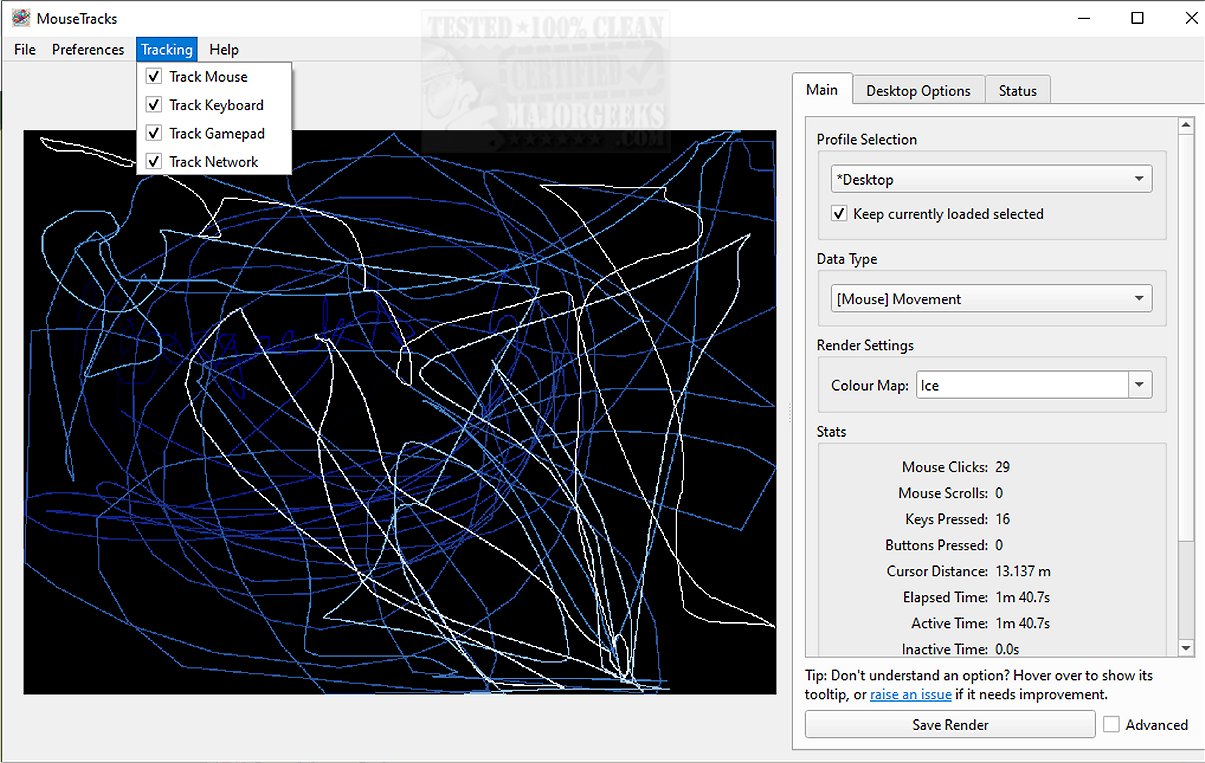
MouseTracks is an advanced application designed to meticulously monitor and visualize various user inputs, including mouse movements, clicks, keyboard activity, and gamepad interactions. It is built for long-term use, enabling users to run the software continuously without interruption, which allows for the collection of extensive data over time. Upon revisiting the application, users can explore detailed and vivid visual representations of their activity, making it a powerful tool for understanding interaction patterns.
Key Features of MouseTracks:
1. Continuous Tracking: MouseTracks provides precise monitoring of mouse movements and clicks. The interface is dynamic, gradually fading older interactions to keep focus on recent activity.
2. Comprehensive Input Analysis: In addition to mouse tracking, the application generates keyboard heatmaps and captures gamepad inputs, giving users a holistic view of their interaction habits.
3. Live Preview Functionality: A notable feature is the Live Preview capability, which ensures that tracking data is rendered in real-time within the graphical user interface (GUI). The application maintains high-quality visuals regardless of changes in screen resolution, with independent tracking for each display and careful merging of visual data for clarity.
4. Multi-Monitor Support: MouseTracks is optimized for multi-monitor environments, allowing for seamless tracking across different displays. It adjusts rendering bounds to align with specific application windows, enhancing data relevance.
5. Silent Operation: Designed for convenience, MouseTracks can operate silently in the background, with options for automatic startup and minimizing to the system tray, ensuring it does not interfere with users’ daily activities.
6. Modular Architecture: The application's architecture consists of multiple independent components that communicate efficiently, ensuring stability in live tracking even during demanding tasks such as rendering visualizations.
User Experience and Verdict:
MouseTracks goes beyond basic tracking, offering a sophisticated platform for users who wish to gain deep insights into their input behaviors. Its clarity, efficiency, and seamless integration make it an invaluable tool for analyzing user interactions, all while maintaining minimal disruption to daily workflows. Plus, its innovative features and user-friendly design make it a compelling application for anyone interested in understanding their digital habits.
For further details, including how to run or build from source and a mini FAQ, users are encouraged to visit the developer's repository.
Future Considerations:
As MouseTracks continues to evolve, potential enhancements could include additional analytical features like trend analysis, custom reporting, or machine learning integration to predict user behavior. Providing cross-platform compatibility and mobile versions could also broaden its user base, enabling more people to benefit from its insightful tracking capabilities
Key Features of MouseTracks:
1. Continuous Tracking: MouseTracks provides precise monitoring of mouse movements and clicks. The interface is dynamic, gradually fading older interactions to keep focus on recent activity.
2. Comprehensive Input Analysis: In addition to mouse tracking, the application generates keyboard heatmaps and captures gamepad inputs, giving users a holistic view of their interaction habits.
3. Live Preview Functionality: A notable feature is the Live Preview capability, which ensures that tracking data is rendered in real-time within the graphical user interface (GUI). The application maintains high-quality visuals regardless of changes in screen resolution, with independent tracking for each display and careful merging of visual data for clarity.
4. Multi-Monitor Support: MouseTracks is optimized for multi-monitor environments, allowing for seamless tracking across different displays. It adjusts rendering bounds to align with specific application windows, enhancing data relevance.
5. Silent Operation: Designed for convenience, MouseTracks can operate silently in the background, with options for automatic startup and minimizing to the system tray, ensuring it does not interfere with users’ daily activities.
6. Modular Architecture: The application's architecture consists of multiple independent components that communicate efficiently, ensuring stability in live tracking even during demanding tasks such as rendering visualizations.
User Experience and Verdict:
MouseTracks goes beyond basic tracking, offering a sophisticated platform for users who wish to gain deep insights into their input behaviors. Its clarity, efficiency, and seamless integration make it an invaluable tool for analyzing user interactions, all while maintaining minimal disruption to daily workflows. Plus, its innovative features and user-friendly design make it a compelling application for anyone interested in understanding their digital habits.
For further details, including how to run or build from source and a mini FAQ, users are encouraged to visit the developer's repository.
Future Considerations:
As MouseTracks continues to evolve, potential enhancements could include additional analytical features like trend analysis, custom reporting, or machine learning integration to predict user behavior. Providing cross-platform compatibility and mobile versions could also broaden its user base, enabling more people to benefit from its insightful tracking capabilities
MouseTracks 2.5.0 released
MouseTracks is a sophisticated application crafted to meticulously track and visualize various forms of user input over time, including mouse movements, clicks, keyboard activity, and gamepad input.