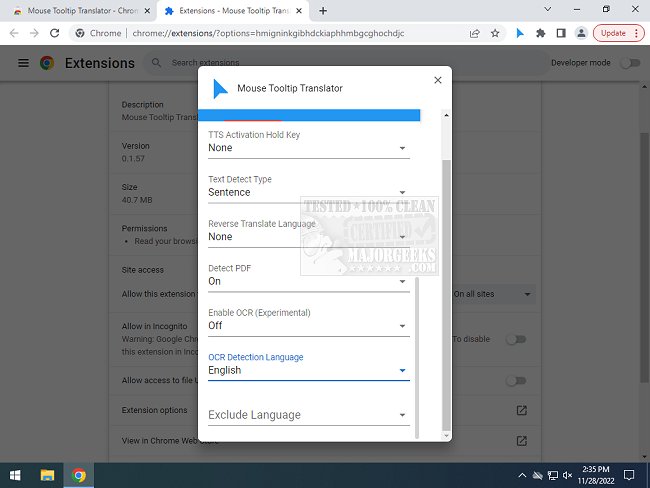
The Mouse Tooltip Translator for Chrome and Edge has been updated to version 0.1.217, enhancing user experience by providing real-time translations of text when hovering over it with a mouse. This extension is particularly useful for those who encounter web pages in foreign languages but do not wish to translate the entire page. By simply hovering over a section of text, users can receive instant translations into their preferred language, making it an ideal tool for browsing the internet or traveling.
Key features of the Mouse Tooltip Translator include:
- The ability to translate text by hovering or highlighting it.
- Visualization of tooltips on virtually any web page, excluding the Chrome Web Store.
- Compatibility with both Google Translate and Bing Translator for translation options.
- An integrated Google Text-to-Speech (TTS) feature that allows users to listen to the translated text.
- Support for PDF documents, enabling tooltip translations within them using PDF.js.
- A filtering option to avoid translations when the source and target languages are identical.
- Experimental features such as translating YouTube captions on mouseover and using Optical Character Recognition (OCR) to translate comic book text when hovering over speech bubbles.
Overall, this extension represents a significant advancement for users seeking quick and efficient translations, enhancing accessibility and understanding while navigating multilingual content online.
Future updates may include improved language support, additional customizable features, and enhanced accuracy in translations. The development team could also explore incorporating more advanced AI translation options to provide contextually relevant translations for complex phrases or idiomatic expressions. As the digital landscape continues to evolve, tools like the Mouse Tooltip Translator will play a crucial role in bridging language barriers in real-time
Key features of the Mouse Tooltip Translator include:
- The ability to translate text by hovering or highlighting it.
- Visualization of tooltips on virtually any web page, excluding the Chrome Web Store.
- Compatibility with both Google Translate and Bing Translator for translation options.
- An integrated Google Text-to-Speech (TTS) feature that allows users to listen to the translated text.
- Support for PDF documents, enabling tooltip translations within them using PDF.js.
- A filtering option to avoid translations when the source and target languages are identical.
- Experimental features such as translating YouTube captions on mouseover and using Optical Character Recognition (OCR) to translate comic book text when hovering over speech bubbles.
Overall, this extension represents a significant advancement for users seeking quick and efficient translations, enhancing accessibility and understanding while navigating multilingual content online.
Future updates may include improved language support, additional customizable features, and enhanced accuracy in translations. The development team could also explore incorporating more advanced AI translation options to provide contextually relevant translations for complex phrases or idiomatic expressions. As the digital landscape continues to evolve, tools like the Mouse Tooltip Translator will play a crucial role in bridging language barriers in real-time
Mouse Tooltip Translator for Chrome and Edge 0.1.217 released
Mouse Tooltip Translator for Chrome and Edge extension that provides mouseover tooltip language translations.
Mouse Tooltip Translator for Chrome and Edge 0.1.217 released @ MajorGeeks