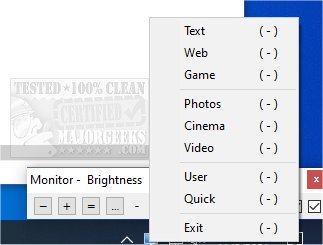
Monitor Plus version 0.1.3.8 has been released, offering users enhanced control over their primary monitor's brightness, contrast, and color temperature in real-time. This portable application resides in the system tray, allowing for easy access to various display modes such as cinema, text, web, and game. Users can also manually tweak brightness and contrast settings for a more personalized viewing experience.
In addition to its primary features, Monitor Plus complements popular guides on monitor adjustments, including instructions for enabling or disabling adaptive brightness in Windows 10, methods to turn off the monitor on demand, and troubleshooting tips for identifying and repairing stuck or dead pixels on LCD screens.
To further enhance user experience, future updates could introduce customizable profiles for different lighting conditions, improved support for multiple monitors, and integration with other display calibration tools. This would allow for a more comprehensive management of screen settings tailored to individual preferences and usage scenarios
In addition to its primary features, Monitor Plus complements popular guides on monitor adjustments, including instructions for enabling or disabling adaptive brightness in Windows 10, methods to turn off the monitor on demand, and troubleshooting tips for identifying and repairing stuck or dead pixels on LCD screens.
To further enhance user experience, future updates could introduce customizable profiles for different lighting conditions, improved support for multiple monitors, and integration with other display calibration tools. This would allow for a more comprehensive management of screen settings tailored to individual preferences and usage scenarios
Monitor Plus 0.1.3.8 released
Monitor Plus manages the brightness, contrast, and color (temperature) of the primary monitor on the fly.