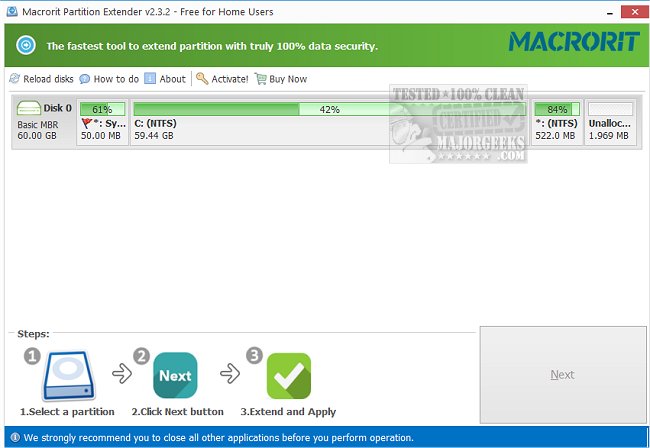
Macrorit Partition Extender Free Edition 2.6.2 has been released, offering users a straightforward solution for extending partitions on their computers while ensuring zero data loss. This tool simplifies the process of reallocating disk space, making it accessible even for those who are not technically inclined. Users can easily extend their data partitions with just a few clicks, which is particularly beneficial for beginners.
The software is available in both installer and portable formats, allowing users to work on their partitions at home or on the go. The extension process involves three simple steps: selecting the partition to be extended, specifying the new size, and then applying the changes. However, it is important to note that once changes are made, they cannot be undone, so users should proceed with caution to avoid mistakes.
Key features of Macrorit Partition Extender Free Edition include:
- 100% no data loss during the partition extension.
- The ability to extend data partitions.
- Compatibility with both GPT (GUID Partition Table) and MBR (Master Boot Record) formats.
- Assistance with common partition-related questions, such as the necessity of formatting a hard drive during a fresh Windows installation and converting MBR to GPT.
In summary, Macrorit Partition Extender Free Edition is a user-friendly tool that effectively meets the needs of individuals looking to manage their disk partitions without the risk of losing data. Its simplicity and dual availability make it a versatile option for users with varying levels of expertise
The software is available in both installer and portable formats, allowing users to work on their partitions at home or on the go. The extension process involves three simple steps: selecting the partition to be extended, specifying the new size, and then applying the changes. However, it is important to note that once changes are made, they cannot be undone, so users should proceed with caution to avoid mistakes.
Key features of Macrorit Partition Extender Free Edition include:
- 100% no data loss during the partition extension.
- The ability to extend data partitions.
- Compatibility with both GPT (GUID Partition Table) and MBR (Master Boot Record) formats.
- Assistance with common partition-related questions, such as the necessity of formatting a hard drive during a fresh Windows installation and converting MBR to GPT.
In summary, Macrorit Partition Extender Free Edition is a user-friendly tool that effectively meets the needs of individuals looking to manage their disk partitions without the risk of losing data. Its simplicity and dual availability make it a versatile option for users with varying levels of expertise
Macrorit Partition Extender Free Edition 2.6.2 released
Macrorit Partition Extender Free Edition helps to extend the partitions on your machine with zero data loss.
Macrorit Partition Extender Free Edition 2.6.2 released @ MajorGeeks