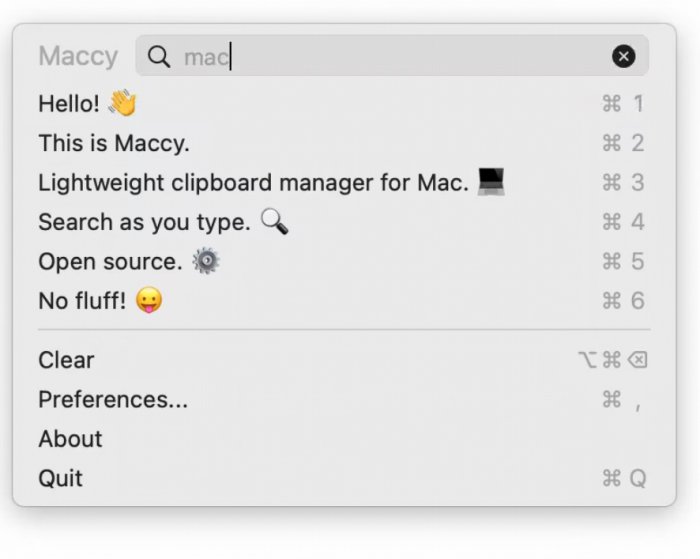
Maccy 2.7.0 has been released, enhancing the functionality of this efficient clipboard manager for macOS. If you've ever experienced the frustration of losing important copied content due to an accidental overwrite, Maccy serves as a vital tool. It operates quietly in the background, acting as a safety net for your clipboard by retaining a history of copied items, much like a Time Machine for your clipboard.
Getting Started with Maccy
Installing Maccy is straightforward; simply download the latest version and drag it into your Applications folder, and you're set. Once initialized, Maccy resides in your menu bar, automatically recording all copied content—whether text, images, or links. You can quickly access your clipboard history by pressing Cmd+Shift+V (with the option to customize the hotkey). A dropdown menu will appear, displaying your recent clippings, allowing for easy pasting with a click or keyboard navigation.
Why Use Maccy?
Maccy prioritizes speed and simplicity over unnecessary features, distinguishing itself from other clipboard managers that can become resource-heavy. It’s designed to be unobtrusive and efficient, making it feel like a native part of your macOS experience.
Key Features:
- Search Functionality: Quickly locate past clippings with a real-time search feature.
- Pin Items: Keep frequently used snippets readily accessible at the top of your list.
- Privacy Focused: Maccy ensures all data remains local, with no cloud syncing, addressing privacy concerns.
- Customizable: You can adjust hotkeys and appearance and choose to exclude certain applications from tracking. It also supports advanced filtering options, allowing users to ignore sensitive information like passwords.
Pros and Cons
Pros:
- Extremely lightweight and quick
- Intuitive user interface
- Local storage ensures no privacy risks
- Customizable settings for shortcuts and functionality
Cons:
- Exclusive to macOS users
- Lacks rich media previews for more complex data types
- No cross-device syncing for users who may want that feature
Geek Verdict
For Mac users managing multiple tasks, Maccy proves to be an exceptional tool. Its speed, unobtrusiveness, and focused functionality make it a highly effective clipboard manager that avoids the pitfalls of more bloated applications. Download it, set it up, and enjoy the peace of mind knowing that your clipboard history is securely managed and easily accessible.
Extension: Future Prospects for Maccy
As Maccy continues to evolve, potential future updates could include features like enhanced media previews, integration with third-party applications, or even collaborative clipboard sharing options for teams. Maintaining its lightweight nature while expanding functionality could position Maccy as an even more indispensable tool for productivity on macOS. Additionally, exploring user feedback could lead to the development of cross-platform compatibility, which would broaden its appeal beyond the macOS ecosystem
Getting Started with Maccy
Installing Maccy is straightforward; simply download the latest version and drag it into your Applications folder, and you're set. Once initialized, Maccy resides in your menu bar, automatically recording all copied content—whether text, images, or links. You can quickly access your clipboard history by pressing Cmd+Shift+V (with the option to customize the hotkey). A dropdown menu will appear, displaying your recent clippings, allowing for easy pasting with a click or keyboard navigation.
Why Use Maccy?
Maccy prioritizes speed and simplicity over unnecessary features, distinguishing itself from other clipboard managers that can become resource-heavy. It’s designed to be unobtrusive and efficient, making it feel like a native part of your macOS experience.
Key Features:
- Search Functionality: Quickly locate past clippings with a real-time search feature.
- Pin Items: Keep frequently used snippets readily accessible at the top of your list.
- Privacy Focused: Maccy ensures all data remains local, with no cloud syncing, addressing privacy concerns.
- Customizable: You can adjust hotkeys and appearance and choose to exclude certain applications from tracking. It also supports advanced filtering options, allowing users to ignore sensitive information like passwords.
Pros and Cons
Pros:
- Extremely lightweight and quick
- Intuitive user interface
- Local storage ensures no privacy risks
- Customizable settings for shortcuts and functionality
Cons:
- Exclusive to macOS users
- Lacks rich media previews for more complex data types
- No cross-device syncing for users who may want that feature
Geek Verdict
For Mac users managing multiple tasks, Maccy proves to be an exceptional tool. Its speed, unobtrusiveness, and focused functionality make it a highly effective clipboard manager that avoids the pitfalls of more bloated applications. Download it, set it up, and enjoy the peace of mind knowing that your clipboard history is securely managed and easily accessible.
Extension: Future Prospects for Maccy
As Maccy continues to evolve, potential future updates could include features like enhanced media previews, integration with third-party applications, or even collaborative clipboard sharing options for teams. Maintaining its lightweight nature while expanding functionality could position Maccy as an even more indispensable tool for productivity on macOS. Additionally, exploring user feedback could lead to the development of cross-platform compatibility, which would broaden its appeal beyond the macOS ecosystem
Maccy 2.7.0 released
Maccy can help Its a lightweight clipboard manager for macOS that quietly runs in the background