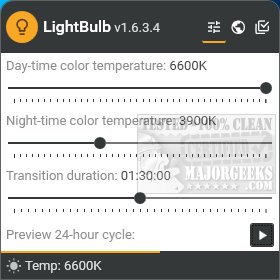
LightBulb version 2.7.3 has been released, introducing a dynamic screen gamma adjustment feature that modifies the color temperature of your display to create warmer hues during nighttime or according to user preference. The application operates from the system tray, allowing users to easily configure and test different color settings, temperature profiles, and durations. A unique 24-hour preview feature enables users to visualize how the screen's appearance will change throughout the day in just about 15 seconds.
The software effectively determines your geographical location for accurate sunrise and sunset adjustments, but it also offers geolocation options. If you prefer not to use internet synchronization, you can manually input your local sunrise and sunset times.
LightBulb includes advanced settings such as gamma polling, temperature smoothing, and options to pause adjustments when in full-screen mode. Users can toggle the application and gamma polling using a variety of keyboard shortcuts, although letter keys are excluded from this functionality.
While there are several applications available for screen gamma adjustment, LightBulb stands out with its extensive settings and the helpful 24-hour preview feature, providing users with a clear expectation of how their display will look.
In addition to its primary function, users may also want to explore similar features in other utilities, such as enabling Night Light mode in Windows 10 and 11 to reduce eye strain, adjusting adaptive brightness settings, or managing monitor power on demand.
Overall, LightBulb 2.7.3 enhances user experience by promoting eye comfort through tailored screen color adjustments, making it a valuable tool for anyone looking to reduce eye strain and improve their viewing experience during various times of the day.
For further enhancement, future updates could include features such as a more intuitive user interface, additional color profiles, or integration with smart home systems to automatically adjust screen settings based on ambient light conditions
The software effectively determines your geographical location for accurate sunrise and sunset adjustments, but it also offers geolocation options. If you prefer not to use internet synchronization, you can manually input your local sunrise and sunset times.
LightBulb includes advanced settings such as gamma polling, temperature smoothing, and options to pause adjustments when in full-screen mode. Users can toggle the application and gamma polling using a variety of keyboard shortcuts, although letter keys are excluded from this functionality.
While there are several applications available for screen gamma adjustment, LightBulb stands out with its extensive settings and the helpful 24-hour preview feature, providing users with a clear expectation of how their display will look.
In addition to its primary function, users may also want to explore similar features in other utilities, such as enabling Night Light mode in Windows 10 and 11 to reduce eye strain, adjusting adaptive brightness settings, or managing monitor power on demand.
Overall, LightBulb 2.7.3 enhances user experience by promoting eye comfort through tailored screen color adjustments, making it a valuable tool for anyone looking to reduce eye strain and improve their viewing experience during various times of the day.
For further enhancement, future updates could include features such as a more intuitive user interface, additional color profiles, or integration with smart home systems to automatically adjust screen settings based on ambient light conditions
LightBulb 2.7.3 released
LightBulb continuously changes the screen gamma using temperature profiles, making the colors appear warmer at night or any way you like.