VOVSOFT Battery Alert is a powerful and user-friendly application designed to optimize your laptop's charging habits and enhance battery longevity. Released in version 1.3, this tool is particularly beneficial for modern lithium-ion batteries, which can suffer degradation when kept at full charge or allowed to fully discharge.
Key Features and Functionalities
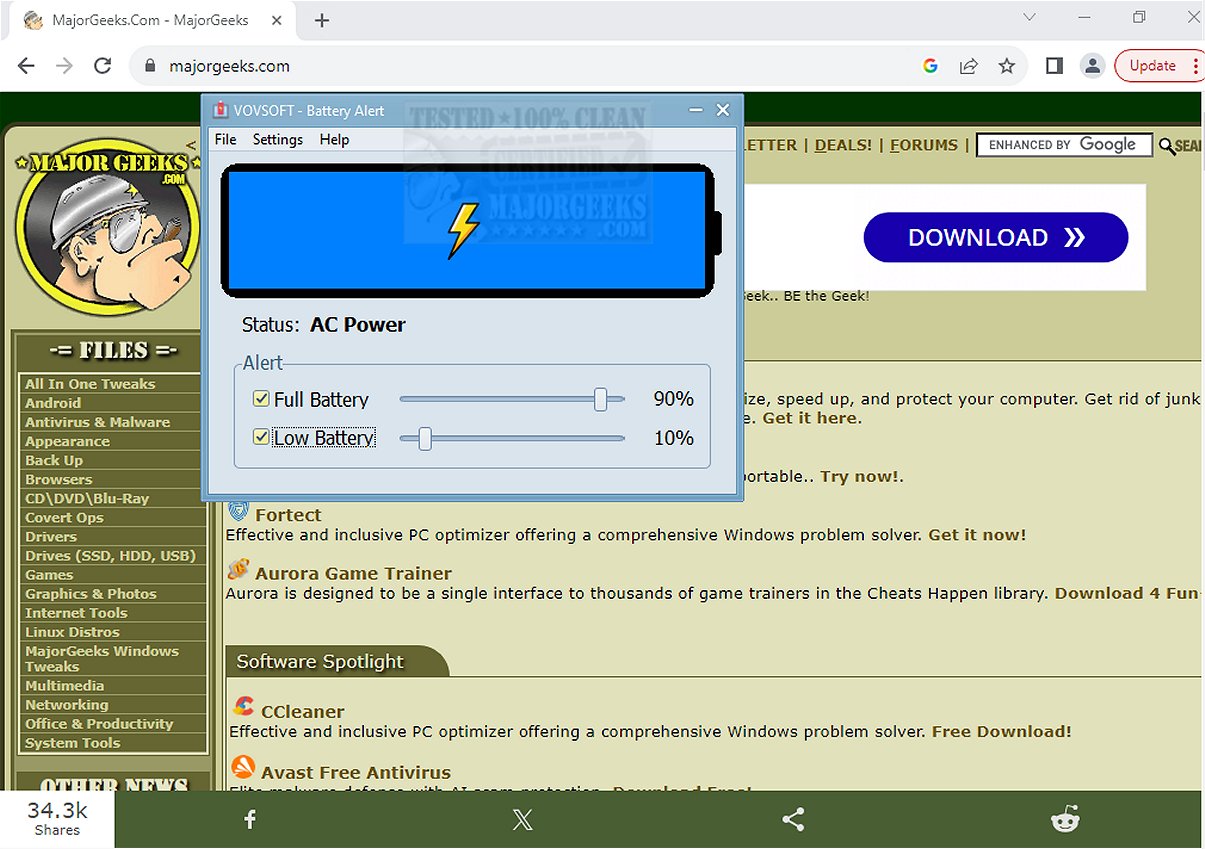
Upon installation, VOVSOFT Battery Alert provides a straightforward interface on your desktop, displaying crucial information such as battery percentage and power status—whether charging, discharging, fully charged, or connected to AC power. Users can minimize the app to the system tray, allowing it to monitor battery health in the background while sending alerts when the battery level is low or sufficiently charged.
Main Features Include:
- Prevent Overcharging: Users can set a "Full Battery" limit (e.g., 80% or 90%) to receive notifications when it's time to unplug the charger, promoting healthier battery maintenance.
- Avoid Unexpected Shutdowns: A customizable "Low Battery" threshold ensures users receive alerts in time to save their work before the laptop powers down.
- Customizable Sliders: Users can easily adjust alert percentages to fit their specific charging preferences.
- Real-time Monitoring: Provides an instant view of the current battery charge and power source status.
- Lightweight & Simple Design: The application is designed to run efficiently without affecting system performance.
Pros and Cons
The application is praised for its user-friendly interface and straightforward functionality, making it easy for users to maintain optimal battery health. However, it currently lacks customization options for alerts, limiting user preferences for notification methods. Future updates may address this issue, and users can submit feature requests for consideration.
Conclusion
VOVSOFT Battery Alert is an essential tool for anyone looking to manage their laptop's battery effectively. With its timely notifications and easy monitoring capabilities, it empowers users to enhance their device's performance and extend battery life. For those seeking reliable battery management, VOVSOFT Battery Alert serves as a valuable companion for optimal device care, providing peace of mind in controlling battery health.
Related Resources:
- Guides on creating battery saver shortcuts in Windows 10 & 11.
- Instructions on setting up notifications for when your laptop battery is charged.
- Tips on checking your active power plan and battery health in Windows.
In summary, VOVSOFT Battery Alert not only helps users maintain battery health but also emphasizes the importance of mindful charging habits in prolonging the lifespan of laptop batteries
Key Features and Functionalities
Upon installation, VOVSOFT Battery Alert provides a straightforward interface on your desktop, displaying crucial information such as battery percentage and power status—whether charging, discharging, fully charged, or connected to AC power. Users can minimize the app to the system tray, allowing it to monitor battery health in the background while sending alerts when the battery level is low or sufficiently charged.
Main Features Include:
- Prevent Overcharging: Users can set a "Full Battery" limit (e.g., 80% or 90%) to receive notifications when it's time to unplug the charger, promoting healthier battery maintenance.
- Avoid Unexpected Shutdowns: A customizable "Low Battery" threshold ensures users receive alerts in time to save their work before the laptop powers down.
- Customizable Sliders: Users can easily adjust alert percentages to fit their specific charging preferences.
- Real-time Monitoring: Provides an instant view of the current battery charge and power source status.
- Lightweight & Simple Design: The application is designed to run efficiently without affecting system performance.
Pros and Cons
The application is praised for its user-friendly interface and straightforward functionality, making it easy for users to maintain optimal battery health. However, it currently lacks customization options for alerts, limiting user preferences for notification methods. Future updates may address this issue, and users can submit feature requests for consideration.
Conclusion
VOVSOFT Battery Alert is an essential tool for anyone looking to manage their laptop's battery effectively. With its timely notifications and easy monitoring capabilities, it empowers users to enhance their device's performance and extend battery life. For those seeking reliable battery management, VOVSOFT Battery Alert serves as a valuable companion for optimal device care, providing peace of mind in controlling battery health.
Related Resources:
- Guides on creating battery saver shortcuts in Windows 10 & 11.
- Instructions on setting up notifications for when your laptop battery is charged.
- Tips on checking your active power plan and battery health in Windows.
In summary, VOVSOFT Battery Alert not only helps users maintain battery health but also emphasizes the importance of mindful charging habits in prolonging the lifespan of laptop batteries
VOVSOFT Battery Alert 1.3 released
VOVSOFT Battery Alert: a versatile and user-friendly application designed to help you optimize your laptop's charging habits and significantly extend its battery life.