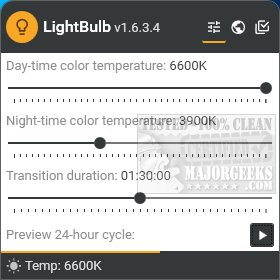
LightBulb version 2.7.2 has been released, introducing a dynamic way to adjust screen gamma based on temperature profiles, helping to create warmer colors during nighttime or as per user preference. This utility resides in the system tray, allowing users to effortlessly configure and experiment with various color temperatures and duration settings.
One of the standout features is the 24-hour preview, which visually simulates how the screen will appear over a full day in approximately 15 seconds. The software accurately detects the user's location for optimal settings but also allows for manual adjustment of sunrise and sunset times, should users choose to disable internet synchronization.
In addition to basic functionalities, LightBulb offers advanced settings such as gamma polling, temperature smoothing, and the ability to pause adjustments when full screen applications are active. Users can also toggle LightBulb and gamma polling using various keys, excluding letters.
While there are several screen gamma adjustment tools available, LightBulb's extensive customization options and real-time preview capabilities set it apart from its competitors. This makes it a valuable tool for those seeking to reduce eye strain during prolonged screen use.
Furthermore, LightBulb could benefit from additional features, such as integration with popular health apps to monitor user eye strain and fatigue levels, or customizable profiles that automatically adjust settings based on specific activities (like reading or gaming). Future updates could also explore machine learning algorithms to better predict user preferences based on time of day and usage patterns
One of the standout features is the 24-hour preview, which visually simulates how the screen will appear over a full day in approximately 15 seconds. The software accurately detects the user's location for optimal settings but also allows for manual adjustment of sunrise and sunset times, should users choose to disable internet synchronization.
In addition to basic functionalities, LightBulb offers advanced settings such as gamma polling, temperature smoothing, and the ability to pause adjustments when full screen applications are active. Users can also toggle LightBulb and gamma polling using various keys, excluding letters.
While there are several screen gamma adjustment tools available, LightBulb's extensive customization options and real-time preview capabilities set it apart from its competitors. This makes it a valuable tool for those seeking to reduce eye strain during prolonged screen use.
Furthermore, LightBulb could benefit from additional features, such as integration with popular health apps to monitor user eye strain and fatigue levels, or customizable profiles that automatically adjust settings based on specific activities (like reading or gaming). Future updates could also explore machine learning algorithms to better predict user preferences based on time of day and usage patterns
LightBulb 2.7.2 released
LightBulb continuously changes the screen gamma using temperature profiles, making the colors appear warmer at night or any way you like.