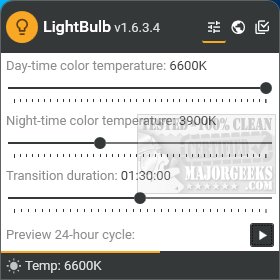
LightBulb version 2.7.1 has been released, offering users the ability to adjust their screen gamma based on temperature profiles. This feature enhances the visual experience by making colors appear warmer during nighttime or according to user preferences. The application operates from the system tray, providing a user-friendly interface for setting and testing various color temperatures and durations.
One of the standout features is the 24-hour preview function, which allows users to see how their screen will appear over the course of a day in just 15 seconds. LightBulb accurately detects the user's location for automatic settings but also allows for manual adjustments of sunrise and sunset times if internet synchronization is disabled.
Advanced users will appreciate the customization options, including gamma polling, temperature smoothing, and the ability to pause adjustments when in full-screen mode. The software also enables users to toggle LightBulb and gamma polling using various key combinations, enhancing usability.
While there are several screen gamma adjustment tools available, LightBulb distinguishes itself with its extensive settings and the convenient 24-hour preview feature, providing users with a clear expectation of their screen's appearance throughout the day.
Additionally, users seeking to reduce eye strain may find it beneficial to explore similar tools like the Night Light Mode in Windows 10 and 11, adaptive brightness features, and options for turning off monitors on demand. These alternatives can further enhance the viewing experience and promote healthier screen habits
One of the standout features is the 24-hour preview function, which allows users to see how their screen will appear over the course of a day in just 15 seconds. LightBulb accurately detects the user's location for automatic settings but also allows for manual adjustments of sunrise and sunset times if internet synchronization is disabled.
Advanced users will appreciate the customization options, including gamma polling, temperature smoothing, and the ability to pause adjustments when in full-screen mode. The software also enables users to toggle LightBulb and gamma polling using various key combinations, enhancing usability.
While there are several screen gamma adjustment tools available, LightBulb distinguishes itself with its extensive settings and the convenient 24-hour preview feature, providing users with a clear expectation of their screen's appearance throughout the day.
Additionally, users seeking to reduce eye strain may find it beneficial to explore similar tools like the Night Light Mode in Windows 10 and 11, adaptive brightness features, and options for turning off monitors on demand. These alternatives can further enhance the viewing experience and promote healthier screen habits
LightBulb 2.7.1 released
LightBulb continuously changes the screen gamma using temperature profiles, making the colors appear warmer at night or any way you like.