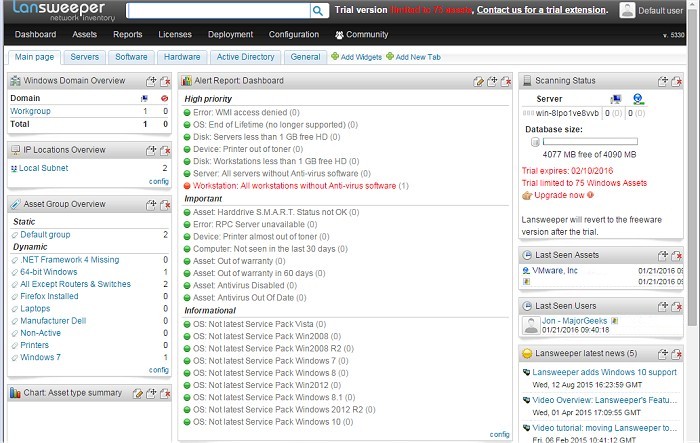
Lansweeper has recently released version 12.6.3.3, an advanced automated network discovery and asset management tool designed to streamline the management of computers and devices within a network. The software scans all devices and presents the data in a user-friendly web interface, making it simple for IT professionals to monitor and manage their assets.
With Lansweeper, users can efficiently track and audit installed software across their network. The tool allows for the generation of comprehensive software inventory reports, which help identify installed applications and their locations. Furthermore, Lansweeper not only detects hardware components but also features a 'change tracking' capability that notifies users when devices are modified or removed from the network.
The tool collects extensive details from Active Directory, including information about users and computers, facilitating the creation of customized reports. It also integrates user pictures and offers functionality for cleaning up Active Directory data. Additionally, Lansweeper incorporates Eventlog integration, enabling users to consolidate computer log errors and receive immediate email alerts for critical issues.
To extend the capabilities of Lansweeper, users may consider exploring additional features such as enhanced reporting tools, custom alert settings for different network conditions, and integration with other IT management systems. These enhancements can further improve network visibility, security, and overall efficiency in asset management.
For those facing network discovery issues, Lansweeper provides relevant guidance, including troubleshooting steps for connecting to other devices on the local network and ensuring proper visibility of networked computers
With Lansweeper, users can efficiently track and audit installed software across their network. The tool allows for the generation of comprehensive software inventory reports, which help identify installed applications and their locations. Furthermore, Lansweeper not only detects hardware components but also features a 'change tracking' capability that notifies users when devices are modified or removed from the network.
The tool collects extensive details from Active Directory, including information about users and computers, facilitating the creation of customized reports. It also integrates user pictures and offers functionality for cleaning up Active Directory data. Additionally, Lansweeper incorporates Eventlog integration, enabling users to consolidate computer log errors and receive immediate email alerts for critical issues.
To extend the capabilities of Lansweeper, users may consider exploring additional features such as enhanced reporting tools, custom alert settings for different network conditions, and integration with other IT management systems. These enhancements can further improve network visibility, security, and overall efficiency in asset management.
For those facing network discovery issues, Lansweeper provides relevant guidance, including troubleshooting steps for connecting to other devices on the local network and ensuring proper visibility of networked computers
Lansweeper 12.6.3.3 released
Lansweeper is an automated network discovery and asset management tool which scans all your computers and devices and displays them in an easily accessible web interface.