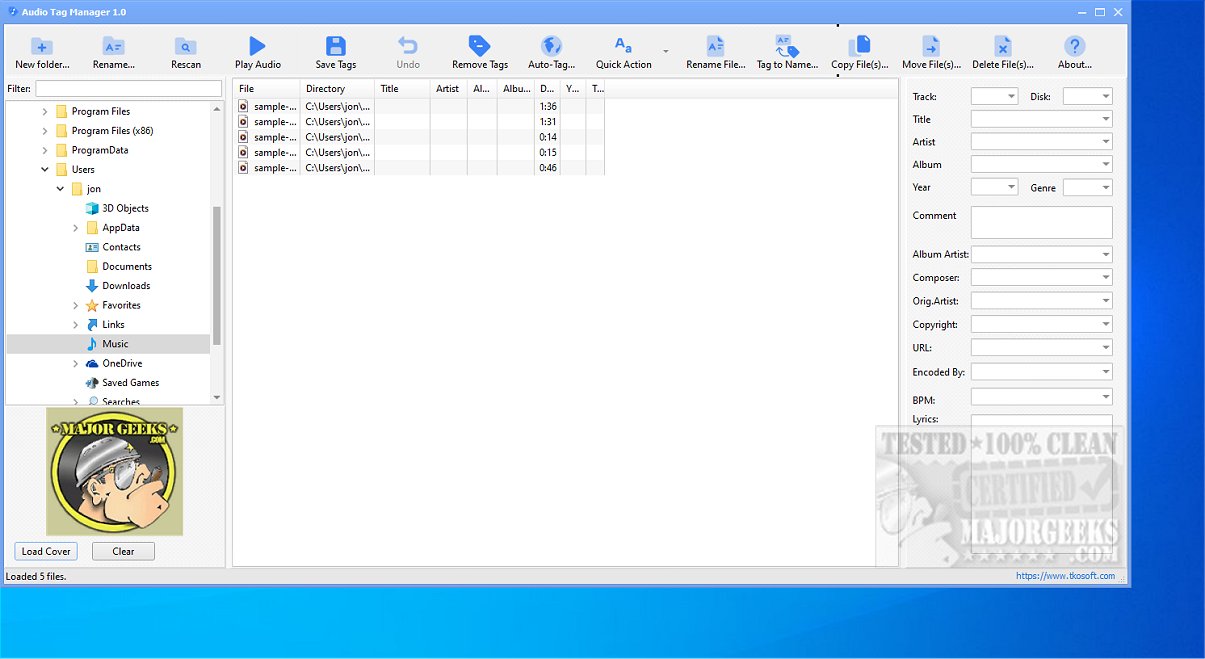
Audio Tag Manager is a free audio tag editor designed to help users efficiently edit, organize, clean, and rename their music files. Supporting a wide range of audio formats such as MP3, FLAC, OGG, APE, M4A, WMA, and WAV, it serves as a versatile tool for managing music collections.
Key Features of Audio Tag Manager:
1. Metadata Editing: Users can enhance their music files by editing crucial metadata fields, including Title, Artist, Album, Year, Track Number, Genre, and more. This feature allows for both individual file editing and mass updates across multiple files, streamlining the management process.
2. File Renaming: The software offers robust renaming capabilities using tag-based patterns. This function helps organize music libraries by allowing users to rename files based on metadata like artist names or song titles, improving overall organization.
3. Auto-Tagging via MusicBrainz: A standout feature of Audio Tag Manager is its ability to auto-tag music files by connecting to MusicBrainz, a community-driven music database. This allows users to retrieve accurate metadata for files that are poorly tagged, ensuring their music library remains well-organized.
4. Batch Editing and Presets: Users can edit tags for multiple audio files simultaneously and utilize built-in presets to tackle common tag-cleaning tasks. Moreover, custom presets can be created to suit individual workflows, enhancing efficiency.
5. Cover Art Management: The software supports managing album cover art, allowing users to load, replace, or clear embedded images, which helps maintain a visually appealing music library.
User-Friendly Interface: Audio Tag Manager offers an intuitive interface that simplifies the audio editing process, making it a great choice for both casual users and those who manage extensive music collections. The ability to save predefined actions significantly boosts efficiency, especially when dealing with large sets of audio files.
Conclusion: Audio Tag Manager stands out as a powerful and user-friendly solution for anyone looking to optimize their music metadata. Its comprehensive features—ranging from flexible editing and batch processing to auto-tagging and cover art management—make it an essential tool for maintaining a clean and organized music collection on Windows.
Future Directions: As the software evolves, potential future updates could include enhanced support for additional audio formats, improved integration with music streaming services, and more advanced AI-driven tagging capabilities to further streamline the music management process
Key Features of Audio Tag Manager:
1. Metadata Editing: Users can enhance their music files by editing crucial metadata fields, including Title, Artist, Album, Year, Track Number, Genre, and more. This feature allows for both individual file editing and mass updates across multiple files, streamlining the management process.
2. File Renaming: The software offers robust renaming capabilities using tag-based patterns. This function helps organize music libraries by allowing users to rename files based on metadata like artist names or song titles, improving overall organization.
3. Auto-Tagging via MusicBrainz: A standout feature of Audio Tag Manager is its ability to auto-tag music files by connecting to MusicBrainz, a community-driven music database. This allows users to retrieve accurate metadata for files that are poorly tagged, ensuring their music library remains well-organized.
4. Batch Editing and Presets: Users can edit tags for multiple audio files simultaneously and utilize built-in presets to tackle common tag-cleaning tasks. Moreover, custom presets can be created to suit individual workflows, enhancing efficiency.
5. Cover Art Management: The software supports managing album cover art, allowing users to load, replace, or clear embedded images, which helps maintain a visually appealing music library.
User-Friendly Interface: Audio Tag Manager offers an intuitive interface that simplifies the audio editing process, making it a great choice for both casual users and those who manage extensive music collections. The ability to save predefined actions significantly boosts efficiency, especially when dealing with large sets of audio files.
Conclusion: Audio Tag Manager stands out as a powerful and user-friendly solution for anyone looking to optimize their music metadata. Its comprehensive features—ranging from flexible editing and batch processing to auto-tagging and cover art management—make it an essential tool for maintaining a clean and organized music collection on Windows.
Future Directions: As the software evolves, potential future updates could include enhanced support for additional audio formats, improved integration with music streaming services, and more advanced AI-driven tagging capabilities to further streamline the music management process
Audio Tag Manager 1.0 released
Audio Tag Manager is a free audio tag editor that lets you efficiently edit, organize, clean, and rename your music files. This versatile tool supports a variety of audio formats, including MP3, FLAC, OGG, APE, M4A, WMA, and WAV, making it a comprehensive solution for managing your music collection.