KTimer version 1.3.2 has been released, offering users a simple yet effective tool for scheduling automatic computer shutdowns at designated times. This functionality not only aids in energy conservation but also ensures that computers are not left running unnecessarily, which is particularly useful for users who might forget to turn off their devices.
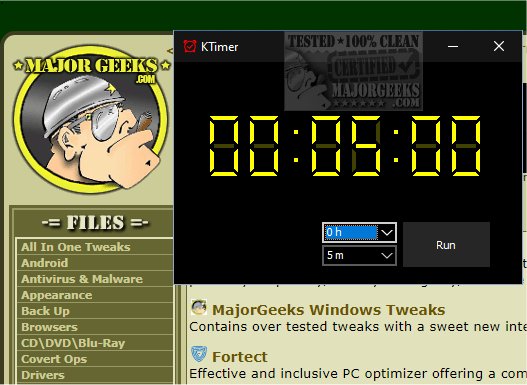
Upon launching KTimer by double-clicking its executable file, users are greeted with an intuitive countdown timer interface. This user-friendly display allows users to set the countdown duration in hours, minutes, and seconds, tailored to their specific tasks or operations. Once the timer is set, KTimer can be programmed to initiate a shutdown automatically upon reaching zero. This feature is particularly beneficial for users engaged in lengthy processes, as it alleviates the need for constant oversight, allowing the computer to complete its tasks without interruption.
When the "Run" button is pressed, the countdown begins, and the timer progresses without the option to pause or modify it. Once the timer expires, the computer shuts down immediately and forcefully, closing all applications and processes without saving any unsaved work. Therefore, users are advised to save their work beforehand to avoid data loss.
KTimer is designed with simplicity in mind, focusing solely on the shutdown function, with no additional options for restarting, hibernating, or sleeping the system. Key features of KTimer include:
- Automatic shutdown scheduling at user-defined times.
- A screen capture function right before shutdown.
As technology continues to evolve, tools like KTimer remain essential for efficient computer management, promoting better energy usage and user convenience. Understanding the critical importance of saving work and monitoring tasks is vital for users, especially when relying on automated functions. Future updates could potentially include options for restarting or entering sleep mode, enhancing the versatility of KTimer while maintaining its core simplicity
Upon launching KTimer by double-clicking its executable file, users are greeted with an intuitive countdown timer interface. This user-friendly display allows users to set the countdown duration in hours, minutes, and seconds, tailored to their specific tasks or operations. Once the timer is set, KTimer can be programmed to initiate a shutdown automatically upon reaching zero. This feature is particularly beneficial for users engaged in lengthy processes, as it alleviates the need for constant oversight, allowing the computer to complete its tasks without interruption.
When the "Run" button is pressed, the countdown begins, and the timer progresses without the option to pause or modify it. Once the timer expires, the computer shuts down immediately and forcefully, closing all applications and processes without saving any unsaved work. Therefore, users are advised to save their work beforehand to avoid data loss.
KTimer is designed with simplicity in mind, focusing solely on the shutdown function, with no additional options for restarting, hibernating, or sleeping the system. Key features of KTimer include:
- Automatic shutdown scheduling at user-defined times.
- A screen capture function right before shutdown.
As technology continues to evolve, tools like KTimer remain essential for efficient computer management, promoting better energy usage and user convenience. Understanding the critical importance of saving work and monitoring tasks is vital for users, especially when relying on automated functions. Future updates could potentially include options for restarting or entering sleep mode, enhancing the versatility of KTimer while maintaining its core simplicity
KTimer 1.3.2 released
KTimer allows you to schedule your computer to shut down automatically at a designated time.