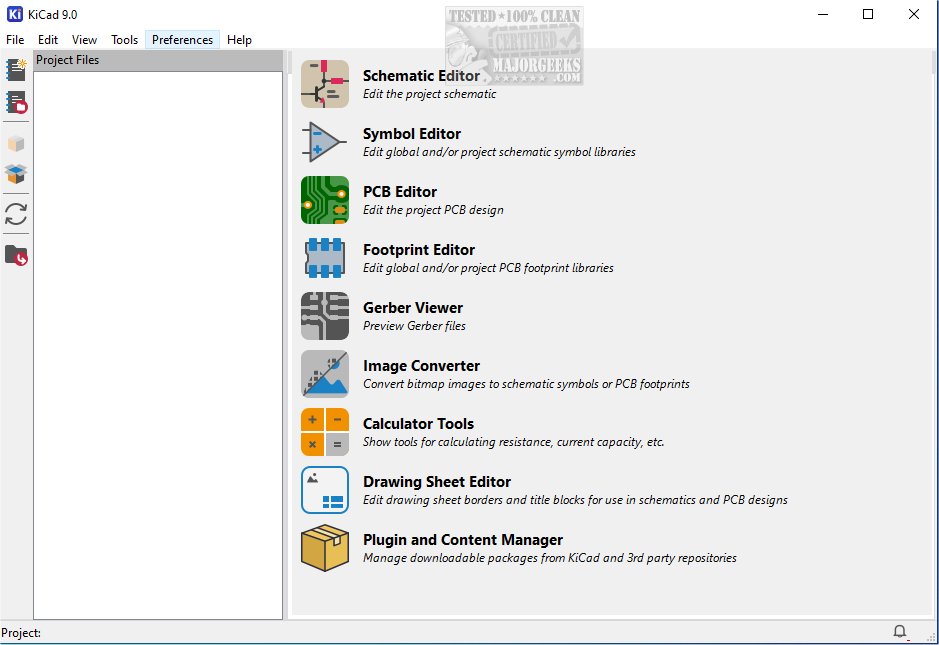
KiCad 10.0.1 has been released, marking an important update for this cross-platform, open-source suite dedicated to electronics design automation. KiCad excels in managing both schematic capture and PCB (printed circuit board) layout, making it a versatile tool for a wide range of design applications. It supports outputs such as Gerber files and IPC-2581, ensuring that users can meet various manufacturing requirements.
The software provides a comprehensive integrated workflow that allows users to create schematic diagrams and PCBs seamlessly. This integration helps maintain consistency throughout the design process, reducing errors and enhancing the transition from initial concept to final production. Users can create and edit electrical schematics that visually represent connections and components within electronic circuits, which are essential for understanding circuit functionality and planning layouts.
KiCad offers a rich set of tools for PCB layout, enabling users to place components like resistors, capacitors, and integrated circuits on a virtual board. Advanced routing capabilities facilitate the connection of these components with traces, mimicking real-life electrical pathways. The software also allows for adjustments in parameters such as trace width and clearances, which are vital for the performance and manufacturability of the final PCB.
Upon finalizing a design, KiCad can generate a variety of manufacturing files, including Gerber files and a Bill of Materials (BOM), aiding in the production process. Its intuitive interface and extensive feature set make it an invaluable resource for both hobbyists and professionals in electronics.
Beyond core design capabilities, KiCad includes several utilities that enhance the user experience. Its PCB calculator helps with critical design parameters such as trace width, current capacity, and voltage drop calculations. A built-in Gerber viewer allows users to inspect manufacturing files, ensuring compliance with fabrication requirements before production. Furthermore, an integrated SPICE simulator enables detailed circuit analysis, allowing users to simulate and validate their designs under various conditions to ensure reliability and performance prior to prototyping.
KiCad stands out as a powerful platform catering to the diverse needs of hobbyists and professional engineers alike. Its robust features and user-friendly interface foster creativity and innovation in PCB design and electronic circuit development. The portable version is available through MajorGeeks, and it is recommended that users refer to the provided documentation to facilitate their onboarding process.
In summary, KiCad 10.0.1 enhances the electronic design automation experience, offering an array of tools and features that support both novice and experienced users. As technology continues to evolve, KiCad is likely to expand its capabilities, providing even more resources for the electronics community. Future updates may include improvements in simulation accuracy, enhanced collaboration features, and expanded libraries of components to further streamline the design process
The software provides a comprehensive integrated workflow that allows users to create schematic diagrams and PCBs seamlessly. This integration helps maintain consistency throughout the design process, reducing errors and enhancing the transition from initial concept to final production. Users can create and edit electrical schematics that visually represent connections and components within electronic circuits, which are essential for understanding circuit functionality and planning layouts.
KiCad offers a rich set of tools for PCB layout, enabling users to place components like resistors, capacitors, and integrated circuits on a virtual board. Advanced routing capabilities facilitate the connection of these components with traces, mimicking real-life electrical pathways. The software also allows for adjustments in parameters such as trace width and clearances, which are vital for the performance and manufacturability of the final PCB.
Upon finalizing a design, KiCad can generate a variety of manufacturing files, including Gerber files and a Bill of Materials (BOM), aiding in the production process. Its intuitive interface and extensive feature set make it an invaluable resource for both hobbyists and professionals in electronics.
Beyond core design capabilities, KiCad includes several utilities that enhance the user experience. Its PCB calculator helps with critical design parameters such as trace width, current capacity, and voltage drop calculations. A built-in Gerber viewer allows users to inspect manufacturing files, ensuring compliance with fabrication requirements before production. Furthermore, an integrated SPICE simulator enables detailed circuit analysis, allowing users to simulate and validate their designs under various conditions to ensure reliability and performance prior to prototyping.
KiCad stands out as a powerful platform catering to the diverse needs of hobbyists and professional engineers alike. Its robust features and user-friendly interface foster creativity and innovation in PCB design and electronic circuit development. The portable version is available through MajorGeeks, and it is recommended that users refer to the provided documentation to facilitate their onboarding process.
In summary, KiCad 10.0.1 enhances the electronic design automation experience, offering an array of tools and features that support both novice and experienced users. As technology continues to evolve, KiCad is likely to expand its capabilities, providing even more resources for the electronics community. Future updates may include improvements in simulation accuracy, enhanced collaboration features, and expanded libraries of components to further streamline the design process
KiCad 10.0.1 released
KiCad: A cross-platform, Open Source suite for electronics design automation that effectively manages schematic capture and PCB (printed circuit board) layout. MajorGeeks also has the portable version.