Kalmuri 5.0.4 has been officially released, enhancing its capabilities as a user-friendly screen capture and recording application. This software allows users to easily capture and record their screen activities, functioning both as a snapshot utility and a screen recorder. Kalmuri operates discreetly in the system tray, ensuring that it does not disrupt ongoing tasks.
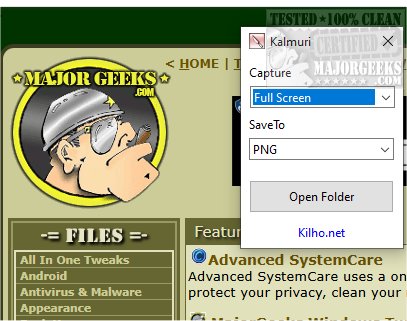
The application features an intuitive interface with two drop-down menus. The first menu enables users to select their desired action, while the second allows for the selection of output formats. Although the initial interface may appear limited, users can access a more comprehensive menu by right-clicking within the main window, unlocking additional functionalities. This includes options for naming output files, adjusting sound settings, configuring a default hotkey for capturing screens, and setting a default folder for saving images and videos.
Kalmuri supports a variety of output formats to cater to diverse user needs. It offers popular image formats such as PNG for high-quality graphics, JPG for compressed photos, GIF for animations, and BMP for uncompressed images. This versatility makes it easy for users to select the most suitable format for their projects. Users can save screenshots locally, send them to the clipboard, print them, or upload directly to Imgbox. The application even includes a built-in browser for capturing snapshots of websites.
As a screen recording tool, Kalmuri allows users to select MP4 as the format for video recordings. Users can capture the entire screen or a specific area, with the option to include the cursor, which is particularly useful for creating video tutorials.
Overall, Kalmuri stands out as an efficient and user-friendly screen capture tool with a streamlined feature set. Its minimalistic design ensures that users can navigate the interface with ease, making it a reliable choice for capturing high-quality screenshots quickly. Whether for presentations, tutorials, or saving important information, Kalmuri delivers dependable functionality worth considering.
In addition to its core features, future updates could potentially include enhancements such as advanced editing tools for captured images and videos, cloud integration for easy access across devices, or collaboration features allowing multiple users to share and annotate captures in real time. This would further solidify Kalmuri's position as a versatile tool for both personal and professional use
The application features an intuitive interface with two drop-down menus. The first menu enables users to select their desired action, while the second allows for the selection of output formats. Although the initial interface may appear limited, users can access a more comprehensive menu by right-clicking within the main window, unlocking additional functionalities. This includes options for naming output files, adjusting sound settings, configuring a default hotkey for capturing screens, and setting a default folder for saving images and videos.
Kalmuri supports a variety of output formats to cater to diverse user needs. It offers popular image formats such as PNG for high-quality graphics, JPG for compressed photos, GIF for animations, and BMP for uncompressed images. This versatility makes it easy for users to select the most suitable format for their projects. Users can save screenshots locally, send them to the clipboard, print them, or upload directly to Imgbox. The application even includes a built-in browser for capturing snapshots of websites.
As a screen recording tool, Kalmuri allows users to select MP4 as the format for video recordings. Users can capture the entire screen or a specific area, with the option to include the cursor, which is particularly useful for creating video tutorials.
Overall, Kalmuri stands out as an efficient and user-friendly screen capture tool with a streamlined feature set. Its minimalistic design ensures that users can navigate the interface with ease, making it a reliable choice for capturing high-quality screenshots quickly. Whether for presentations, tutorials, or saving important information, Kalmuri delivers dependable functionality worth considering.
In addition to its core features, future updates could potentially include enhancements such as advanced editing tools for captured images and videos, cloud integration for easy access across devices, or collaboration features allowing multiple users to share and annotate captures in real time. This would further solidify Kalmuri's position as a versatile tool for both personal and professional use
Kalmuri 5.0.4 released
Capture and record your screen with Kalmuri, the easy-to-use screen capture app.