Kalmuri has officially released version 5.0.0, an intuitive screen capture application designed for effortless screen recording and snapshot functionality. Operating discreetly from the system tray, Kalmuri provides users with a seamless experience without disrupting their workflow.
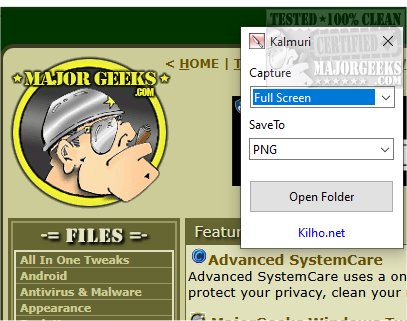
The application features a straightforward interface characterized by two drop-down menus. The first menu allows users to choose their desired action, while the second offers output format options. Although the initial interface may present a limited selection, users can discover a more comprehensive range of features by right-clicking within the main window. This expanded menu includes functionalities for naming output files, adjusting sound settings, setting default hotkeys for screen captures, and designating default save folders for images or videos.
Kalmuri supports multiple output formats tailored to various needs, including PNG for high-quality images with transparency, JPG for compressed yet high-quality photos, GIF for simple animations, and BMP for uncompressed images that retain all details. Users can save their screenshots locally, send them to the clipboard, print them, or upload them to Imgbox. Additionally, a built-in browser allows for easy website snapshotting.
As a screen recorder, Kalmuri enables users to record in MP4 format, capturing either the entire screen or a designated area, complete with cursor visibility, making it ideal for creating video tutorials and presentations.
Overall, Kalmuri is an efficient and user-friendly tool that streamlines the screen capturing process. Its minimalist design ensures accessibility for all users, allowing them to quickly capture high-quality screenshots. Whether for presentations, tutorials, or saving important information, Kalmuri stands out as a reliable solution.
In enhancing its features, future updates could potentially include advanced editing tools for captured images and videos, integration with popular cloud storage services for easy file sharing, and enhanced customization options for the user interface to cater to individual preferences. Additionally, implementing features such as automatic saving and a history log of past captures could further improve user experience
The application features a straightforward interface characterized by two drop-down menus. The first menu allows users to choose their desired action, while the second offers output format options. Although the initial interface may present a limited selection, users can discover a more comprehensive range of features by right-clicking within the main window. This expanded menu includes functionalities for naming output files, adjusting sound settings, setting default hotkeys for screen captures, and designating default save folders for images or videos.
Kalmuri supports multiple output formats tailored to various needs, including PNG for high-quality images with transparency, JPG for compressed yet high-quality photos, GIF for simple animations, and BMP for uncompressed images that retain all details. Users can save their screenshots locally, send them to the clipboard, print them, or upload them to Imgbox. Additionally, a built-in browser allows for easy website snapshotting.
As a screen recorder, Kalmuri enables users to record in MP4 format, capturing either the entire screen or a designated area, complete with cursor visibility, making it ideal for creating video tutorials and presentations.
Overall, Kalmuri is an efficient and user-friendly tool that streamlines the screen capturing process. Its minimalist design ensures accessibility for all users, allowing them to quickly capture high-quality screenshots. Whether for presentations, tutorials, or saving important information, Kalmuri stands out as a reliable solution.
In enhancing its features, future updates could potentially include advanced editing tools for captured images and videos, integration with popular cloud storage services for easy file sharing, and enhanced customization options for the user interface to cater to individual preferences. Additionally, implementing features such as automatic saving and a history log of past captures could further improve user experience
Kalmuri 5.0.0 released
Capture and record your screen with Kalmuri, the easy-to-use screen capture app.