Kalmuri 4.2.5 has been released, providing users with a versatile and user-friendly screen capture and recording application. Designed for ease of use, Kalmuri allows you to capture screen activity effortlessly, serving as both a screenshot utility and a screen recorder. The application operates quietly in the system tray, ensuring that it does not disrupt your workflow.
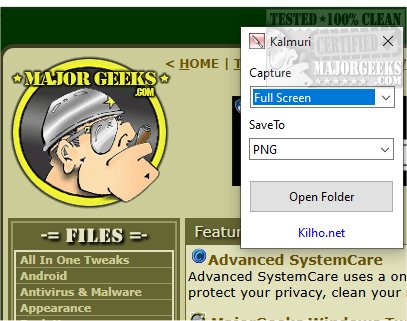
The interface of Kalmuri is straightforward, featuring two drop-down menus. The first menu lets you choose the action you want to perform, while the second helps you select the desired output format. Although the initial options may seem limited, users can access a more extensive feature set by right-clicking within the main window. This reveals options for naming output files, adjusting sound settings, setting default hotkeys for screen capturing, and designating a default save folder for images and videos.
Kalmuri supports various output formats to meet different needs. Users can select from popular formats such as PNG for high-quality graphics, JPG for compressed images, GIF for animations, and BMP for uncompressed images. This versatility allows users to choose the best format for their specific projects. Screenshots can be saved locally, copied to the clipboard, printed, or uploaded to Imgbox. Additionally, Kalmuri includes a built-in browser for capturing website snapshots.
As a screen recorder, Kalmuri enables users to select the MP4 format for video recordings. You can capture either the entire screen or a specific area, and include the cursor in your recordings, making it particularly useful for creating video tutorials.
Overall, Kalmuri is an efficient and intuitive screen-capturing tool, perfect for users looking to quickly and easily capture high-quality screenshots or recordings. Its minimalistic design and reliable functionality make it an excellent choice for a variety of tasks, whether for presentations, tutorials, or saving important information.
Extension: Future updates to Kalmuri could enhance its capabilities by incorporating advanced editing tools, enabling users to annotate or modify captured images directly within the application. Additionally, integrating cloud storage options for easy access and sharing could further improve user experience. A tutorial or help section for beginners could also be beneficial, guiding new users through the various features and functionalities. As screen capture and recording needs evolve, Kalmuri could position itself as a comprehensive tool by continually adapting to user feedback and technological advancements
The interface of Kalmuri is straightforward, featuring two drop-down menus. The first menu lets you choose the action you want to perform, while the second helps you select the desired output format. Although the initial options may seem limited, users can access a more extensive feature set by right-clicking within the main window. This reveals options for naming output files, adjusting sound settings, setting default hotkeys for screen capturing, and designating a default save folder for images and videos.
Kalmuri supports various output formats to meet different needs. Users can select from popular formats such as PNG for high-quality graphics, JPG for compressed images, GIF for animations, and BMP for uncompressed images. This versatility allows users to choose the best format for their specific projects. Screenshots can be saved locally, copied to the clipboard, printed, or uploaded to Imgbox. Additionally, Kalmuri includes a built-in browser for capturing website snapshots.
As a screen recorder, Kalmuri enables users to select the MP4 format for video recordings. You can capture either the entire screen or a specific area, and include the cursor in your recordings, making it particularly useful for creating video tutorials.
Overall, Kalmuri is an efficient and intuitive screen-capturing tool, perfect for users looking to quickly and easily capture high-quality screenshots or recordings. Its minimalistic design and reliable functionality make it an excellent choice for a variety of tasks, whether for presentations, tutorials, or saving important information.
Extension: Future updates to Kalmuri could enhance its capabilities by incorporating advanced editing tools, enabling users to annotate or modify captured images directly within the application. Additionally, integrating cloud storage options for easy access and sharing could further improve user experience. A tutorial or help section for beginners could also be beneficial, guiding new users through the various features and functionalities. As screen capture and recording needs evolve, Kalmuri could position itself as a comprehensive tool by continually adapting to user feedback and technological advancements
Kalmuri 4.2.5 released
Capture and record your screen with Kalmuri, the easy-to-use screen capture app.