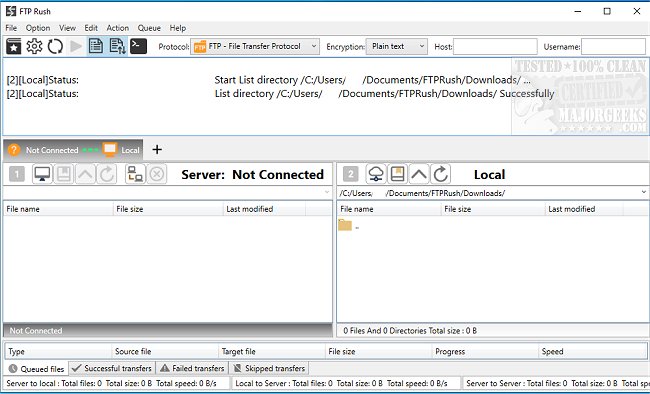
FTP Rush 3.6.7 has recently been released, enhancing its capabilities as a versatile cross-platform FTP/SFTP/cloud storage client. Designed for users familiar with file transfer software, FTP Rush features a user-friendly tabbed Explorer-like interface that allows for multiple connections to be managed simultaneously. Users can easily upload and download files using drag and drop functionality.
One of the standout features of FTP Rush is its ability to facilitate file transfers between different protocols, such as moving files from OneDrive to Dropbox, by utilizing the local machine as a bridge. The software supports various protocols, including FTP, FTPS, SFTP, WebDAV, as well as cloud storage services like Google Drive, Dropbox, OneDrive, and Amazon S3.
Additionally, FTP Rush includes support for C# scripting, which allows users to automate tasks and customize their experience further. The program also comes equipped with a range of practical interface functions, an interactive terminal for custom tasks, and detailed documentation to assist users in troubleshooting.
Key features of FTP Rush include:
- A multi-platform support covering Windows, Mac, Linux, Android, and iOS.
- Server-to-server file transfer capabilities across different protocols.
- A tabbed interface for managing multiple connections seamlessly.
- HTTP and SOCKS5 proxy support, with easy proxy switching.
- Features like Skip & Allow Lists to ensure only desired data is transferred.
- Quick directory changes through bookmarks and file filters for enhanced file management.
- FTP folder caching to improve browsing efficiency.
For users looking to set up their FTP server on Windows 10 and 11, FTP Rush also provides relevant guidance, making it a comprehensive solution for file transfers and cloud storage management.
In summary, FTP Rush 3.6.7 is a robust tool for individuals and businesses needing efficient file transfer solutions across various platforms and protocols, equipped with a wealth of features to enhance user experience and productivity
One of the standout features of FTP Rush is its ability to facilitate file transfers between different protocols, such as moving files from OneDrive to Dropbox, by utilizing the local machine as a bridge. The software supports various protocols, including FTP, FTPS, SFTP, WebDAV, as well as cloud storage services like Google Drive, Dropbox, OneDrive, and Amazon S3.
Additionally, FTP Rush includes support for C# scripting, which allows users to automate tasks and customize their experience further. The program also comes equipped with a range of practical interface functions, an interactive terminal for custom tasks, and detailed documentation to assist users in troubleshooting.
Key features of FTP Rush include:
- A multi-platform support covering Windows, Mac, Linux, Android, and iOS.
- Server-to-server file transfer capabilities across different protocols.
- A tabbed interface for managing multiple connections seamlessly.
- HTTP and SOCKS5 proxy support, with easy proxy switching.
- Features like Skip & Allow Lists to ensure only desired data is transferred.
- Quick directory changes through bookmarks and file filters for enhanced file management.
- FTP folder caching to improve browsing efficiency.
For users looking to set up their FTP server on Windows 10 and 11, FTP Rush also provides relevant guidance, making it a comprehensive solution for file transfers and cloud storage management.
In summary, FTP Rush 3.6.7 is a robust tool for individuals and businesses needing efficient file transfer solutions across various platforms and protocols, equipped with a wealth of features to enhance user experience and productivity
FTP Rush 3.6.7 released
FTP Rush is a cross-platform FTP/SFTP/cloud storage client.