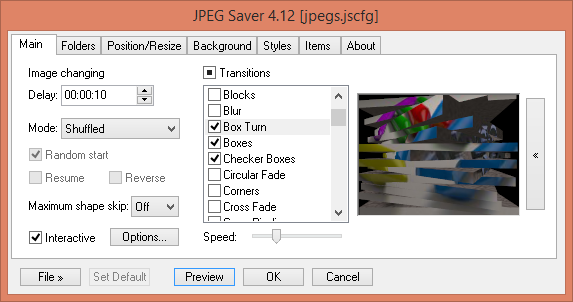
JPEGSaver 5.47 has been released, enhancing the experience of displaying images as a screensaver, reminiscent of the My Pictures screensaver from Windows XP and the Photos screensaver in Windows 7. This updated version allows users to set a delay for image transitions ranging from one second to 24 hours and offers multiple display modes to customize the order of images. It features interactive capabilities that enable users to control the screensaver like a slideshow, alongside a variety of transition effects that can be individually activated or deactivated.
Moreover, JPEGSaver can search multiple folders for images, storing the found images in a database to ensure quicker loading times in future sessions. Users can apply filters to limit displayed images based on filename, path, creation or modification dates and times, and file sizes. The software also provides options for positioning images randomly or in specific areas of the screen, with resizing capabilities utilizing simple, bilinear, and bicubic methods.
For images with EXIF orientation data, an auto-rotation feature is included. Users can also take advantage of color management support, gamma adjustment options, and timed screen dimming settings. Additionally, JPEGSaver allows for background customization with colors, gradients, or images, and users can enhance their display with extra elements like clocks, borders around images, and track information from popular media players.
In summary, JPEGSaver 5.47 offers a versatile and customizable screensaver experience, catering to various user preferences for image display and interaction, making it a valuable addition for anyone looking to personalize their screensaver settings. Future updates could further enhance usability by integrating cloud storage options for images and introducing more advanced editing tools for image customization
Moreover, JPEGSaver can search multiple folders for images, storing the found images in a database to ensure quicker loading times in future sessions. Users can apply filters to limit displayed images based on filename, path, creation or modification dates and times, and file sizes. The software also provides options for positioning images randomly or in specific areas of the screen, with resizing capabilities utilizing simple, bilinear, and bicubic methods.
For images with EXIF orientation data, an auto-rotation feature is included. Users can also take advantage of color management support, gamma adjustment options, and timed screen dimming settings. Additionally, JPEGSaver allows for background customization with colors, gradients, or images, and users can enhance their display with extra elements like clocks, borders around images, and track information from popular media players.
In summary, JPEGSaver 5.47 offers a versatile and customizable screensaver experience, catering to various user preferences for image display and interaction, making it a valuable addition for anyone looking to personalize their screensaver settings. Future updates could further enhance usability by integrating cloud storage options for images and introducing more advanced editing tools for image customization
JPEGSaver 5.47 released
JPEGSaver is an image-displaying screensaver similar to the Windows XP My Pictures screen saver or the Photos screensaver on Windows 7.