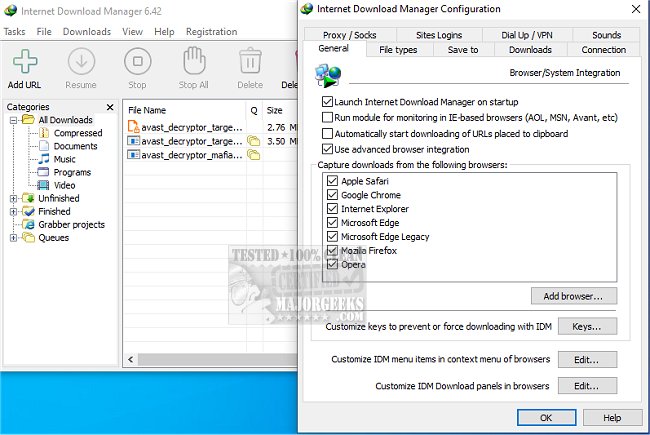
The recent release of Internet Download Manager (IDM) version 6.43 Build 19 promises to enhance user experience by significantly boosting download speeds and offering convenient features such as resuming and scheduling downloads. This powerful tool addresses common frustrations associated with traditional browser downloaders, providing a seamless and organized downloading experience.
Key Features of Internet Download Manager:
1. Accelerated Download Speeds: IDM utilizes innovative file-segmentation technology to increase download speeds by up to five times. By splitting files into multiple segments, it capitalizes on parallel connections, overcoming bandwidth limitations and ensuring efficient downloads that are less susceptible to interruptions.
2. Resume Capabilities: The software allows users to recover broken downloads, picking up right where they left off in case of internet disruptions or system crashes. This feature is essential for users who frequently download large files.
3. Browser Integration: IDM integrates seamlessly with major web browsers like Chrome, Firefox, Edge, and Opera. It automatically detects downloadable content on web pages, providing a convenient "Download" button for quick access to videos and files.
4. Streaming Video Downloads: Users can easily download streaming videos from platforms such as YouTube and Dailymotion, making it an ideal tool for saving tutorials, presentations, and music mixes for offline viewing.
5. Organized Downloads: IDM automatically categorizes downloads into organized folders—such as documents, music, and videos—facilitating easy access to files and preventing clutter.
6. Customization Options: Advanced users can fine-tune settings, establish download limits, schedule downloads during off-peak times, and control the number of simultaneous downloads. The command-line feature is also available for tech-savvy individuals.
7. Security Features: IDM works in conjunction with antivirus software to scan downloads for malware, ensuring a secure downloading experience without the risk of hidden viruses.
Geek Verdict: Internet Download Manager transforms sluggish downloads into a streamlined experience, making it an invaluable tool for frequent downloaders. While the interface may benefit from an update, the software's robust capabilities and efficiency justify its use. Users can expect a noticeable improvement in their download experiences.
Extended Insights: As digital content continues to proliferate, the demand for efficient download management tools like IDM is likely to grow. Future updates could include enhanced support for newer video streaming platforms, increased cloud storage integration, and improved user interface designs to cater to a wider audience. Moreover, as cybersecurity threats evolve, ongoing enhancements to security features will be crucial in maintaining user trust.
For those interested in optimizing their download experience further, consider exploring network performance tips, troubleshooting slow internet issues, and utilizing tools that monitor real-time internet usage. Overall, IDM stands out as a game-changing solution for anyone who frequently downloads files, offering speed, reliability, and ease of use
Internet Download Manager 6.43 Build 19 released
Internet Download Manager is a tool for drastically increasing your download speeds and resuming/scheduling downloads, including the capability to download any streaming video.
Internet Download Manager 6.43 Build 19 released @ MajorGeeks