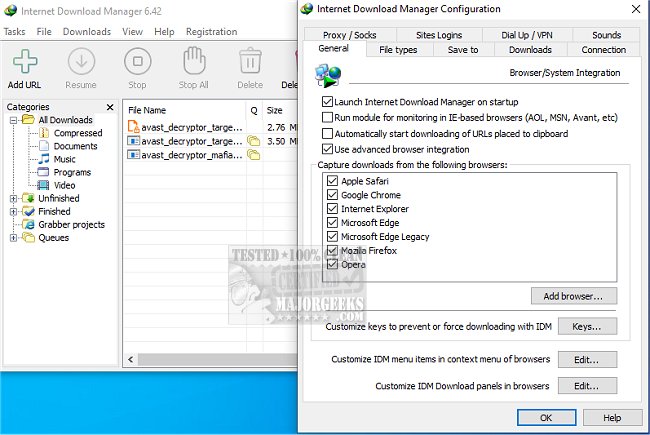
Internet Download Manager (IDM) has recently released version 6.43 Build 11, enhancing its reputation as a powerful tool for boosting download speeds and managing downloads efficiently. IDM is designed to overcome common frustrations such as slow, interrupted, or chaotic downloads, providing a significant upgrade over standard browser downloaders.
1. Lightning-Fast Downloads: IDM enhances download speeds by up to five times using advanced file-segmentation technology. By splitting files and utilizing parallel connections, it maximizes bandwidth and circumvents server limitations, resulting in faster downloads and reduced latency.
2. Resume and Recover Broken Downloads: One of IDM's standout features is its ability to resume interrupted downloads, allowing users to pick up exactly where they left off, saving time and effort.
3. Seamless Browser Integration: IDM integrates smoothly with popular browsers like Chrome, Firefox, and Edge. It automatically detects downloadable content on web pages and provides a convenient "Download" button for quick access to files.
4. Streaming Media Grabber: Users can easily download streaming videos and audio from major platforms, including YouTube and Dailymotion, making it a versatile tool for media enthusiasts.
5. Advanced Download Organization: IDM automatically categorizes downloads into distinct folders (documents, music, videos), enabling users to keep their files organized and easily accessible.
6. Customization Options for Power Users: Users can fine-tune settings, set download limits, and schedule downloads to occur during off-peak hours. Advanced users can also initiate downloads via the command line for added flexibility.
7. Robust Security Measures: IDM is compatible with antivirus programs, automatically scanning downloads for malware to protect users from potential threats.
Internet Download Manager transforms the downloading experience by significantly increasing speed and providing reliable management features. Despite its somewhat outdated interface, the performance and efficiency of IDM make it an invaluable tool for anyone who frequently downloads files, videos, or software updates. Whether you're a casual user or a power downloader, IDM promises a smoother, more organized, and faster download journey.
- Optimize Your Internet Connection: Ensure that your network is stable and fast to maximize the benefits of IDM.
- Use Off-Peak Hours: Schedule downloads during times of lower internet traffic to improve speed further.
- Regularly Update IDM: Keep your software updated to benefit from the latest enhancements and security features.
- Explore IDM's Settings: Familiarize yourself with customization options to tailor the application to your specific downloading needs.
With these insights and the power of Internet Download Manager, users can significantly elevate their downloading capabilities and enjoy a more efficient online experience
Key Features of Internet Download Manager
1. Lightning-Fast Downloads: IDM enhances download speeds by up to five times using advanced file-segmentation technology. By splitting files and utilizing parallel connections, it maximizes bandwidth and circumvents server limitations, resulting in faster downloads and reduced latency.
2. Resume and Recover Broken Downloads: One of IDM's standout features is its ability to resume interrupted downloads, allowing users to pick up exactly where they left off, saving time and effort.
3. Seamless Browser Integration: IDM integrates smoothly with popular browsers like Chrome, Firefox, and Edge. It automatically detects downloadable content on web pages and provides a convenient "Download" button for quick access to files.
4. Streaming Media Grabber: Users can easily download streaming videos and audio from major platforms, including YouTube and Dailymotion, making it a versatile tool for media enthusiasts.
5. Advanced Download Organization: IDM automatically categorizes downloads into distinct folders (documents, music, videos), enabling users to keep their files organized and easily accessible.
6. Customization Options for Power Users: Users can fine-tune settings, set download limits, and schedule downloads to occur during off-peak hours. Advanced users can also initiate downloads via the command line for added flexibility.
7. Robust Security Measures: IDM is compatible with antivirus programs, automatically scanning downloads for malware to protect users from potential threats.
Conclusion
Internet Download Manager transforms the downloading experience by significantly increasing speed and providing reliable management features. Despite its somewhat outdated interface, the performance and efficiency of IDM make it an invaluable tool for anyone who frequently downloads files, videos, or software updates. Whether you're a casual user or a power downloader, IDM promises a smoother, more organized, and faster download journey.
Additional Tips for Enhancing Your Download Experience
- Optimize Your Internet Connection: Ensure that your network is stable and fast to maximize the benefits of IDM.
- Use Off-Peak Hours: Schedule downloads during times of lower internet traffic to improve speed further.
- Regularly Update IDM: Keep your software updated to benefit from the latest enhancements and security features.
- Explore IDM's Settings: Familiarize yourself with customization options to tailor the application to your specific downloading needs.
With these insights and the power of Internet Download Manager, users can significantly elevate their downloading capabilities and enjoy a more efficient online experience
Internet Download Manager 6.43 Build 11 released
Internet Download Manager is a tool for drastically increasing your download speeds and resuming/scheduling downloads, including the capability to download any streaming video.
Internet Download Manager 6.43 Build 11 released @ MajorGeeks