InstallerClean 1.9.0 has been released as an effective solution for cleaning the often-overlooked C:\Windows\Installer folder, which can accumulate a vast amount of data over time. This folder is notorious for growing large, sometimes exceeding 100 GB, especially on systems with applications like Adobe Acrobat installed. InstallerClean serves as a modern alternative to the outdated PatchCleaner, which has not received updates since 2016.
The accumulation of residual files occurs when new applications are installed or Windows updates are applied. These files can consume valuable storage space without users being aware of their presence. InstallerClean is designed to target and remove these leftover files, streamlining the cleanup process.
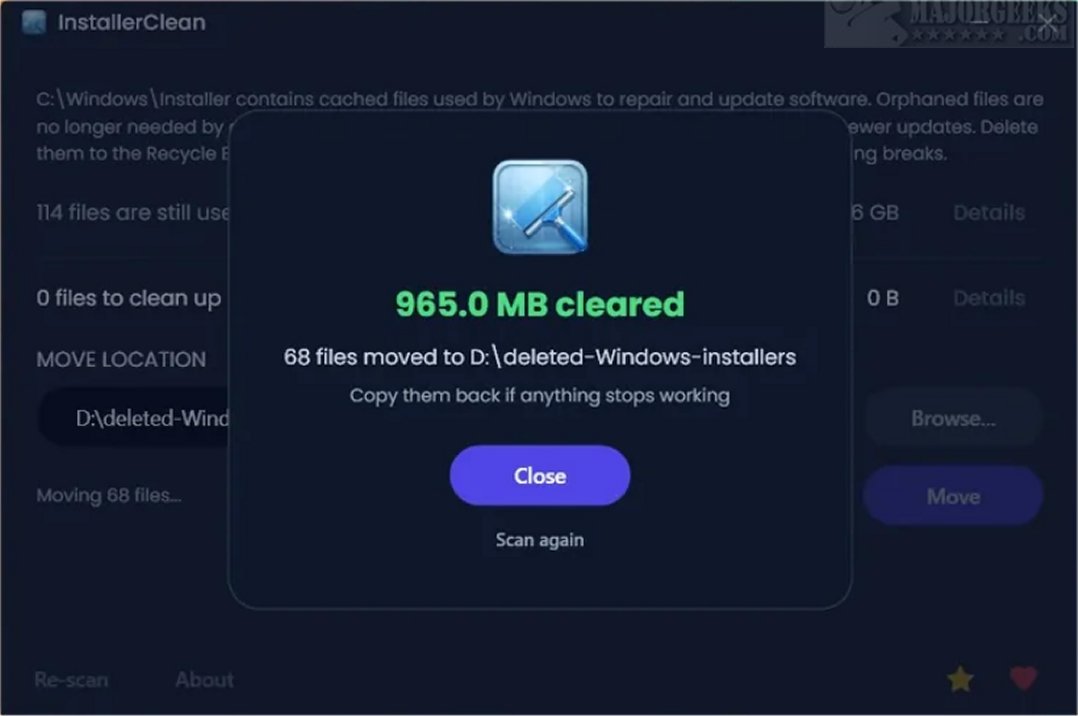
User-friendliness is a key feature of InstallerClean. The tool presents a clean layout upon launch, listing all detected installer files along with essential details such as file sizes. This allows users to easily identify which files are safe to remove. After the cleanup, the program shows the total space reclaimed and prompts users to finalize the operation clearly.
InstallerClean automatically scans for leftover installer files at system startup, but both deletion and movement of files require user confirmation, ensuring that users maintain control over what is removed. The tool cross-references identified files with the operating system to verify which files are safe to delete, reducing the risk of removing necessary files.
The developer notes that InstallerClean effectively identifies orphaned files, which are remnants of previous installations, and superseded patches, which are outdated update files. Both types of files can take up unnecessary space on the system.
Users have three download options for InstallerClean:
- A regular Windows installer for most users
- A portable version that requires no installation
- A slim version for those with the .NET 10 Desktop Runtime pre-installed
From a user perspective, InstallerClean is especially useful for those looking to periodically clean their systems or reinstall multiple applications at once. Although extraneous files do not accumulate as frequently as one might think, having a tool like InstallerClean for occasional use remains a practical choice. After the cleanup, users receive a detailed completion screen that outlines the files found and removed, allowing for a transparent review of the cleanup process.
In summary, InstallerClean 1.9.0 is a robust and user-centric utility that helps maintain system efficiency by freeing up storage space occupied by unnecessary files. Its thoughtful design and verification processes make it a reliable choice for users who want to keep their systems clean and organized. As technology continues to evolve, tools like InstallerClean will be essential for managing the growing complexity of software installations and updates
The accumulation of residual files occurs when new applications are installed or Windows updates are applied. These files can consume valuable storage space without users being aware of their presence. InstallerClean is designed to target and remove these leftover files, streamlining the cleanup process.
User-friendliness is a key feature of InstallerClean. The tool presents a clean layout upon launch, listing all detected installer files along with essential details such as file sizes. This allows users to easily identify which files are safe to remove. After the cleanup, the program shows the total space reclaimed and prompts users to finalize the operation clearly.
InstallerClean automatically scans for leftover installer files at system startup, but both deletion and movement of files require user confirmation, ensuring that users maintain control over what is removed. The tool cross-references identified files with the operating system to verify which files are safe to delete, reducing the risk of removing necessary files.
The developer notes that InstallerClean effectively identifies orphaned files, which are remnants of previous installations, and superseded patches, which are outdated update files. Both types of files can take up unnecessary space on the system.
Users have three download options for InstallerClean:
- A regular Windows installer for most users
- A portable version that requires no installation
- A slim version for those with the .NET 10 Desktop Runtime pre-installed
From a user perspective, InstallerClean is especially useful for those looking to periodically clean their systems or reinstall multiple applications at once. Although extraneous files do not accumulate as frequently as one might think, having a tool like InstallerClean for occasional use remains a practical choice. After the cleanup, users receive a detailed completion screen that outlines the files found and removed, allowing for a transparent review of the cleanup process.
In summary, InstallerClean 1.9.0 is a robust and user-centric utility that helps maintain system efficiency by freeing up storage space occupied by unnecessary files. Its thoughtful design and verification processes make it a reliable choice for users who want to keep their systems clean and organized. As technology continues to evolve, tools like InstallerClean will be essential for managing the growing complexity of software installations and updates
InstallerClean 1.9.0 released
InstallerClean is a tool designed to effectively clean the hidden C:\Windows\Installer folder, which can potentially accumulate significant data over time. On many systems, this folder can grow to tens of gigabytes, and in cases where Adobe Acrobat is installed, it may exceed 100 GB.