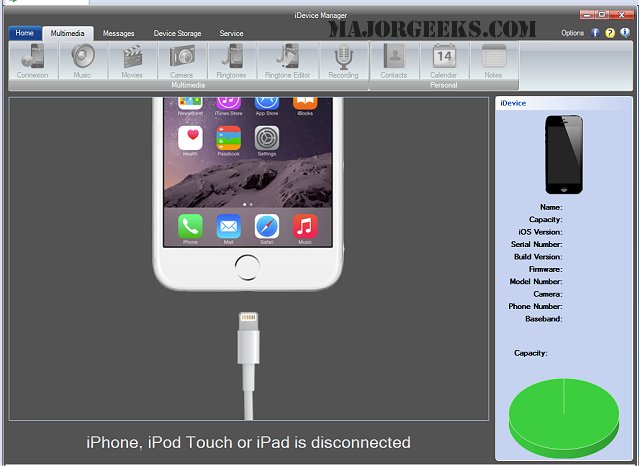
The recent release of iDevice Manager version 11.7.1.0 enhances users' ability to interact with their Apple devices by providing comprehensive access to the device's file system. This software allows users to create custom ringtones from various audio formats, manage SMS messages, and play music, among other features.
With iDevice Manager, users can explore the file system of their iPhone, iPad, and iPod Touch, facilitating file uploads and downloads through a USB connection without concerns about file formats. This functionality effectively turns the supported Apple devices into external storage solutions. Users can directly access and transfer photos, emails, SMS, and videos to their PC seamlessly.
One standout feature is the ringtone editor, which allows for the creation of custom ringtones using MP3, WAV, AIFF, and M4A formats. Unlike iTunes, which limits ringtone length to 32 seconds, iDevice Manager enables users to create longer ringtones with precise cutting options.
Key features of iDevice Manager include:
- Access to music, video, and SMS data
- File system browsing capabilities
- Use as a solid disk storage solution
- Backup and save contacts, SMS, iMessages, WhatsApp messages, and notes to the PC (limited to 50 items within a 7-day period)
- Transfer capabilities for videos, music, ringtones, and photos from the iPhone to the PC (up to 100 items in 7 days)
- Daily creation of one ringtone from MP3 files
- Options to add or change iPhone contacts and upload media to the iPhone (limited to 50 items within a 7-day period)
For users looking to maximize their Apple device management, iDevice Manager offers various functionalities that streamline the process. Additionally, it is worth exploring similar applications, such as those that allow mirroring of Android, iPhone, or iPad screens to a PC, to enhance overall device usability.
In summary, iDevice Manager 11.7.1.0 is a powerful tool for Apple device users, making file management and customization straightforward and efficient. With its user-friendly interface and robust features, it stands out as an essential software for anyone looking to optimize their experience with iOS devices
With iDevice Manager, users can explore the file system of their iPhone, iPad, and iPod Touch, facilitating file uploads and downloads through a USB connection without concerns about file formats. This functionality effectively turns the supported Apple devices into external storage solutions. Users can directly access and transfer photos, emails, SMS, and videos to their PC seamlessly.
One standout feature is the ringtone editor, which allows for the creation of custom ringtones using MP3, WAV, AIFF, and M4A formats. Unlike iTunes, which limits ringtone length to 32 seconds, iDevice Manager enables users to create longer ringtones with precise cutting options.
Key features of iDevice Manager include:
- Access to music, video, and SMS data
- File system browsing capabilities
- Use as a solid disk storage solution
- Backup and save contacts, SMS, iMessages, WhatsApp messages, and notes to the PC (limited to 50 items within a 7-day period)
- Transfer capabilities for videos, music, ringtones, and photos from the iPhone to the PC (up to 100 items in 7 days)
- Daily creation of one ringtone from MP3 files
- Options to add or change iPhone contacts and upload media to the iPhone (limited to 50 items within a 7-day period)
For users looking to maximize their Apple device management, iDevice Manager offers various functionalities that streamline the process. Additionally, it is worth exploring similar applications, such as those that allow mirroring of Android, iPhone, or iPad screens to a PC, to enhance overall device usability.
In summary, iDevice Manager 11.7.1.0 is a powerful tool for Apple device users, making file management and customization straightforward and efficient. With its user-friendly interface and robust features, it stands out as an essential software for anyone looking to optimize their experience with iOS devices
iDevice Manager 11.7.1.0 released
iDevice Manager offers access to the device file system, creates its own ringtones from MP3, displays SMS messages, plays music and many more useful functions.