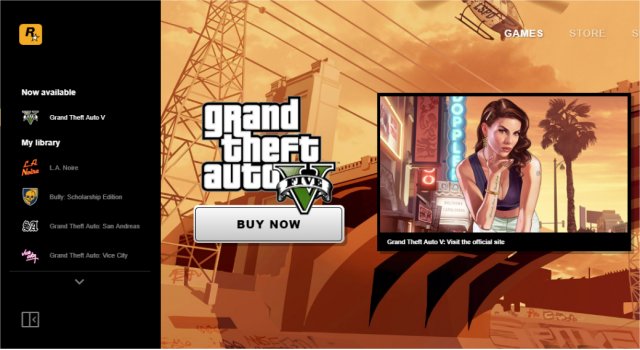
The Rockstar Games Launcher, version 1.0.110.3139, has been released as a centralized platform for users to download, purchase, and play the latest titles from Rockstar Games. As a relatively new entrant in the gaming launcher market, it requires users to create an account for access. Currently, it features auto-updates and cloud save functionality, with expectations of further enhancements in future updates.
To run the launcher smoothly, certain dependencies are necessary, including Windows Universal CRT, Chromium Embedded Framework, Rockstar Games Authentication Framework, Steam Client API, Rockstar Games Social Club Framework, and Microsoft Visual C++ 2015-2019 Redistributable. Users who have previously purchased games can easily integrate them into the Rockstar Games Launcher, as it will automatically scan the system for existing Rockstar titles across different platforms, ensuring that all game data remains intact.
In addition to improving the gaming experience, the launcher also opens up a range of possibilities for social interaction and community engagement among players. As the launcher evolves, it is likely to introduce more features such as enhanced social functionalities, better game discovery tools, and potential integration with other gaming services.
For users interested in exploring more gaming-related content, there are helpful guides available, including how to discover indie games, uninstall the Xbox Game Bar, and troubleshoot missing Game Mode in Windows 10 and 11. The Rockstar Games Launcher is poised to become an essential tool for fans of the developer, streamlining access to their beloved games
To run the launcher smoothly, certain dependencies are necessary, including Windows Universal CRT, Chromium Embedded Framework, Rockstar Games Authentication Framework, Steam Client API, Rockstar Games Social Club Framework, and Microsoft Visual C++ 2015-2019 Redistributable. Users who have previously purchased games can easily integrate them into the Rockstar Games Launcher, as it will automatically scan the system for existing Rockstar titles across different platforms, ensuring that all game data remains intact.
In addition to improving the gaming experience, the launcher also opens up a range of possibilities for social interaction and community engagement among players. As the launcher evolves, it is likely to introduce more features such as enhanced social functionalities, better game discovery tools, and potential integration with other gaming services.
For users interested in exploring more gaming-related content, there are helpful guides available, including how to discover indie games, uninstall the Xbox Game Bar, and troubleshoot missing Game Mode in Windows 10 and 11. The Rockstar Games Launcher is poised to become an essential tool for fans of the developer, streamlining access to their beloved games
Rockstar Games Launcher 1.0.110.3139 released
Rockstar Games Launcher is a convenient way to download, purchase, and play the latest games from Rockstar Games.