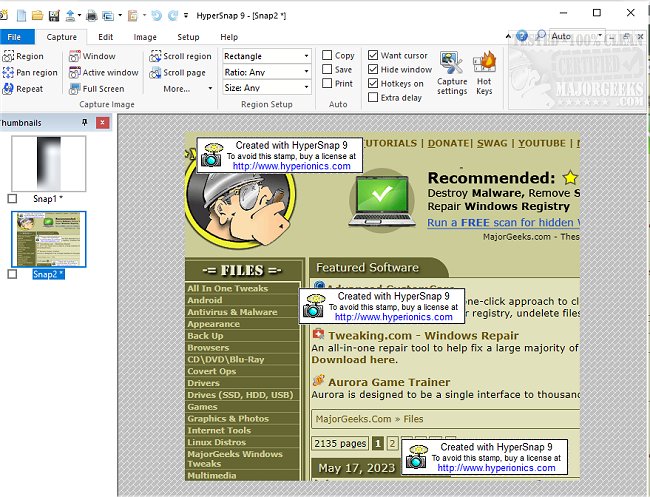
HyperSnap 10.2.0 has been released, providing users with an efficient tool for capturing screen images and text. This software is designed for both casual users and professionals, allowing quick and easy screen captures from standard displays as well as full-screen games. One of its standout features, TextSnap, enables users to capture text from areas where traditional copy-paste methods fail, including the ability to extract tab-delimited data for MS Excel.
HyperSnap merges an advanced image editing suite with a robust screen capture utility, making it a versatile tool for various tasks. Users can capture images from anywhere on their screens, including multi-monitor setups, and utilize a comprehensive array of editing, annotation, and manipulation tools. The software allows users to save objects drawn for further editing or embed them directly into captured images.
Some of the key features of HyperSnap include:
- Unlimited undo/redo capabilities.
- The ability to capture editable text and data seamlessly.
- Capture functionality for challenging screen captures from DirectX and Glide games.
- Various options for image customization, including stamps, frames, and drop shadows.
- Automatic color substitution and non-rectangular window captures.
- A button capture feature tailored for technical writers needing to document multiple buttons.
- Auto-scrolling capabilities for capturing long web pages or documents.
- Integration with the Windows clipboard for streamlining repetitive tasks.
- Automatic saving of captures to graphic files.
- Functionality as an image viewer and converter supporting over 20 formats.
- A fully customizable user interface, allowing users to rearrange menus, assign shortcuts, and even control the application via voice commands.
- Extended window capture capabilities on Windows XP, enabling users to capture larger windows in one swift action without auto-scrolling.
With its blend of powerful features and user-friendly design, HyperSnap 10.2.0 is positioned as an essential tool for anyone needing efficient screen capture and image editing solutions. Future updates may continue to enhance its capabilities, potentially incorporating more advanced editing features, improved integration with additional software, and expanded support for emerging image formats
HyperSnap merges an advanced image editing suite with a robust screen capture utility, making it a versatile tool for various tasks. Users can capture images from anywhere on their screens, including multi-monitor setups, and utilize a comprehensive array of editing, annotation, and manipulation tools. The software allows users to save objects drawn for further editing or embed them directly into captured images.
Some of the key features of HyperSnap include:
- Unlimited undo/redo capabilities.
- The ability to capture editable text and data seamlessly.
- Capture functionality for challenging screen captures from DirectX and Glide games.
- Various options for image customization, including stamps, frames, and drop shadows.
- Automatic color substitution and non-rectangular window captures.
- A button capture feature tailored for technical writers needing to document multiple buttons.
- Auto-scrolling capabilities for capturing long web pages or documents.
- Integration with the Windows clipboard for streamlining repetitive tasks.
- Automatic saving of captures to graphic files.
- Functionality as an image viewer and converter supporting over 20 formats.
- A fully customizable user interface, allowing users to rearrange menus, assign shortcuts, and even control the application via voice commands.
- Extended window capture capabilities on Windows XP, enabling users to capture larger windows in one swift action without auto-scrolling.
With its blend of powerful features and user-friendly design, HyperSnap 10.2.0 is positioned as an essential tool for anyone needing efficient screen capture and image editing solutions. Future updates may continue to enhance its capabilities, potentially incorporating more advanced editing features, improved integration with additional software, and expanded support for emerging image formats
HyperSnap 10.2.0 released
HyperSnap allows you to take quick and easy screen captures from your main screen and full-screen games and text capture (TextSnap) where normal text copy is not possible.