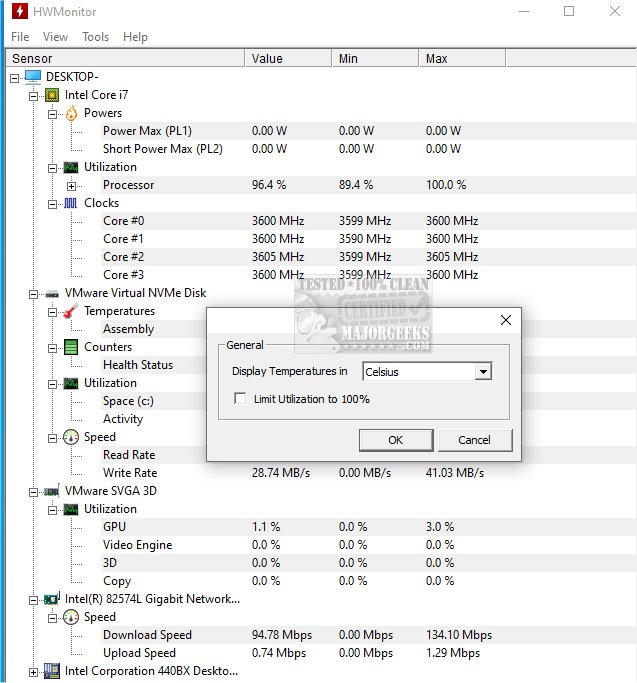
HWMonitor 1.68 has recently been released, offering users a free and efficient way to monitor the health of their PC hardware. Developed by CPUID, the same team behind the popular CPU-Z tool, HWMonitor provides real-time data on critical system metrics such as CPU and GPU temperatures, fan speeds, system voltages, battery status for laptops, and power consumption for supported processors.
This lightweight application is particularly beneficial for users engaged in stress-testing, benchmarking, overclocking, or troubleshooting overheating problems. It acts as a vital dashboard, allowing users to identify potential issues like overheating CPUs or malfunctioning power supplies without the need for complex troubleshooting methods.
HWMonitor is designed for simplicity, boasting a minimalistic interface that consumes very few system resources. It is available for Windows 11, 10, 8, and 7, and supports a wide range of Intel and AMD processors, as well as various modern graphics cards and motherboards. The portable version can be run from a USB stick, making it a convenient option for IT professionals or users who frequently work on different machines.
In addition to the free version, there is a paid variant called HWMonitor PRO, which includes features like data logging, graph generation, and remote monitoring for managing servers or test rigs. While the free version is robust enough for most users, the PRO version may appeal to those needing long-term data tracking or remote capabilities.
Pros and Cons of HWMonitor:
- Pros:
- Minimal file size and quick startup.
- No installation required for the portable version.
- Provides real-time readings of voltage, temperature, and fan speed.
- Free version meets the needs of most users.
- Developed by CPUID, a reputable name in system monitoring tools.
- Cons:
- Lacks alert systems or fan control capabilities, focusing solely on monitoring.
- The interface may appear outdated, with no support for dark mode or custom themes.
- Advanced functionalities, such as graphs and logging, are exclusive to the PRO version.
In conclusion, HWMonitor is an essential tool for anyone interested in maintaining their system's health or diagnosing hardware issues without delving into BIOS settings. It is accurate, resource-efficient, and straightforward to use, making it suitable for system builders, overclocking enthusiasts, or anyone curious about their PC's internal workings. For those looking for a reliable and free method to monitor temperatures, voltages, and fan speeds on Windows, HWMonitor is an excellent choice.
Additionally, users may find interest in related topics such as how to update and find their Windows Experience Index score, identify hardware components in their computers, display internet usage on the taskbar, and understand Windows Auto-Tuning
This lightweight application is particularly beneficial for users engaged in stress-testing, benchmarking, overclocking, or troubleshooting overheating problems. It acts as a vital dashboard, allowing users to identify potential issues like overheating CPUs or malfunctioning power supplies without the need for complex troubleshooting methods.
HWMonitor is designed for simplicity, boasting a minimalistic interface that consumes very few system resources. It is available for Windows 11, 10, 8, and 7, and supports a wide range of Intel and AMD processors, as well as various modern graphics cards and motherboards. The portable version can be run from a USB stick, making it a convenient option for IT professionals or users who frequently work on different machines.
In addition to the free version, there is a paid variant called HWMonitor PRO, which includes features like data logging, graph generation, and remote monitoring for managing servers or test rigs. While the free version is robust enough for most users, the PRO version may appeal to those needing long-term data tracking or remote capabilities.
Pros and Cons of HWMonitor:
- Pros:
- Minimal file size and quick startup.
- No installation required for the portable version.
- Provides real-time readings of voltage, temperature, and fan speed.
- Free version meets the needs of most users.
- Developed by CPUID, a reputable name in system monitoring tools.
- Cons:
- Lacks alert systems or fan control capabilities, focusing solely on monitoring.
- The interface may appear outdated, with no support for dark mode or custom themes.
- Advanced functionalities, such as graphs and logging, are exclusive to the PRO version.
In conclusion, HWMonitor is an essential tool for anyone interested in maintaining their system's health or diagnosing hardware issues without delving into BIOS settings. It is accurate, resource-efficient, and straightforward to use, making it suitable for system builders, overclocking enthusiasts, or anyone curious about their PC's internal workings. For those looking for a reliable and free method to monitor temperatures, voltages, and fan speeds on Windows, HWMonitor is an excellent choice.
Additionally, users may find interest in related topics such as how to update and find their Windows Experience Index score, identify hardware components in their computers, display internet usage on the taskbar, and understand Windows Auto-Tuning
HWMonitor 1.68 released
HWMonitor is a free hardware monitoring program that reads PC systems' primary health sensors: voltages, temperatures, and fan speeds. Portable version via PortableApps is also available.