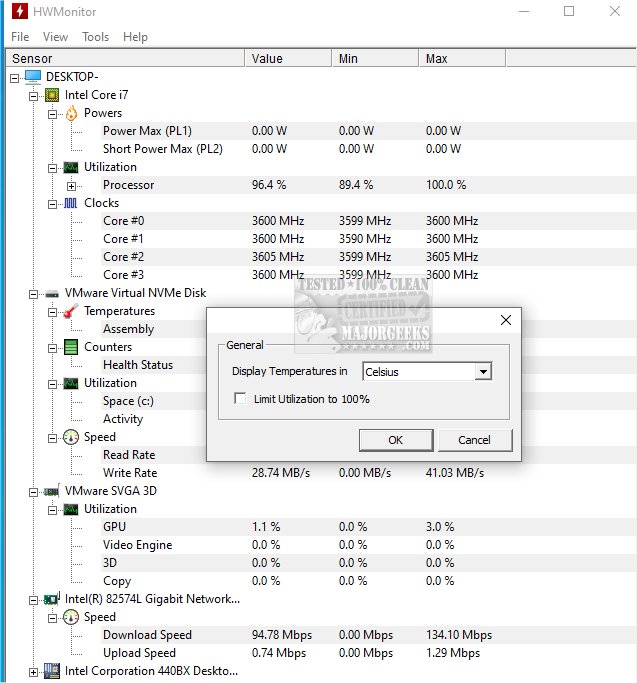
HWMonitor 1.67 has been released, enhancing its status as a premier free hardware monitoring tool that provides an overview of a PC's health by tracking vital sensors such as voltages, temperatures, and fan speeds. Developed by CPUID—the creators of CPU-Z—HWMonitor offers a straightforward interface that displays real-time data, making it an ideal solution for diagnosing hardware issues, especially during activities like gaming, overclocking, or system stress-testing.
Key features of HWMonitor include the ability to monitor CPU and GPU temperatures, fan speeds, system voltages, laptop battery status, and power consumption. This tool is particularly beneficial for users experiencing lag issues or unexpected shutdowns, as it quickly identifies whether overheating or power supply problems are to blame. While HWMonitor does not resolve issues directly, it empowers users to take corrective actions such as enhancing cooling systems or adjusting fan settings.
The software is lightweight and resource-efficient, requiring minimal installation effort. It is compatible with various Windows operating systems, including Windows 11, 10, 8, and 7, and supports a wide range of Intel and AMD processors, as well as modern graphics cards and motherboards. For those needing a portable solution, a ZIP version is available for use on USB drives, making it a practical choice for IT professionals or anyone working on multiple computers.
For users looking for advanced functionality, HWMonitor PRO offers features such as data logging, graph creation, and remote monitoring, making it suitable for managing servers or test rigs. However, the free version is robust enough to meet the needs of most users.
Pros and Cons:
- Pros:
- Compact file size and quick startup time.
- Portable version available with no installation required.
- Real-time monitoring of critical system metrics.
- Free version sufficient for most users.
- Developed by a reputable company in system tools.
- Cons:
- Lacks alert and fan control capabilities, focusing solely on monitoring.
- The user interface appears outdated and lacks customization options.
- Advanced features are exclusive to the paid PRO version.
Conclusion:
HWMonitor is an essential tool for anyone interested in maintaining their system's health or troubleshooting hardware problems without delving into BIOS settings or complex motherboard utilities. Its accuracy, ease of use, and efficiency make it an excellent choice for overclockers, system builders, or simply those curious about their hardware performance. Download HWMonitor to access a reliable and straightforward method for monitoring temperatures, voltages, and fan speeds on Windows systems. The portable version via PortableApps is also a noteworthy option for on-the-go monitoring.
Extended Insights:
In addition to its monitoring capabilities, users could benefit from combining HWMonitor with other performance-tuning tools. For instance, software that manages fan curves or optimizes power settings could enhance the effectiveness of HWMonitor's readings. Users should also consider regular maintenance, such as cleaning fans and ensuring good airflow within their PC cases to mitigate overheating issues. As technology evolves, HWMonitor may introduce updates that enhance its functionality, potentially including more advanced analytics or customization features that cater to the growing demands of PC enthusiasts
Key features of HWMonitor include the ability to monitor CPU and GPU temperatures, fan speeds, system voltages, laptop battery status, and power consumption. This tool is particularly beneficial for users experiencing lag issues or unexpected shutdowns, as it quickly identifies whether overheating or power supply problems are to blame. While HWMonitor does not resolve issues directly, it empowers users to take corrective actions such as enhancing cooling systems or adjusting fan settings.
The software is lightweight and resource-efficient, requiring minimal installation effort. It is compatible with various Windows operating systems, including Windows 11, 10, 8, and 7, and supports a wide range of Intel and AMD processors, as well as modern graphics cards and motherboards. For those needing a portable solution, a ZIP version is available for use on USB drives, making it a practical choice for IT professionals or anyone working on multiple computers.
For users looking for advanced functionality, HWMonitor PRO offers features such as data logging, graph creation, and remote monitoring, making it suitable for managing servers or test rigs. However, the free version is robust enough to meet the needs of most users.
Pros and Cons:
- Pros:
- Compact file size and quick startup time.
- Portable version available with no installation required.
- Real-time monitoring of critical system metrics.
- Free version sufficient for most users.
- Developed by a reputable company in system tools.
- Cons:
- Lacks alert and fan control capabilities, focusing solely on monitoring.
- The user interface appears outdated and lacks customization options.
- Advanced features are exclusive to the paid PRO version.
Conclusion:
HWMonitor is an essential tool for anyone interested in maintaining their system's health or troubleshooting hardware problems without delving into BIOS settings or complex motherboard utilities. Its accuracy, ease of use, and efficiency make it an excellent choice for overclockers, system builders, or simply those curious about their hardware performance. Download HWMonitor to access a reliable and straightforward method for monitoring temperatures, voltages, and fan speeds on Windows systems. The portable version via PortableApps is also a noteworthy option for on-the-go monitoring.
Extended Insights:
In addition to its monitoring capabilities, users could benefit from combining HWMonitor with other performance-tuning tools. For instance, software that manages fan curves or optimizes power settings could enhance the effectiveness of HWMonitor's readings. Users should also consider regular maintenance, such as cleaning fans and ensuring good airflow within their PC cases to mitigate overheating issues. As technology evolves, HWMonitor may introduce updates that enhance its functionality, potentially including more advanced analytics or customization features that cater to the growing demands of PC enthusiasts
HWMonitor 1.67 released
HWMonitor is a free hardware monitoring program that reads PC systems' primary health sensors: voltages, temperatures, and fan speeds. Portable version via PortableApps is also available.