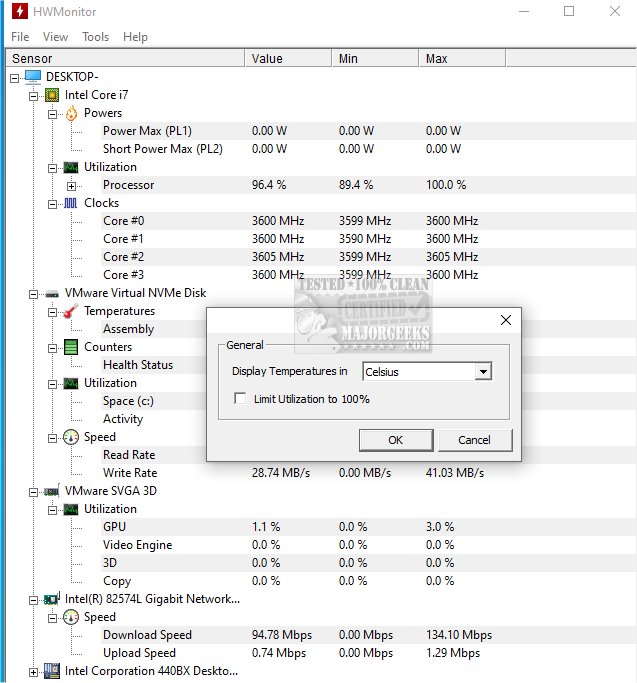
HWMonitor 1.64 has been released, offering a robust, free tool for monitoring the health of your PC hardware. Developed by CPUID, the same company behind CPU-Z, HWMonitor provides real-time readings of critical system metrics such as CPU and GPU temperatures, fan speeds, voltages, battery status for laptops, and power consumption for supported chips. The tool is particularly beneficial for users engaged in stress testing, gaming benchmarks, overclocking, or troubleshooting overheating issues, acting as a dashboard for your computer's vital signs.
One of HWMonitor's key advantages is its lightweight and user-friendly nature. It requires minimal system resources, is easy to use, and has a straightforward interface that doesn’t bog down your PC with unnecessary features. It’s compatible with various versions of Windows, including 11, 10, 8, and 7, and supports most Intel and AMD processors, as well as many modern graphics cards and motherboards. For added convenience, a portable version can be run directly from a USB stick, making it ideal for technicians who work on multiple systems.
While the free version of HWMonitor is comprehensive and adequate for the majority of users, there is also a paid version, HWMonitor PRO, that includes additional features such as data logging, graph generation, and remote monitoring capabilities. However, the free version's functionality generally meets the needs of casual users effectively.
Pros and Cons
Pros:
- Compact file size with fast startup
- Portable version eliminates installation hassle
- Real-time monitoring of essential parameters
- Free version provides substantial functionality
- Backed by a reputable developer (CPUID)
Cons:
- Lacks alert and fan control features, focusing solely on monitoring
- The interface may appear dated, lacking modern aesthetics like dark mode
- Advanced features like logging and graphs are exclusive to the PRO version
Conclusion
HWMonitor is an essential tool for anyone who wants to keep tabs on their system's health or troubleshoot hardware issues efficiently. Its ease of use and reliability make it a top choice for overclockers, system builders, and everyday users alike. For those looking for a straightforward solution to monitor Windows temperatures, voltages, and fan speeds, HWMonitor is a must-have. The portable version is also available through PortableApps, allowing for flexibility and convenience in various computing environments.
In addition to HWMonitor, users may find value in exploring other related resources, such as guides on updating the Windows Experience Index, identifying computer hardware, displaying internet usage on the taskbar, and understanding Windows auto-tuning
One of HWMonitor's key advantages is its lightweight and user-friendly nature. It requires minimal system resources, is easy to use, and has a straightforward interface that doesn’t bog down your PC with unnecessary features. It’s compatible with various versions of Windows, including 11, 10, 8, and 7, and supports most Intel and AMD processors, as well as many modern graphics cards and motherboards. For added convenience, a portable version can be run directly from a USB stick, making it ideal for technicians who work on multiple systems.
While the free version of HWMonitor is comprehensive and adequate for the majority of users, there is also a paid version, HWMonitor PRO, that includes additional features such as data logging, graph generation, and remote monitoring capabilities. However, the free version's functionality generally meets the needs of casual users effectively.
Pros and Cons
Pros:
- Compact file size with fast startup
- Portable version eliminates installation hassle
- Real-time monitoring of essential parameters
- Free version provides substantial functionality
- Backed by a reputable developer (CPUID)
Cons:
- Lacks alert and fan control features, focusing solely on monitoring
- The interface may appear dated, lacking modern aesthetics like dark mode
- Advanced features like logging and graphs are exclusive to the PRO version
Conclusion
HWMonitor is an essential tool for anyone who wants to keep tabs on their system's health or troubleshoot hardware issues efficiently. Its ease of use and reliability make it a top choice for overclockers, system builders, and everyday users alike. For those looking for a straightforward solution to monitor Windows temperatures, voltages, and fan speeds, HWMonitor is a must-have. The portable version is also available through PortableApps, allowing for flexibility and convenience in various computing environments.
In addition to HWMonitor, users may find value in exploring other related resources, such as guides on updating the Windows Experience Index, identifying computer hardware, displaying internet usage on the taskbar, and understanding Windows auto-tuning
HWMonitor 1.64 released
HWMonitor is a free hardware monitoring program that reads PC systems' primary health sensors: voltages, temperatures, and fan speeds. Portable version via PortableApps is also available.