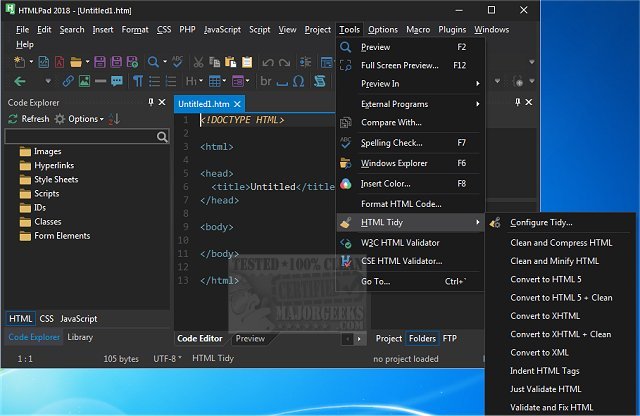
HTMLPad 18.9 has been released, showcasing itself as a powerful coding tool designed for CSS, HTML, and JavaScript, all within a highly user-friendly interface. This software effectively caters to users of all skill levels, making it ideal for beginners while still offering advanced features for seasoned developers. By functioning similarly to a basic text editor, HTMLPad enhances the coding experience through various practical tools, including HTML and CSS wizards, instant code snippets, and a browser preview feature that aids in reducing errors during the coding process.
Upon launching HTMLPad, users are welcomed by a setup wizard that assists in customizing the initial appearance and configuration of the application. Users can choose from several layout options, including All But Kitchen Sink, File Explorer Only, Full IDE, Normal, and Notepad, with the added flexibility to create and save their custom layouts. After selecting a layout, users can take advantage of features such as syntax and line highlighting, an advanced text editor, code folding, macro recording, and search and replace functionalities. The software also includes a file explorer and FTP interface, a code beautifier, and extensive customization options for the text editor, menus, toolbars, and shortcut keys.
For those interested in exploring its features in more detail, the author's website provides a comprehensive list, as the functionality of HTMLPad is extensive and goes far beyond what can be summarized here.
In addition to its existing features, future updates could focus on enhancing collaboration tools for teams, integrating more cloud storage options for project management, and providing additional learning resources, such as tutorials and community forums, to further support users in their coding journeys. This continued development could solidify HTMLPad's position as a leading choice for web developers across varying levels of expertise
Upon launching HTMLPad, users are welcomed by a setup wizard that assists in customizing the initial appearance and configuration of the application. Users can choose from several layout options, including All But Kitchen Sink, File Explorer Only, Full IDE, Normal, and Notepad, with the added flexibility to create and save their custom layouts. After selecting a layout, users can take advantage of features such as syntax and line highlighting, an advanced text editor, code folding, macro recording, and search and replace functionalities. The software also includes a file explorer and FTP interface, a code beautifier, and extensive customization options for the text editor, menus, toolbars, and shortcut keys.
For those interested in exploring its features in more detail, the author's website provides a comprehensive list, as the functionality of HTMLPad is extensive and goes far beyond what can be summarized here.
In addition to its existing features, future updates could focus on enhancing collaboration tools for teams, integrating more cloud storage options for project management, and providing additional learning resources, such as tutorials and community forums, to further support users in their coding journeys. This continued development could solidify HTMLPad's position as a leading choice for web developers across varying levels of expertise
HTMLPad 18.9 released
HTMLPad is a comprehensive coding tool for CSS, HTML, and Javascript through an extremely user-friendly interface.