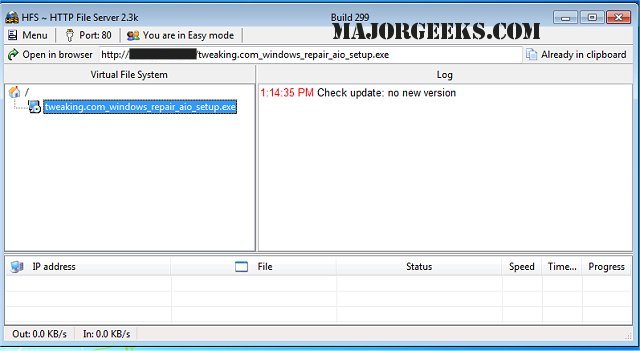
The HFS - Http File Server has released version 3.2.2, enhancing its capabilities as a fast and user-friendly tool for file transfers. This software effectively transforms your computer into an HTTP server, enabling users to connect and download files through a simple webpage accessed via their browser. The application simplifies the sharing process by automatically copying file URLs to the clipboard, which can then be easily pasted into chats or other platforms.
HFS offers a range of features that provide users with extensive control over their file-sharing environment. This includes the ability to set specific IP addresses, manage bandwidth, create user accounts, and more, ensuring that users can customize their experience to meet their needs. The interface is designed for simplicity, making it accessible for users of all skill levels, from novices to experts.
Key features of HFS - Http File Server include:
- Support for both download and upload functions
- A virtual file system for organizing files
- High customization options through HTML templates
- Bandwidth management to optimize transfer speeds
- Easy and expert modes for users with varying levels of technical expertise
- Logging capabilities for monitoring activity
- Complete control over all connections and user accounts
- A dynamic DNS updater for seamless connectivity
For those interested in similar functionalities, there are also guides available on how to set up an FTP server on Windows 10, providing alternatives for file sharing and management.
In conclusion, HFS - Http File Server 3.2.2 stands out as a practical solution for anyone needing to transfer files quickly and securely, offering a blend of usability and advanced features that cater to a wide range of user needs. Whether you are sharing files for personal use or for a larger community, HFS provides the tools necessary to ensure a smooth and efficient file transfer process
HFS offers a range of features that provide users with extensive control over their file-sharing environment. This includes the ability to set specific IP addresses, manage bandwidth, create user accounts, and more, ensuring that users can customize their experience to meet their needs. The interface is designed for simplicity, making it accessible for users of all skill levels, from novices to experts.
Key features of HFS - Http File Server include:
- Support for both download and upload functions
- A virtual file system for organizing files
- High customization options through HTML templates
- Bandwidth management to optimize transfer speeds
- Easy and expert modes for users with varying levels of technical expertise
- Logging capabilities for monitoring activity
- Complete control over all connections and user accounts
- A dynamic DNS updater for seamless connectivity
For those interested in similar functionalities, there are also guides available on how to set up an FTP server on Windows 10, providing alternatives for file sharing and management.
In conclusion, HFS - Http File Server 3.2.2 stands out as a practical solution for anyone needing to transfer files quickly and securely, offering a blend of usability and advanced features that cater to a wide range of user needs. Whether you are sharing files for personal use or for a larger community, HFS provides the tools necessary to ensure a smooth and efficient file transfer process
HFS - Http File Server 3.2.2 released
HFS - Http File Server is a fast and convenient way for you to transfer files.