Hardcopy 2026.07.02 has been released, offering a comprehensive screen capture solution that comes equipped with a variety of editing tools and functions. The setup process is seamless, and the intuitive interface allows users to quickly capture and save images in numerous formats, catering to a wide range of needs.
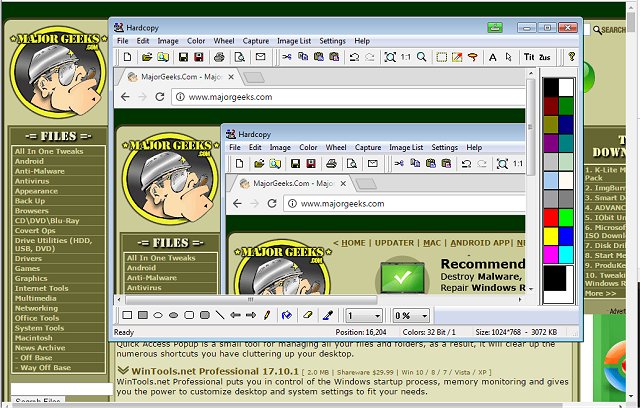
Upon capturing an image, users are introduced to a dedicated editing window where they can enhance their screenshots. This editing space provides functionalities for adding annotations, modifying the color scheme, and managing resources such as bitmaps and file icons. Additionally, each captured image is displayed within a designated preview window featuring standard screen capture tools, including line and shape drawing, filters, and watermarks.
Despite being a free version, Hardcopy does not compromise on features, offering an extensive array of tools that exceed typical expectations. Users can refer to the comparison page for a complete list of its capabilities.
In summary, Hardcopy is designed for both casual users and professionals who need a robust screen capture tool with extensive editing options. As technology continues to evolve, future updates may incorporate even more advanced features, such as cloud integration for easy sharing, enhanced collaboration tools, and AI-driven editing suggestions, making the app even more versatile and user-friendly.
For those interested in maximizing their screenshot experience, additional resources are available, including guides on taking screenshots in Windows 10, creating shortcuts for screen snips, and managing screenshot indexes effectively
Upon capturing an image, users are introduced to a dedicated editing window where they can enhance their screenshots. This editing space provides functionalities for adding annotations, modifying the color scheme, and managing resources such as bitmaps and file icons. Additionally, each captured image is displayed within a designated preview window featuring standard screen capture tools, including line and shape drawing, filters, and watermarks.
Despite being a free version, Hardcopy does not compromise on features, offering an extensive array of tools that exceed typical expectations. Users can refer to the comparison page for a complete list of its capabilities.
In summary, Hardcopy is designed for both casual users and professionals who need a robust screen capture tool with extensive editing options. As technology continues to evolve, future updates may incorporate even more advanced features, such as cloud integration for easy sharing, enhanced collaboration tools, and AI-driven editing suggestions, making the app even more versatile and user-friendly.
For those interested in maximizing their screenshot experience, additional resources are available, including guides on taking screenshots in Windows 10, creating shortcuts for screen snips, and managing screenshot indexes effectively
Hardcopy 2026.07.02 released
Hardcopy is a full-service screen capture app that includes many useful additional editing tools and options.