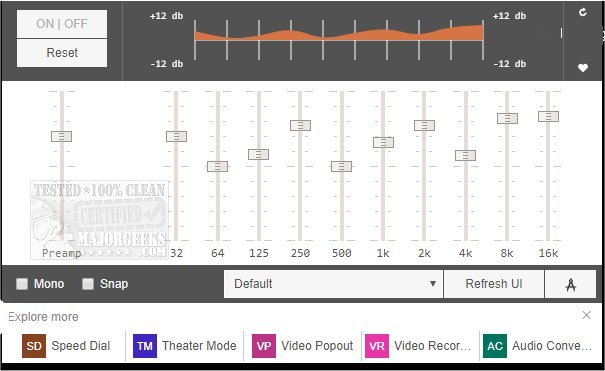
The recently released version 0.2.1 of the Audio Equalizer for Chrome and Firefox introduces a sleek and functional equalizer that can be easily accessed via a popup in the browser toolbar. Designed to streamline audio adjustments, this tool enables users to modify the balance of different frequency components in audio files with minimal effort.
The Equalizer comes equipped with several pre-set audio profiles tailored for various genres such as Club and Rock, allowing users to select an option that best suits their listening preferences. Additionally, it offers customization capabilities where users can create their own audio settings and save them for future use. Should users wish to revert their adjustments, a reset button is conveniently available to restore the default settings.
Moreover, the Equalizer features a Mono option, which serves as an accessibility aid for individuals with hearing impairments. This feature ensures that all sounds and dialogue can be clearly heard while using headphones, enhancing the overall listening experience.
In summary, the Audio Equalizer for Chrome and Firefox is a valuable browser extension that not only facilitates audio enhancement through easy adjustments and personalized settings but also prioritizes accessibility. With its stylish interface and practical functionality, it is an excellent addition for anyone looking to improve their audio experience while browsing.
To further explore audio enhancements, users can also look into related topics such as enabling Windows Sonic Surround Sound on Windows 10 and 11, changing the default sound output device, troubleshooting sound issues, and diagnosing audio delays and latency problems
The Equalizer comes equipped with several pre-set audio profiles tailored for various genres such as Club and Rock, allowing users to select an option that best suits their listening preferences. Additionally, it offers customization capabilities where users can create their own audio settings and save them for future use. Should users wish to revert their adjustments, a reset button is conveniently available to restore the default settings.
Moreover, the Equalizer features a Mono option, which serves as an accessibility aid for individuals with hearing impairments. This feature ensures that all sounds and dialogue can be clearly heard while using headphones, enhancing the overall listening experience.
In summary, the Audio Equalizer for Chrome and Firefox is a valuable browser extension that not only facilitates audio enhancement through easy adjustments and personalized settings but also prioritizes accessibility. With its stylish interface and practical functionality, it is an excellent addition for anyone looking to improve their audio experience while browsing.
To further explore audio enhancements, users can also look into related topics such as enabling Windows Sonic Surround Sound on Windows 10 and 11, changing the default sound output device, troubleshooting sound issues, and diagnosing audio delays and latency problems
Audio Equalizer for Chrome and Firefox 0.2.1 released
Audio Equalizer for Chrome and Firefox provides you with a stylish equalizer that runs right from a browser toolbar popup.
Audio Equalizer for Chrome and Firefox 0.2.1 released @ MajorGeeks