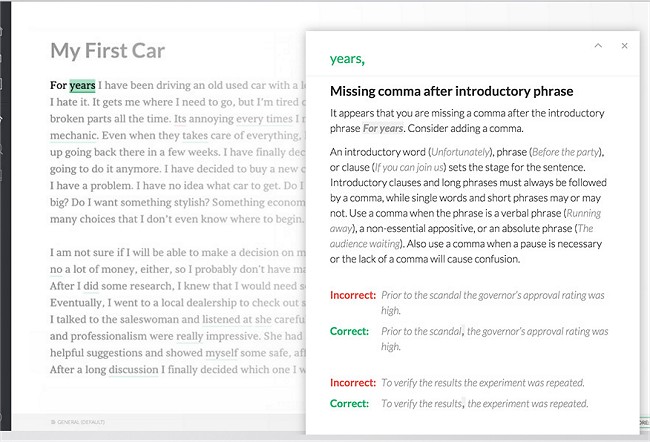
Grammarly is a powerful writing assistant designed to enhance your writing skills by identifying and correcting mistakes in your text. It surpasses traditional word processors by effectively fixing up to ten times more errors. This tool is particularly beneficial for users on platforms like MajorGeeks, ensuring clarity and coherence in written content.
Grammarly operates seamlessly on various platforms, including Windows and as an extension for major browsers such as Chrome, Firefox, Edge, and Safari. Additionally, it offers a user-friendly web app that requires no installation. The software detects over 250 types of grammatical and contextual errors, including spelling, punctuation, and vocabulary issues that other programs might overlook.
The standout features of Grammarly include:
- Contextual Spell Checker: Unlike basic spell checkers, Grammarly understands the context of words, helping users avoid common pitfalls such as confusing "lose" with "loose."
- Advanced Grammar Checker: It evaluates more than 250 grammar rules, addressing complex issues like subject-verb agreement and misplaced modifiers.
- Vocabulary Enhancement: It offers suggestions for stronger word choices based on context rather than random synonyms.
- AI-Powered Clarity: Its AI analyzes tone, clarity, and flow, ensuring your writing is natural and easy to read.
Grammarly is a favorite among writers, bloggers, and professionals alike, as it not only corrects errors but also refines writing style, improves readability, and boosts confidence. The free version is robust enough for everyday tasks, while the premium version unlocks advanced features like tone detection, full sentence rewrites, plagiarism checks, and clarity suggestions.
Moreover, Grammarly's AI continuously learns from millions of writing patterns to enhance clarity and engagement, which can also benefit SEO efforts, as well-written content typically performs better in search rankings.
In conclusion, whether you write blog posts, emails, or social media updates, incorporating Grammarly into your workflow can significantly enhance your writing quality. For many users, including those with learning disabilities, it is an indispensable tool that supports clear communication and professional presentation.
Extension: As writing continues to evolve in the digital age, tools like Grammarly not only assist individual users but also contribute to broader trends in content creation and communication. With the rise of remote work and online collaboration, effective writing has become crucial in conveying ideas and maintaining professionalism. As Grammarly continues to innovate, it may also integrate more collaborative features, enabling teams to provide feedback and enhance group writing efforts. Embracing such tools can empower writers at every level, fostering a culture of clarity and precision in an increasingly complex digital landscape
Grammarly operates seamlessly on various platforms, including Windows and as an extension for major browsers such as Chrome, Firefox, Edge, and Safari. Additionally, it offers a user-friendly web app that requires no installation. The software detects over 250 types of grammatical and contextual errors, including spelling, punctuation, and vocabulary issues that other programs might overlook.
The standout features of Grammarly include:
- Contextual Spell Checker: Unlike basic spell checkers, Grammarly understands the context of words, helping users avoid common pitfalls such as confusing "lose" with "loose."
- Advanced Grammar Checker: It evaluates more than 250 grammar rules, addressing complex issues like subject-verb agreement and misplaced modifiers.
- Vocabulary Enhancement: It offers suggestions for stronger word choices based on context rather than random synonyms.
- AI-Powered Clarity: Its AI analyzes tone, clarity, and flow, ensuring your writing is natural and easy to read.
Grammarly is a favorite among writers, bloggers, and professionals alike, as it not only corrects errors but also refines writing style, improves readability, and boosts confidence. The free version is robust enough for everyday tasks, while the premium version unlocks advanced features like tone detection, full sentence rewrites, plagiarism checks, and clarity suggestions.
Moreover, Grammarly's AI continuously learns from millions of writing patterns to enhance clarity and engagement, which can also benefit SEO efforts, as well-written content typically performs better in search rankings.
In conclusion, whether you write blog posts, emails, or social media updates, incorporating Grammarly into your workflow can significantly enhance your writing quality. For many users, including those with learning disabilities, it is an indispensable tool that supports clear communication and professional presentation.
Extension: As writing continues to evolve in the digital age, tools like Grammarly not only assist individual users but also contribute to broader trends in content creation and communication. With the rise of remote work and online collaboration, effective writing has become crucial in conveying ideas and maintaining professionalism. As Grammarly continues to innovate, it may also integrate more collaborative features, enabling teams to provide feedback and enhance group writing efforts. Embracing such tools can empower writers at every level, fostering a culture of clarity and precision in an increasingly complex digital landscape
Grammarly released
Grammarly helps make you a better writer by assisting in finding and correcting mistakes within a body of text, effectively fixing up to 10x more errors than your standard word processor. It's the reason anything you see on MajorGeeks makes any sense.