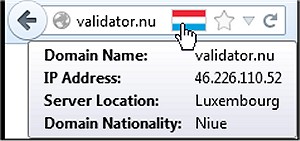
Flagfox has recently released version 6.2.5 for Firefox, enhancing its functionality as a browser add-on that displays a flag icon representing the physical location of the current webserver. This feature is not only informative but also adds a layer of security and awareness while users are browsing the internet. By knowing the server's location, users can infer the native language and applicable legal jurisdiction, which is particularly useful for international web interactions.
The add-on allows users to access additional information through various external lookups. It provides a customizable context menu for the flag icon, enabling the addition of personal actions or quick keyboard shortcuts for efficiency. Clicking on the flag icon will invoke the default action, which displays a detailed map of the server's city location. Flagfox also offers other features, including local time information, ISP details, site safety and malware checks, site reviews, automatic language translation, SEO and web development research tools, diagnostic functions like pings and traceroutes, Whois and DNS information, page code validation, quick URL shortening, and the ability to copy a server's IP address.
In light of its comprehensive set of features, Flagfox serves as a valuable tool for users looking to enhance their browsing experience with contextual information and security measures. The add-on not only informs users about the geographical context of their internet connection but also equips them with tools for effective web navigation and research.
For further optimization of browsing experience, users may explore additional resources, such as guides on speeding up their browsers, resetting or repairing them, or muting tabs across different platforms. These extensions and tips can complement the functionality of Flagfox, leading to a more streamlined and secure online experience
The add-on allows users to access additional information through various external lookups. It provides a customizable context menu for the flag icon, enabling the addition of personal actions or quick keyboard shortcuts for efficiency. Clicking on the flag icon will invoke the default action, which displays a detailed map of the server's city location. Flagfox also offers other features, including local time information, ISP details, site safety and malware checks, site reviews, automatic language translation, SEO and web development research tools, diagnostic functions like pings and traceroutes, Whois and DNS information, page code validation, quick URL shortening, and the ability to copy a server's IP address.
In light of its comprehensive set of features, Flagfox serves as a valuable tool for users looking to enhance their browsing experience with contextual information and security measures. The add-on not only informs users about the geographical context of their internet connection but also equips them with tools for effective web navigation and research.
For further optimization of browsing experience, users may explore additional resources, such as guides on speeding up their browsers, resetting or repairing them, or muting tabs across different platforms. These extensions and tips can complement the functionality of Flagfox, leading to a more streamlined and secure online experience
Flagfox for Firefox 6.2.5 released
Flagfox is a Firefox add-on that displays a flag icon indicating the current webserver's physical location.