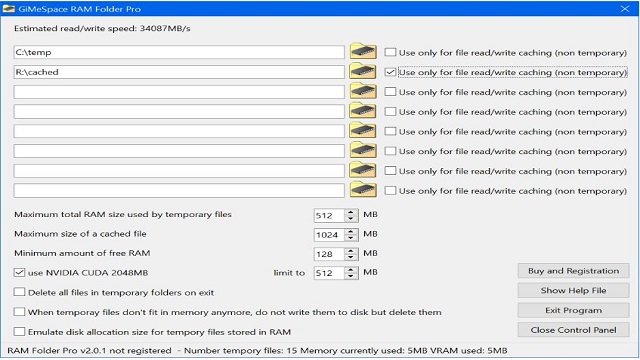
GiMeSpace RAM Folder Pro 2.4.0 has recently been released, offering a lightweight and efficient tool for Windows users that creates a virtual folder directly in the system's RAM. This innovative software is designed for those who require rapid access to temporary files, large datasets, or frequently used applications, making it compatible with a wide range of Windows versions from XP to 11 and available for free for personal use.
Speed and Functionality
The primary advantage of GiMeSpace RAM Folder lies in its ability to leverage RAM speeds, which significantly outpace traditional hard drives or SSDs. By creating a folder in system memory, users can enjoy instantaneous access to files, making it an ideal solution for tasks that demand quick read/write speeds, such as video editing, 3D rendering, and software testing. Users simply install the tool, and it sets up a RAM-based folder that operates like any other folder, with the added benefit of speed. Additionally, users can configure the tool to automatically back up and restore the contents of the RAM folder between sessions, ensuring that important data is not lost upon shutting down or restarting the PC.
Use Cases and Benefits
GiMeSpace RAM Folder is particularly beneficial for professionals engaged in tasks that involve large files or temporary data. For instance, video editors can store scratch data in the RAM folder for near-instant access, while developers can test applications in a clean environment without cluttering their main drive. The software is designed to be lightweight, minimizing CPU and memory usage, which is crucial for maintaining system performance.
Limitations and Considerations
While GiMeSpace RAM Folder excels in its purpose, it does have some limitations. The user interface is quite basic, lacking advanced features, and the software is restricted to personal, non-commercial use unless a paid version is obtained. Additionally, users must be mindful of their system's RAM capacity, as excessive usage can impact overall system performance, particularly on machines with limited memory.
Conclusion
Overall, GiMeSpace RAM Folder is a hidden gem for users who value speed and efficiency in their workflows. It provides a unique temporary workspace that enhances productivity and keeps systems clean from clutter. Power users, creators, and software testers will find this utility especially beneficial. However, it is crucial to remember that since the folder operates in RAM, users should save their work before shutting down to avoid data loss.
Future Enhancements
Looking ahead, potential improvements could include a more user-friendly interface, expanded functionality for commercial use, and options for better RAM management to optimize performance on low-RAM machines. These enhancements could broaden its appeal to a wider audience and further solidify its place in the toolkit of tech-savvy individuals
Speed and Functionality
The primary advantage of GiMeSpace RAM Folder lies in its ability to leverage RAM speeds, which significantly outpace traditional hard drives or SSDs. By creating a folder in system memory, users can enjoy instantaneous access to files, making it an ideal solution for tasks that demand quick read/write speeds, such as video editing, 3D rendering, and software testing. Users simply install the tool, and it sets up a RAM-based folder that operates like any other folder, with the added benefit of speed. Additionally, users can configure the tool to automatically back up and restore the contents of the RAM folder between sessions, ensuring that important data is not lost upon shutting down or restarting the PC.
Use Cases and Benefits
GiMeSpace RAM Folder is particularly beneficial for professionals engaged in tasks that involve large files or temporary data. For instance, video editors can store scratch data in the RAM folder for near-instant access, while developers can test applications in a clean environment without cluttering their main drive. The software is designed to be lightweight, minimizing CPU and memory usage, which is crucial for maintaining system performance.
Limitations and Considerations
While GiMeSpace RAM Folder excels in its purpose, it does have some limitations. The user interface is quite basic, lacking advanced features, and the software is restricted to personal, non-commercial use unless a paid version is obtained. Additionally, users must be mindful of their system's RAM capacity, as excessive usage can impact overall system performance, particularly on machines with limited memory.
Conclusion
Overall, GiMeSpace RAM Folder is a hidden gem for users who value speed and efficiency in their workflows. It provides a unique temporary workspace that enhances productivity and keeps systems clean from clutter. Power users, creators, and software testers will find this utility especially beneficial. However, it is crucial to remember that since the folder operates in RAM, users should save their work before shutting down to avoid data loss.
Future Enhancements
Looking ahead, potential improvements could include a more user-friendly interface, expanded functionality for commercial use, and options for better RAM management to optimize performance on low-RAM machines. These enhancements could broaden its appeal to a wider audience and further solidify its place in the toolkit of tech-savvy individuals
GiMeSpace RAM Folder Pro 2.4.0 released
GiMeSpace RAM Folder is a lightweight Windows tool that creates a super-fast virtual folder right in your PC's RAM.