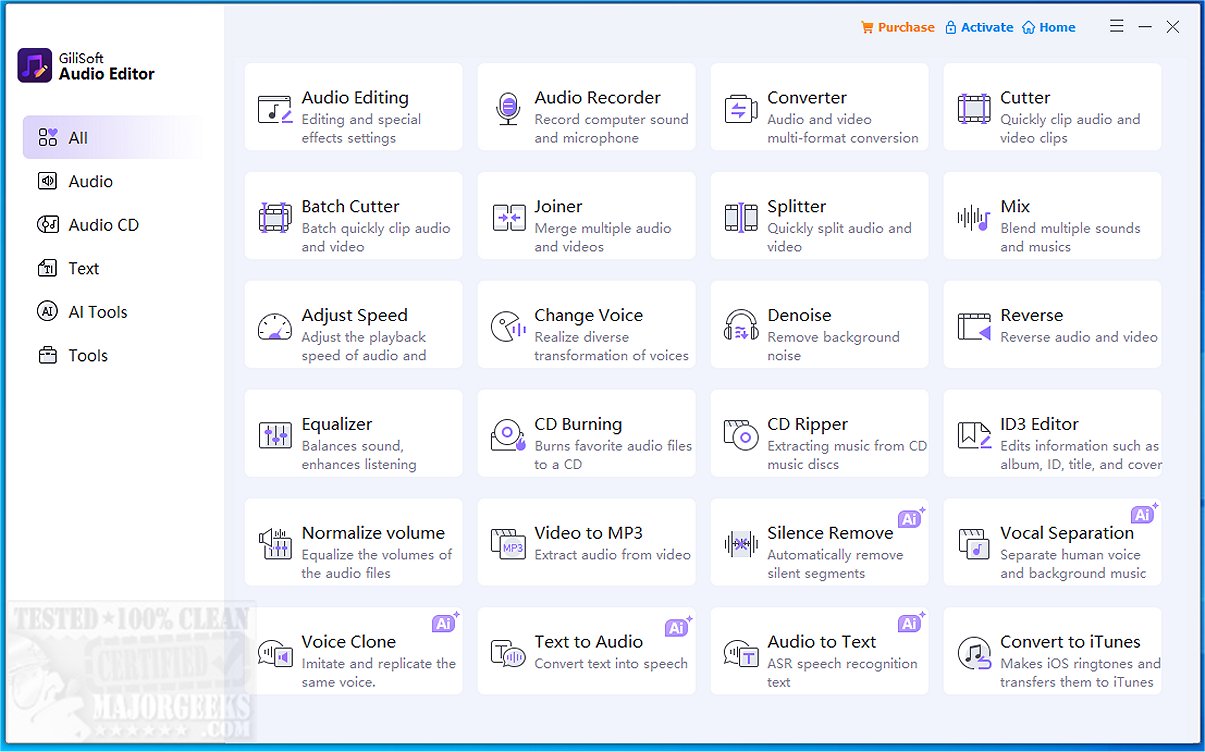
GiliSoft Audio Editor has recently released version 3.2.0, an audio editing tool that prioritizes simplicity and efficiency. This software is tailored for users who need to quickly split or merge audio files without the complexity of full-featured audio editing software. It allows users to easily create ringtones by trimming songs, combine multiple audio clips, and process batch files with ease.
The user-friendly interface makes it straightforward to drag and drop tracks, set precise cut points or join orders, preview the audio, and export the final product. GiliSoft Audio Editor supports a variety of popular audio formats, including MP3, WAV, AAC, FLAC, WMA, and M4A, and also includes functionality for converting video files to audio.
Everyday Use Cases:
- Creating Ringtones: Users can load their favorite song, adjust sliders to select the desired length, preview, and export the file as a ringtone.
- Merging Voice Memos: For those needing to combine multiple voice recordings, the software allows for batch loading, reordering, and saving as a single file.
- Extracting Audio from Videos: Users can easily convert video files to MP3 format, making it suitable for educational or presentation purposes.
Key Features:
- Precise trimming and cutting of audio files.
- Ability to join multiple audio files simultaneously.
- Efficient batch processing to save time.
- Live preview functionality to ensure desired cuts or merges before exporting.
- Support for various audio formats and video-to-audio conversions.
- Capability for batch operations for enhanced efficiency.
Pros and Cons:
- Pros:
- Highly intuitive, making it perfect for quick audio edits.
- Fast processing for batch tasks.
- Reliable preview feature.
- Cons:
- Lacks advanced editing features such as multi-track mixing, equalization, or effects.
- The interface is basic and lacks visual polish.
- Currently only available for Windows users.
Conclusion:
GiliSoft Audio Editor is an excellent choice for users seeking a straightforward solution for trimming, joining, or converting audio files without unnecessary complications. While it may not be suitable for in-depth audio projects, it effectively fulfills its intended purpose and provides a dependable, hassle-free experience for everyday audio editing needs. For future updates, enhancements in user interface design and the addition of advanced editing features could greatly enhance its appeal among a broader range of users
The user-friendly interface makes it straightforward to drag and drop tracks, set precise cut points or join orders, preview the audio, and export the final product. GiliSoft Audio Editor supports a variety of popular audio formats, including MP3, WAV, AAC, FLAC, WMA, and M4A, and also includes functionality for converting video files to audio.
Everyday Use Cases:
- Creating Ringtones: Users can load their favorite song, adjust sliders to select the desired length, preview, and export the file as a ringtone.
- Merging Voice Memos: For those needing to combine multiple voice recordings, the software allows for batch loading, reordering, and saving as a single file.
- Extracting Audio from Videos: Users can easily convert video files to MP3 format, making it suitable for educational or presentation purposes.
Key Features:
- Precise trimming and cutting of audio files.
- Ability to join multiple audio files simultaneously.
- Efficient batch processing to save time.
- Live preview functionality to ensure desired cuts or merges before exporting.
- Support for various audio formats and video-to-audio conversions.
- Capability for batch operations for enhanced efficiency.
Pros and Cons:
- Pros:
- Highly intuitive, making it perfect for quick audio edits.
- Fast processing for batch tasks.
- Reliable preview feature.
- Cons:
- Lacks advanced editing features such as multi-track mixing, equalization, or effects.
- The interface is basic and lacks visual polish.
- Currently only available for Windows users.
Conclusion:
GiliSoft Audio Editor is an excellent choice for users seeking a straightforward solution for trimming, joining, or converting audio files without unnecessary complications. While it may not be suitable for in-depth audio projects, it effectively fulfills its intended purpose and provides a dependable, hassle-free experience for everyday audio editing needs. For future updates, enhancements in user interface design and the addition of advanced editing features could greatly enhance its appeal among a broader range of users
GiliSoft Audio Editor 3.2.0 released
GiliSoft Audio Editor is an audio tool designed for an uncomplicated, no-frills approach to splitting or merging audio.