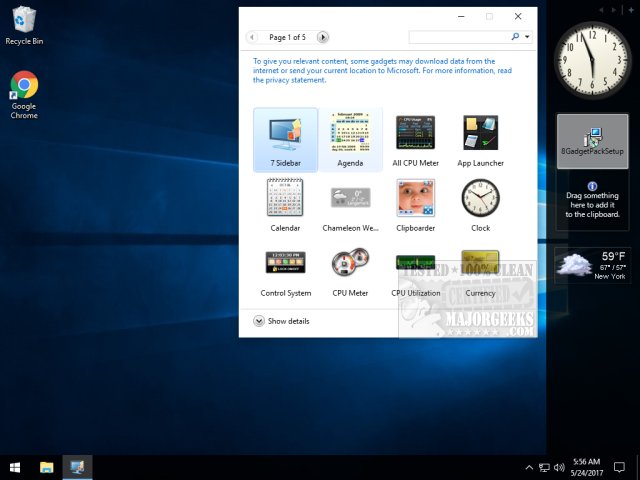
GadgetPack 43.0 has been released, reintroducing gadgets to Windows 11, 10, 8.1, and 7 users. This software serves as an alternative to the gadgets that Microsoft removed due to significant security vulnerabilities present in the Windows Sidebar platform in Windows Vista and 7. Such vulnerabilities could allow malicious actors to exploit gadgets to harm users' computers, access files, display inappropriate content, or take control of the system entirely.
Despite the risks associated with third-party gadgets, many users have expressed a desire to have them back. GadgetPack addresses this need by providing a selection of trusted gadgets, ensuring a safer experience. The installation process is user-friendly, catering to both seasoned users and novices alike. Importantly, GadgetPack does not facilitate access to external gadgets, minimizing security risks associated with unknown sources.
For those nostalgic for the gadget experience, GadgetPack offers a viable, secure solution. The program aims to balance user demand for customization and functionality with the need for safety in an increasingly digital environment.
In addition to GadgetPack, users can explore various Windows 10 tips, such as how to adjust desktop backgrounds, customize the Start menu and taskbar, change text sizes, and incorporate emojis into their interface. These features enhance the personalization of the Windows experience while ensuring users remain aware of potential security risks
Despite the risks associated with third-party gadgets, many users have expressed a desire to have them back. GadgetPack addresses this need by providing a selection of trusted gadgets, ensuring a safer experience. The installation process is user-friendly, catering to both seasoned users and novices alike. Importantly, GadgetPack does not facilitate access to external gadgets, minimizing security risks associated with unknown sources.
For those nostalgic for the gadget experience, GadgetPack offers a viable, secure solution. The program aims to balance user demand for customization and functionality with the need for safety in an increasingly digital environment.
In addition to GadgetPack, users can explore various Windows 10 tips, such as how to adjust desktop backgrounds, customize the Start menu and taskbar, change text sizes, and incorporate emojis into their interface. These features enhance the personalization of the Windows experience while ensuring users remain aware of potential security risks
GadgetPack 43.0 released
GadgetPack (formerly 8GadgetPack) brings gadgets back to your Windows 11, 10, 8.1, and 7.